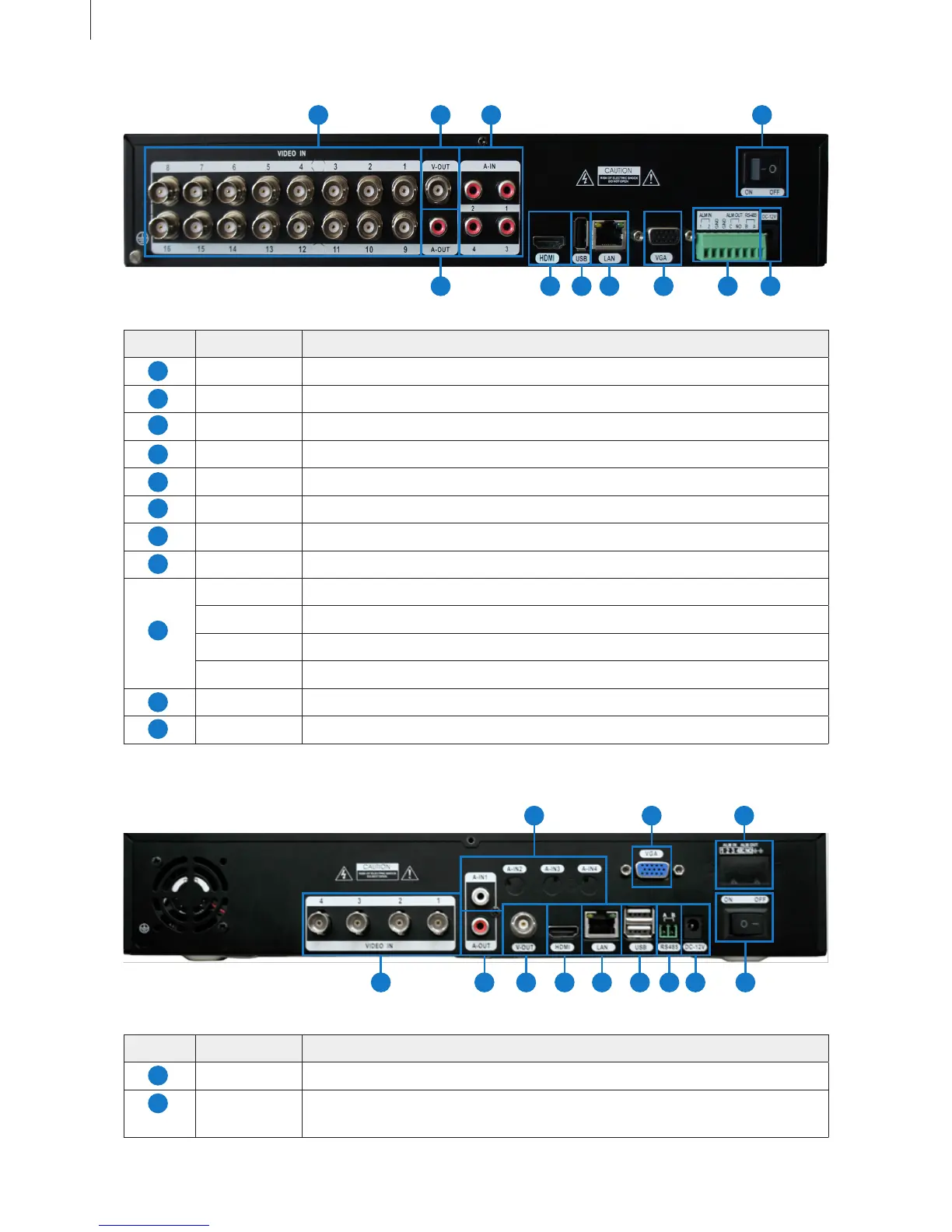
Fig 2-7
Fig 2-8
Item Name Description
VIDEO IN Video signal input.
V-OUT CVBS video signal output: connect to monitor with BNC interface.
A-IN Audio input: connect to pickup and other audio collecting equipment.
A-OUT Audio output: connect to sound box and other audio output equipment.
HDMI port HD 1080P video signal output: connect to high-denition display.
USB port Connect to USB mouse, USB disk, mobile HDD, etc.
LAN port Network connector.
VGA port VGA output: connect to monitor.
ALM IN Alarm input: connect to external alarm sensor.
ALM OUT Alarm output: connect to external alarm output device.
RS-485 RS-485 communication port: connect to PTZ, keyboard, etc.
GND Grounding
DC 12V Power input: DC 12V
Power Switch Turn on/off the power.
Item Name Description
VIDEO IN Video signal input from HD-SDI Cameras.
A-IN 4ch audio input: connect to microphone and other audio collecting
equipment.
15
Getting Started
3) SHR-7016
104
1 2 3 11
5 6 7 8 9
4) SHR-8004
1
3
10
11
5
7
2
9
4
6
8
1
2
1231
2 10 11
4 5 6 7 8 9



 To Next Page