A5E32268616 Pointek ULS200 – QUICK START MANUAL Page EN-13
mmmmm
English
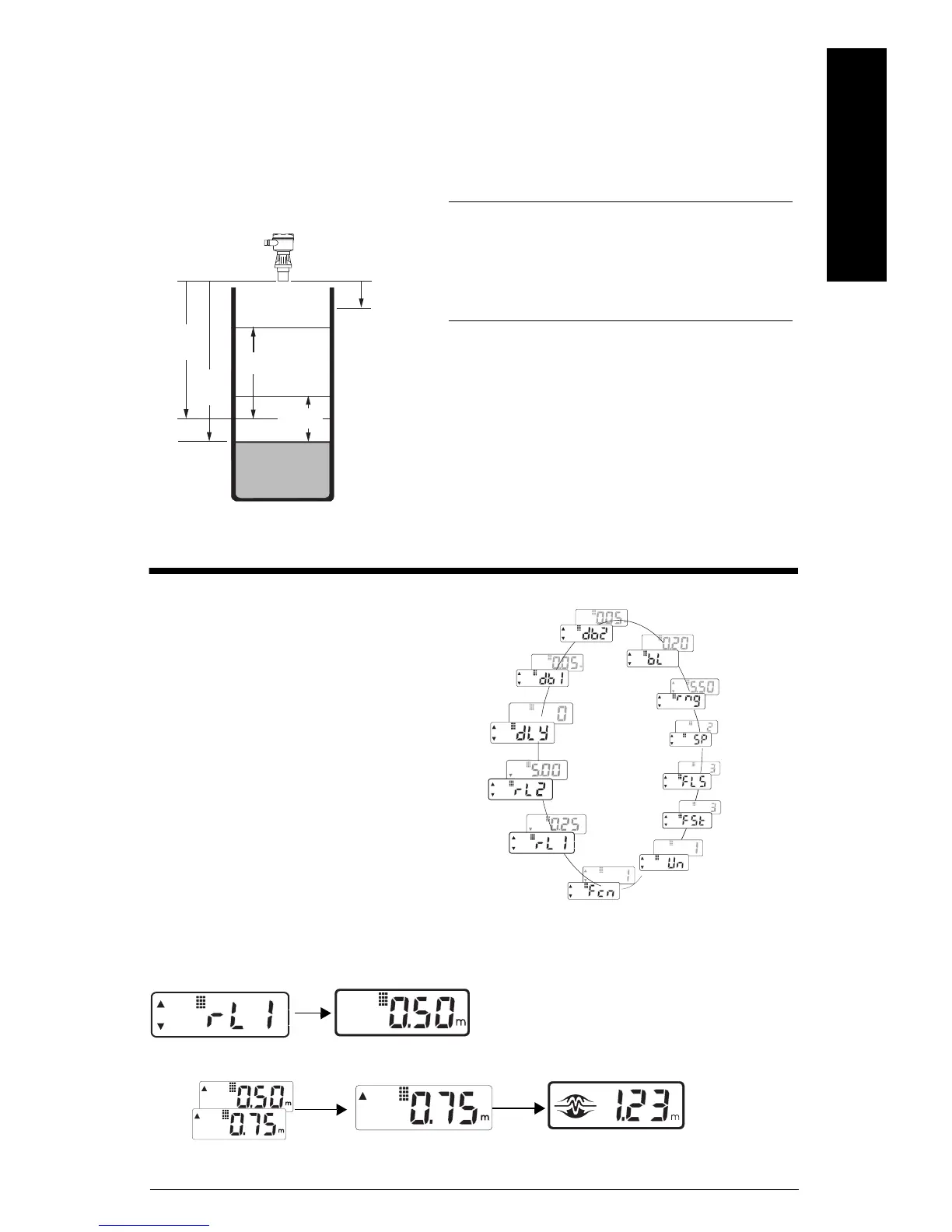
Pump Control with Level Alarm
This application uses the Pointek ULS200 to provide pump control and one level alarm.
If the material reaches a control setpoint, the well is pumped down or up respectively. If the
material reaches an alarm setpoint, the alarm will sound until the material moves beyond the
deadband value.
Operating Adjustments
To adjust a value:
1. Press both operating buttons
2. Press 1 /
Relay Function 8: Pump Up Control
with Low Alarm
Application Adjustments
relay function 6 - high control / low alarm
7 - high control / high alarm
8 - low control / low alarm
9 - low control / high alarm
10 - high control / LOE alarm
11 - low control / LOE alarm
alarm setpoint set the low alarm to the desired
values
To access the operating adjustments,
simultaneously press both keys repeatedly
until the desired adjustment is obtained. A
viewing period of the adjustment value is
initiated. During this time the value can be
changed by pressing either the `up' or
`down' key. After viewing or changing,
operation automatically reverts to the run
mode.
select adjustment (eg. relay 1) current value (eg. 0.5 m)
change value (eg. increase to 0.75 m) new value (eg. new setpoint 0.75 m) after 6 sec. delay, return to run mode
relay 1
(pump up)
(eg. 3 m)
deadband 1
(eg. 2 m)
deadband 2
(eg. 1 m)
alarm off
blanking
(eg. 0.5 m)
relay 2
(low alarm)
(eg. 3.5 m)
pump off
pump on
alarm on
Deadband 2
Deadband 1
Delay
Relay 2
Relay 1
Relay function
Units
Fail-safe timer
Fail-safe
Speed of response
Range limit
Blanking
on setpoint



 To Next Page