Operating the thermostat from the mobile app
Widget overview
9
46 | 59 A6V10877569_en--_e
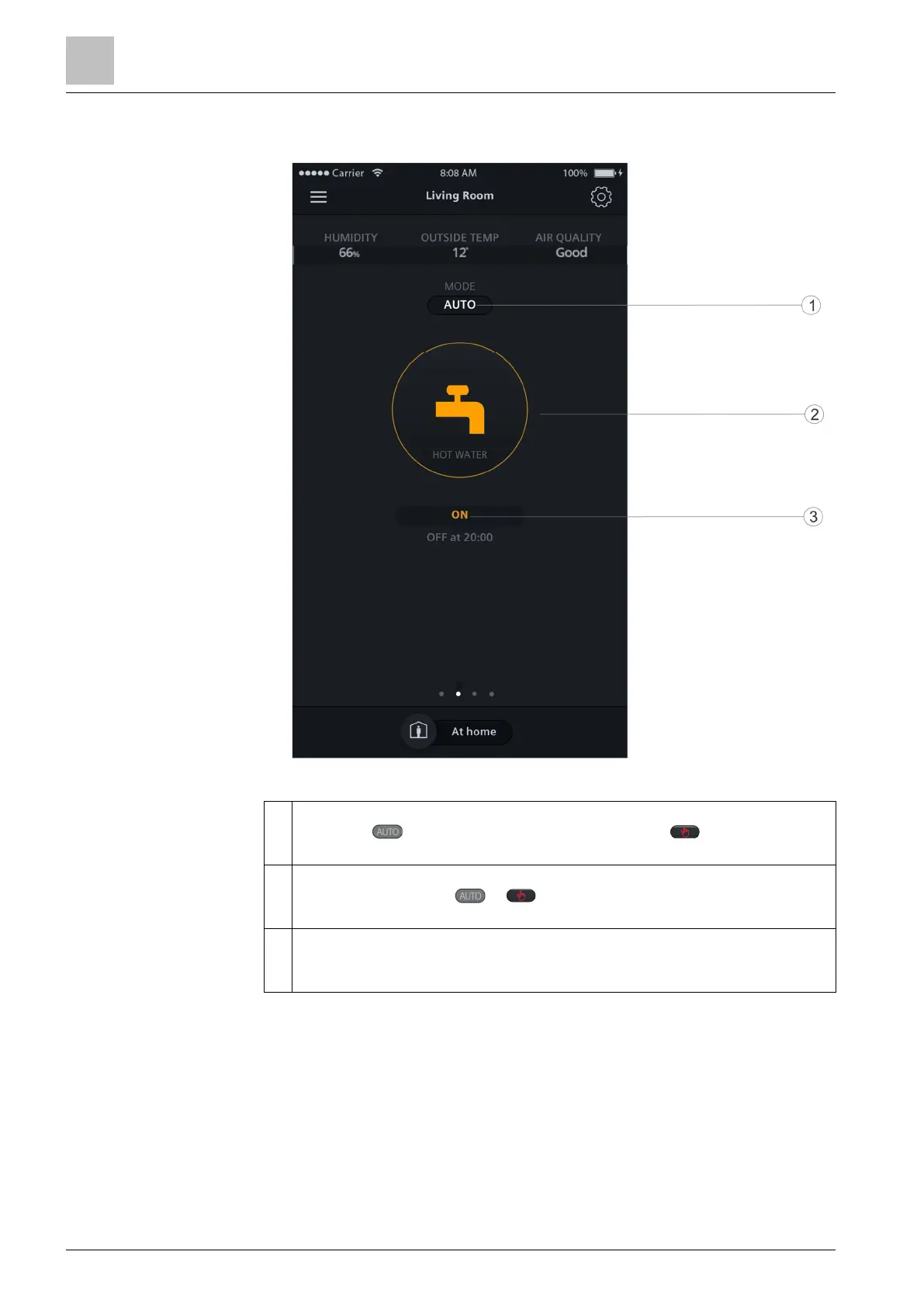
9.5.2 Domestic hot water widget overview
1 Toggle to decide whether to turn on or off the domestic hot water following a
scheduler. means the scheduler is running, while means you must
manually turn it on or off.
2 Displays whether the domestic hot water is turned on or not. You can toggle
the icon to switch from to and then turn on or off the domestic hot
water under the manual mode.
3 Displays whether the domestic hot water is currently turned on or off. You can
see from the adjacent text when the status will be switched if you’ve set a
scheduler for the supply of the domestic hot water.
NOTE: If you haven’t configured the thermostat output as a domestic hot water
boiler, the domestic hot water widget doesn’t appear in the app.



 To Next Page