Maintenance and service
12.3 Separating the control unit from the computer unit
SIMATIC Panel PC 877
12-6 Operating instructions, Release 07/2006, A5E00877780-01
Separating the device in an uninstalled state
As an alternative, dismount the device completely and separate the control unit and
computer unit from one another in an uninstalled state. So that the processing unit, which is
swung away from the control unit, does not bend the lugs (4), place a surface under the
processing unit.
Mounting operator control unit on computer unit
To mount the operator control unit on the computer unit, perform the steps in reverse:
Caution
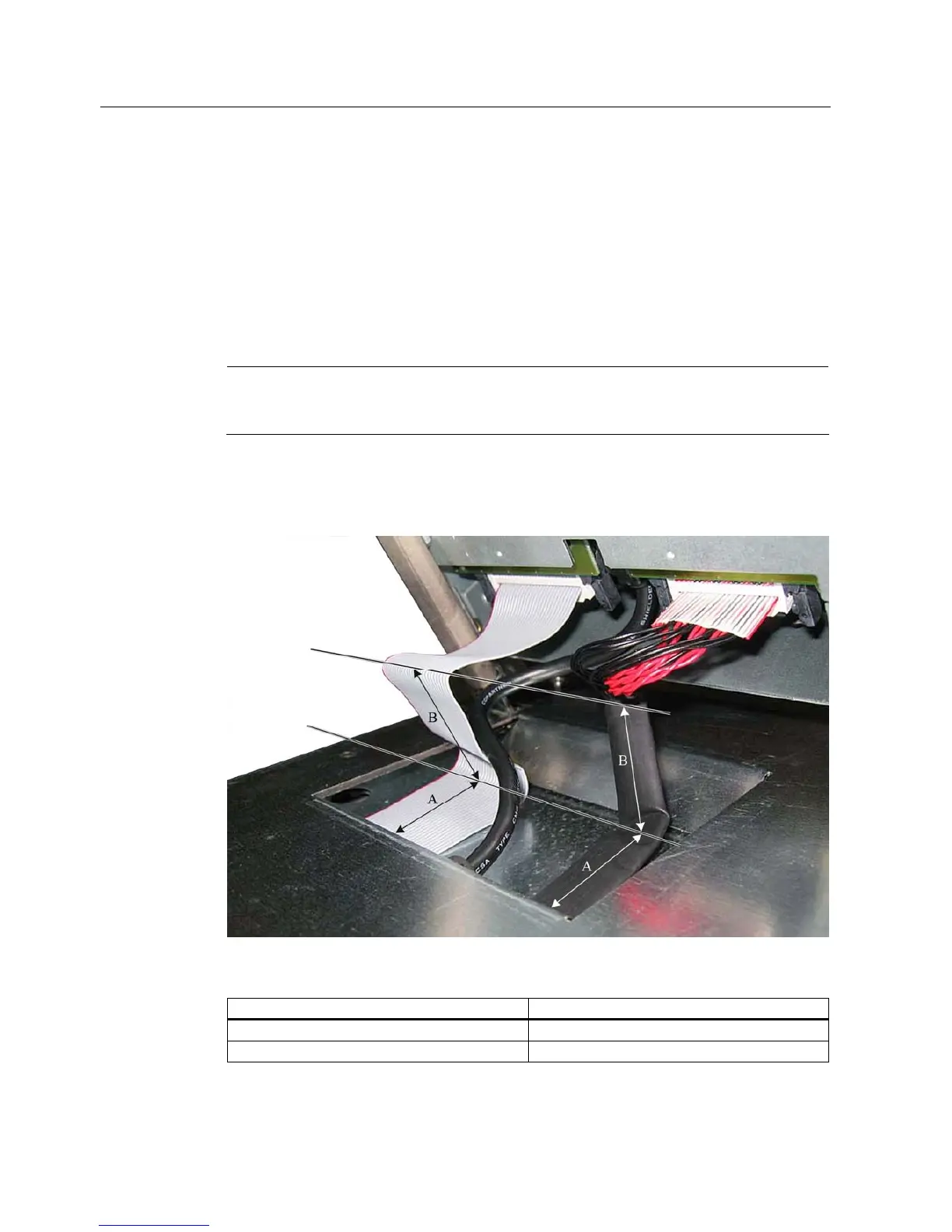
When you swing the control unit and processing unit together, make sure that the flatband
cables are correctly folded together and do not get squished.
In order to do this, fold the flatband cables gently with specific spacing, as shown. The bend
dimensions are specified in the following table. The USB cable does not have to be folded
because it is stored as a loop in the processing unit.
Figure 12-3 Separate the control unit from the computer unit, example regarding folding cables
Position Bend dimension
A 4.5 cm
B 4 cm











 To Next Page