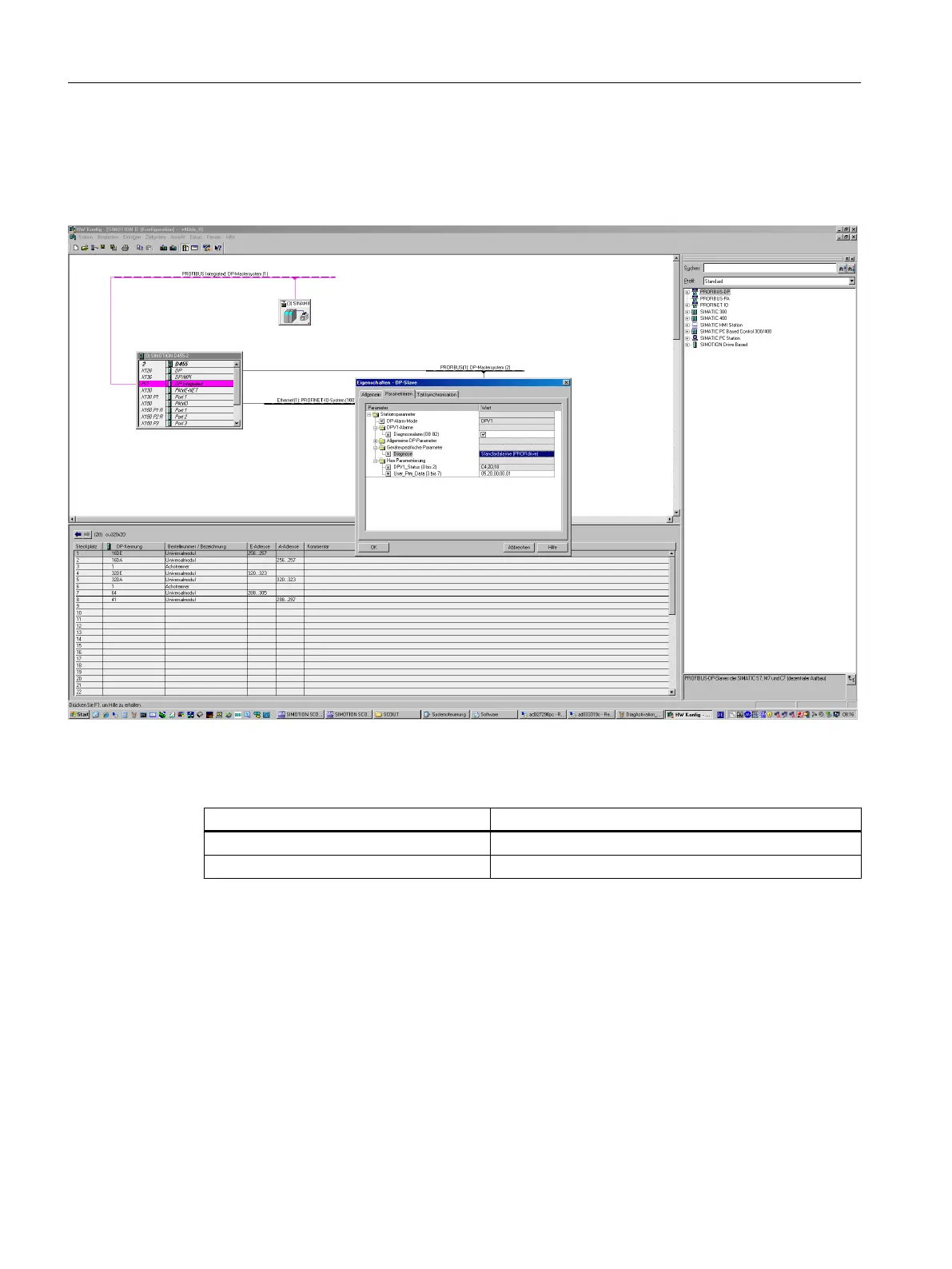
Activating the diagnostic function
The diagnostics function is activated or deactivated via the parameterization of the relevant
configuration tool (HW Config, TIA Portal, etc.).
Figure A-19 Activation of PROFIBUS
The following parameter assignments are possible:
Setting Code for parameter assignment
Inactive 0
PROFIdrive error classes 1
When establishing the communication between SINAMICS and a master, the activated
diagnostics mode of this controller is first transferred to the drive. With activated diagnostics,
SINAMICS first transfers all pending messages to the master. Similarly, all currently pending
messages in the master are deleted by SINAMICS when closing the communication
connection.
Messages
The message texts are described in detail in the converter List Manual, chapter "Explanations
on the list of faults and alarms". A current list of the message texts can be found in the "Message
classes and coding of different diagnostics interfaces" table.
Communication
A.1 Communication
Industrial Security
136 Configuration Manual, 08/2017, A5E36912609A




 To Next Page