EasyManua.ls Logo

Siemens ST950 Plus+ - Page 100

Siemens ST950 Plus+
178 pages
Print Icon
To Next Page IconTo Next Page
To Previous Page IconTo Previous Page
Loading...
ST950 Plus+ User Manual
Page 100 of 176
667/HE/53000/000
5.2.2 WIZ (Deprecated)
WIZ Commands
There are a number of WIZ commands are still supported for standard ST950 features.
However, there is no real new functionality available to implement many of the Plus+ features.
WIZ gives a menu driven handset facility which allows the user to perform various system
functions and access various status and configuration items. It is available through the RS232
handset port and virtual terminal connections (e.g. SSH).
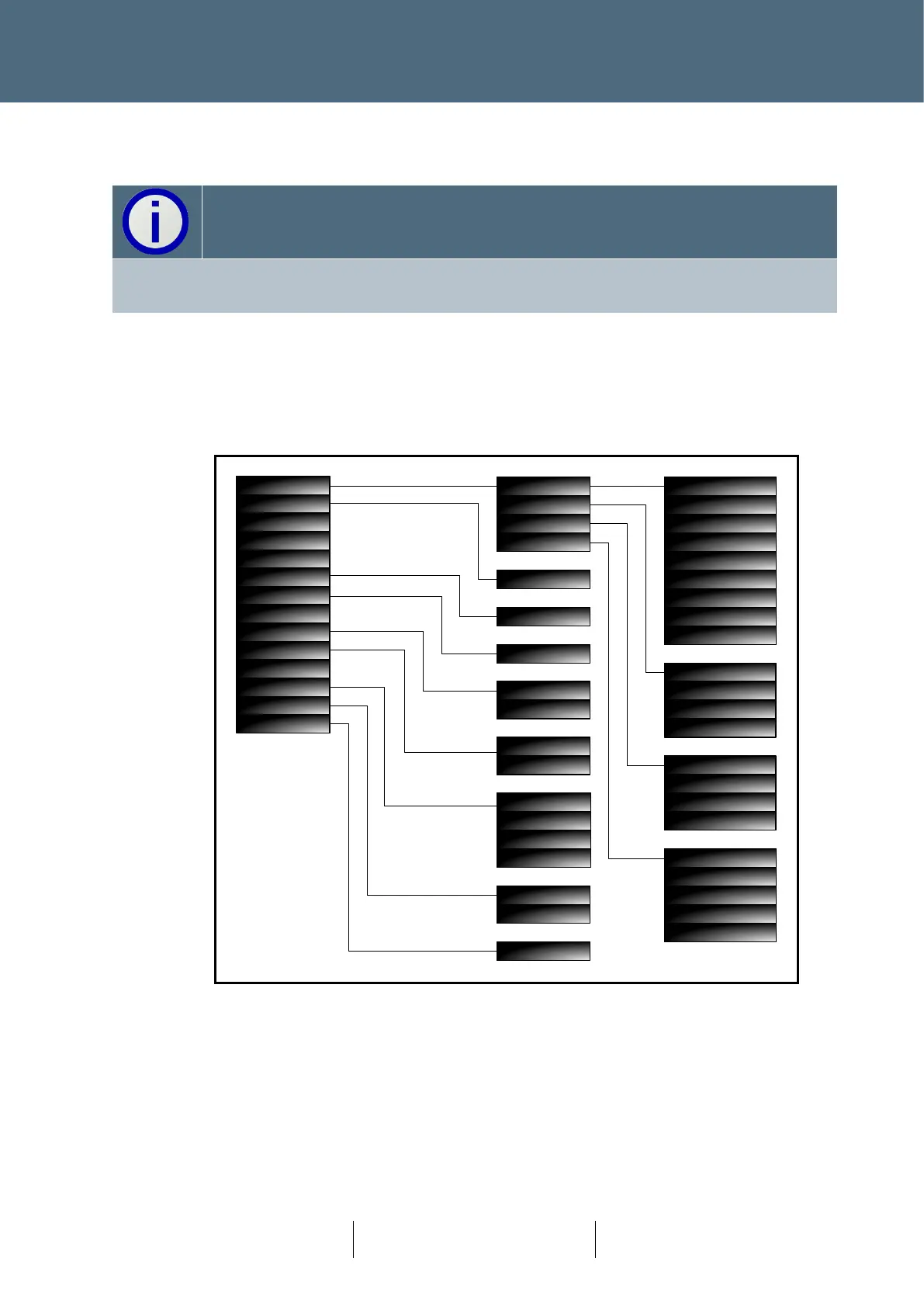
The menu structure is outlined in the following diagram.
Capture WiFi
Capture USB
Capture PPP
Capture Ethernet
Status
Inventory
Date and Time
Basic Config
Platform
Devices
Applications
System
DST Offset
Timezone
DST End
DST Start
Enable OSS Backup
Enable OSS
OSS Address
Site Name
Eth IP Gateway
Eth IP Broadcast
Eth IP Netmask
Eth IP Address
Eth IP Mode
CPU Load
Total Disk Blocks
Free Disk Blocks
Total RAM
Free RAM
OSS
USB Drive
Monitor Outputs
Monitor Inputs
USB Drive
USB Drive
USB Drive
USB Drive
Restore
Own Heart
IC4 Import
Heart
TCP Dump
Reboot
Digital IO
Upgrade
Fetch Sys Config
Save Site Info
Save Log
Load Sys Config
System Log
Tester
Active Faults
Status / Config
5.2.3 Handset
Access to controller and GVP handset commands is supported. These are available through the
RS232 handset port and virtual terminal connections (SSH) and are fully described in
667/HH/46000/000 (controller handset) and 667/HB/31760/000 (GVP handset).

Table of Contents

Related product manuals