6 INSTALLATION AND COMMISSIONING PROCEDURE
Service-Centre Cabinet Testing
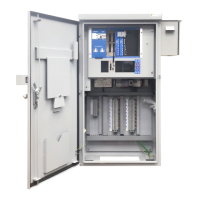
With reference to the Works Specification, check that:
• The cabinet is free from external physical damage
• The correct cards have been supplied and fitted in the correct positions.
• The socketed devices are securely fitted (including Heart and Licence card).
• The correct configurations are loaded into the CPU Card
• The links and address switches are correctly set on each card
• All fuses are fitted securely and are of the correct rating
• All plugs and sockets are securely mated
• All fixings are tight – especially those securing cards to side or back panels of the
cabinet.
Power the cabinet on and run the self-test.
• Check the IC4 Configuration Id Code by navigating to the web page:
Status and Configuration → Controller → IC4 Config
and check that the IC4 Configuration Id Code displayed is the same value that is
printed on the first page of the IC4 printout (IC4 Configuration Id Code)
• Check the IC4 Checksum value by navigating to the web page:
Status and Configuration → Controller → IC4 Config
and check that the Checksum displayed is the same value that is printed on the first
page of the IC4 printout (Configuration Check Value)
Finally, before the cabinet leaves the Service Centre;
• Tighten the screws on the swing-frame
• Place the Junction Plan, the IC4 Printout and the Site Logbook into the pocket inside
the door of the controller
• Close and lock the controller door with both key and T-bar locks
• Re-package the cabinet with the protective packaging.








 To Next Page