Cabinet Installation - Summary
Prior to any installation works, firstly make sure that the cabinet has been delivered to site without
external physical damage.
The electronics should be removed from the controller and stored separately if:
• The controller cabinet cannot be made waterproof.
• The cabinet will be un-powered for any significant period of time and may suffer
from condensation, moisture ingress and/or animal/insect infestation.
• There is a risk of the cabinet being damaged on-site.
• The cabinet will be left in an un-powered state for a prolonged period.
6.3.1 Order of Installation
• Remove the electronics from the controller, if required (see above and method in
Section 6.3.2 below).
• Install the stool into the ground
• Run cables to the controller stool.
• Terminate the cable armouring to the SEB or CET bars
• Test the cables – if applicable.
• Fit the controller case to the stool
• In-fill the stool
• Seal the base
• Refit the electronics (if required)
6.3.2 Removal of Controller Electronics (Not normally Required)
Ensure the Master Switch is in the OFF position
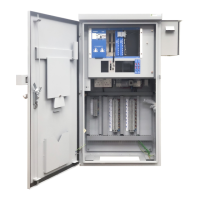
Remove all PCBs from the rack. Swing the rack forward and unscrew the retaining bolts from the
back plate of the rack. Tie this plate to a convenient point on the rear face of the cabinet.
The controller outer case is now ready for installation.








 To Next Page