38 of 50
V 11.21_EN
SIGNODE BPT-H32
4.3 Setting strap tension
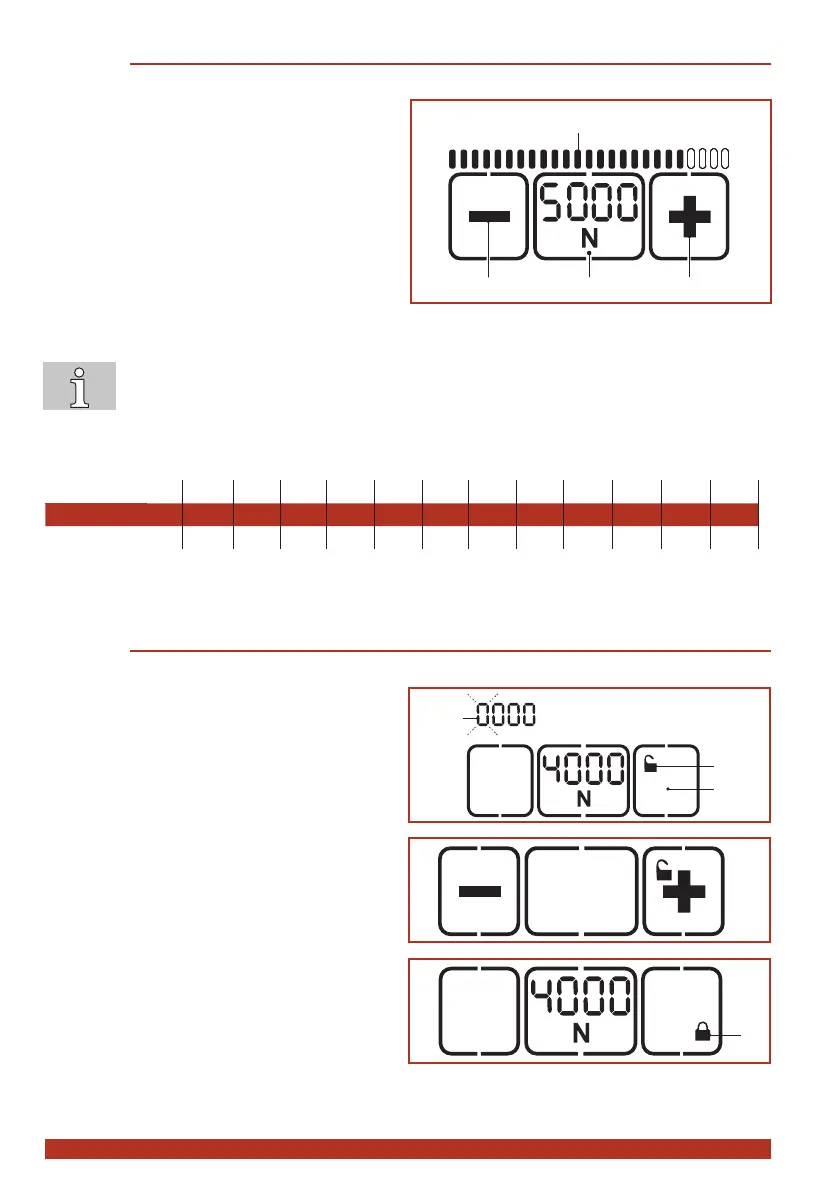
The set tension force is displayed continuously when the tool is ready for operation.
► Press "Tension force" button (2).
– Thesettensionforceashesfor5sec-
onds.
– The + (1) and – (3) buttons appear.
– Unused displays disappear.
► Press the + (1) or – (3) button until the desired
tension force is displayed.
– The status indicator bar (4) shows the set
tension force in relation to the possible
maximum value.
► Save: Press the "Tension force" button (2) or
wait for 5 seconds.
● Switchbetweendisplayin"N"or"lbf":Presstheashing"Tensionforce"button(2)for
two seconds.
● Everytimethebuttonispressedanacousticsignalconrmstheaction.
● The tension force is displayed continuously when the tool is operational.
● Setting soft tension (Section 4.4).
BPT-H32: 1 2 3 4 5 6 7 8 9 10 11 12
N* 2000 2500 3000 3500 4000 4500 5000 5500 6000 6500 7000 7500
lbf* 440 550 660 770 880 990 1100 1210 1320 1430 1540 1650
(rounded values)
* N = Newton, lbf = pound-force per square inch
4.4 Switching touch-pad lock on and o
The touch pad can be locked to prevent unwanted changing of the settings.
► Locking: Press button “touch-pad lock” (1) for
approx. 2 seconds.
– Thelocksymbol(2)andtherstdigit(3)
ofthedisplayashes.
– Unused displays are blanked out. Only
the +/– buttons and the lock symbol are
displayed.
► Pressthe+or–buttonuntiltherstdigit
indicates the desired value.
► Press the middle button to change to the next
digit.
► Repeat the procedure until the desired four-
digit code is displayed (factory setting 5878).
► Press the middle button.
– The touch-pad lock is now on, the lock
symbol (4) changes position and is shown
closed.
► Unlocking: Unlocking is done in the same
order as described above.
4
2
1
3
4


 To Next Page