Home
Sim2
Projector
SuperCube
Page 28
Sim2 SuperCube - Page 28
59 pages
Manual
Save Page as PDF
To Next Page
To Next Page
To Previous Page
To Previous Page
Loading...
–
19
–
English
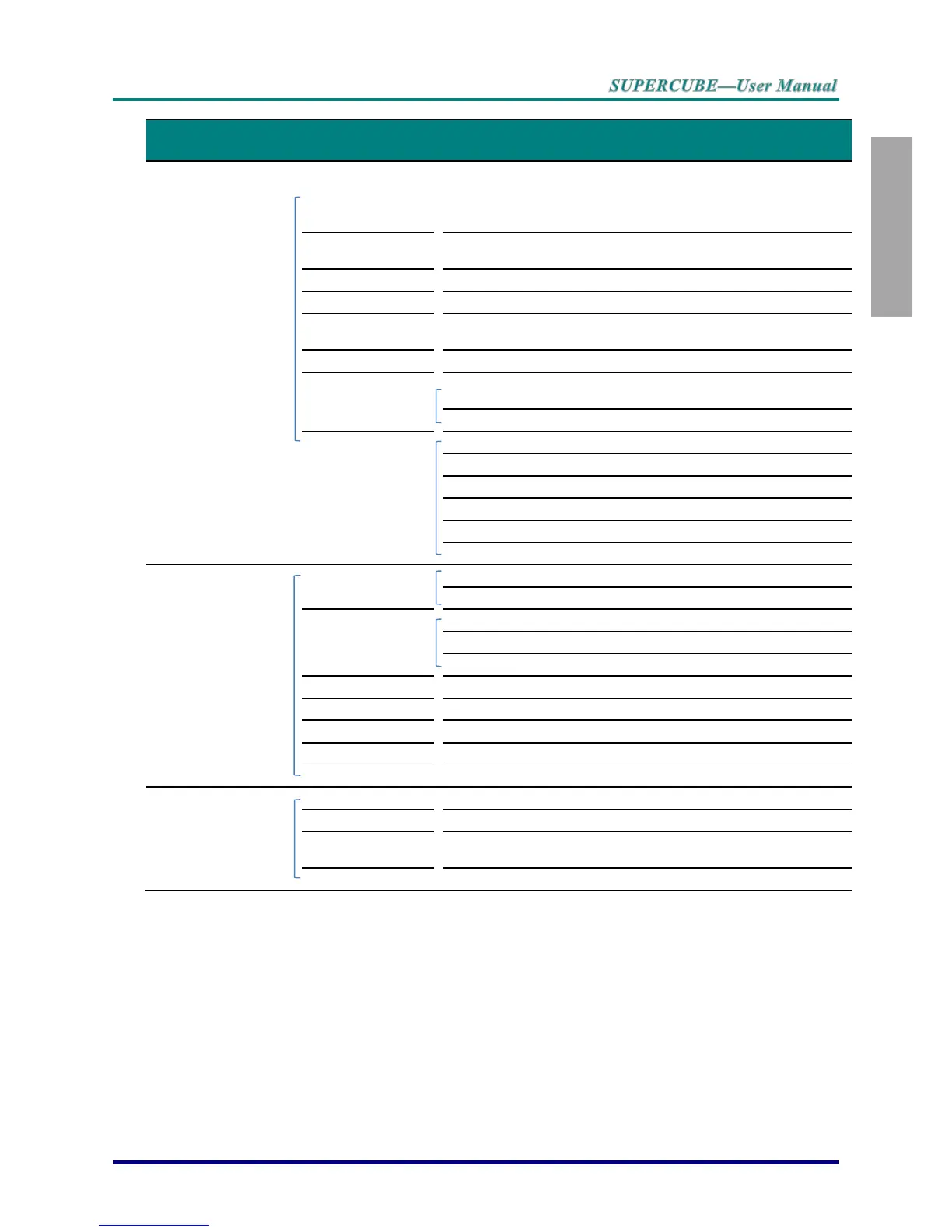
Main Menu
Sub Menu
Settings
Setup >> Basic
Language
English, Français, Deutsch,
Español,
Português,
簡体中文
,
繁體中文
, It
aliano,
Norsk, Svenska, Nederlands, Ру
сский,
Polski, Suomi, Dansk,
한국어
,
日本語
Projection
Front Table / Front Ceiling /
Rear Table
/ Rear Ceiling
Auto Power
On
Off / On
Auto Power O
ff
Disable / 5 / 10 / 15 / 20 /
25 / 30min
Sleep Timer
Disable / 30min / 1hr / 2hr /3hr / 4hr /
8hr / 12hr
Background Color
Black / Blue / Purple
Menu Setting
Menu Position
Center / Top-Right / Top-Left
/
Bottom-Right / Bottom-Left
Menu Display T
ime
5 / 10 / 15 / 20 / 25 / 30 sec
Source
PC
Disable, Enable
HDMI1
Disable, Enable
HDMI2
Disable, Enable
Component
Disable, Enable
Video
Disable, Enable
Quick Auto Search
On / Off
Setup >> Advanced
Audio
Volume
0~10
Mute
Off, On
Lamp
Lamp Mode
Normal / ECO / Dynamic Eco
Reset Lamp Timer
Lamp Hour
High Altitude Mode
Off / On
Test Pattern
Off /On
Close Caption
Off / On
12V OUT A
On / Off
Reset All
Yes / No
Status
Source
Resolution
Lamp Hour
s
(ECO, Normal)
Firmware Version
27
29
Table of Contents
Main Page
Default Chapter
3
Important Safety Information
3
About this Manual
7
Main Features
7
Table of Contents
8
Getting Started
10
Packing Checklist
10
Optional Accessories
10
Views of Projector Parts
11
Front-Right View
11
View of Projector Part
11
Rear View
12
Bottom View
14
Remote Control Parts
15
Remote Control Operating Range
17
Projector and Remote Control Buttons
17
Inserting the Remote Control Batteries
18
Setup and Operation
19
Starting and Shutting down the Projector
19
Ceiling Mounting Operation
21
Adjusting the Projector Level
22
Adjusting the Vertical Image Position
23
Adjusting the Zoom, Focus and Keystone
24
Adjusting the Volume
24
On-Screen Display (Osd) Menu Settings
25
Osd Menu Controls
25
Navigating the OSD
25
Setting the Osd Language
26
Osd Menu Overview
27
Picture>>Basic Menu
29
Picture>>Advanced Menu
30
HSG Adjustment
31
Vividsettings
32
Display Menu
33
PC Detail Adjustment
34
White Balance
35
User Color Temp
36
3D Setting
37
Setup>>Basic Menu
38
Menu Settings
39
Source
39
Setup>>Advanced Menu
40
Audio
41
Lamp
41
Closed Caption
42
Status Menu
43
Maintenance and Security
44
Replacing the Projection Lamp
44
Resetting the Lamp
46
Cleaning the Projector
47
Cleaning the Case
47
Troubleshooting
48
Common Problems and Solutions
48
Tips for Troubleshooting
48
Led Error Messages
49
Image Problems
49
Lamp Problems
50
Remote Control Problems
50
Audio Problems
50
Having the Projector Serviced
51
Hdmi Q & a
52
Specifications
53
Pecifications
53
Projection Distance Vs. Projection Size
54
Projection Distance and Size Table
54
Timing Mode Table
55
Projector Dimensions
57
Regulatory Compliance
58
Fcc Warning
58
Canada
58
Safety Certifications
58
Related product manuals
Sim2 CRYSTAL4-SH
64 pages
Sim2 DOMINO DTV S
45 pages
Sim2 D10
44 pages
Sim2 C3X Lumis
31 pages
Sim2 CRYSTALCUBE
61 pages
Sim2 HT500 link
4 pages
Sim2 NERO4 UHD
60 pages
Sim2 DLP RS-232C
10 pages
Sim2 Pro-C3
39 pages
Sim2 DOMINO Series
62 pages
Sim2 Domino 18
32 pages
Sim2 NERO 4S UHD
64 pages



 To Next Page