14
setting for all nine (9) inputs is “ENABLE”.
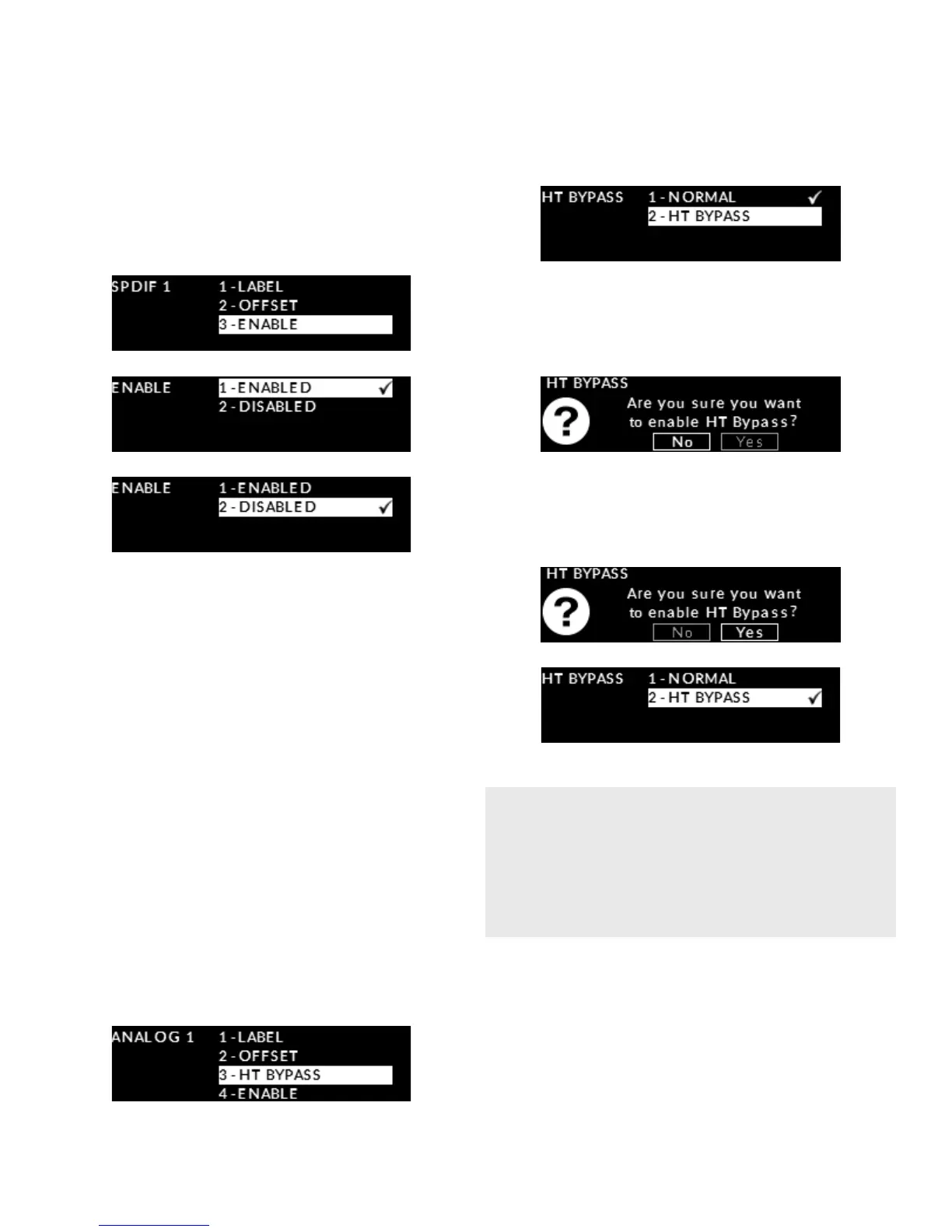
To “disable the “SPDIF1” input, rotate the volume
control until the “ENABLE” option is highlighted in
the “SPDIF 1” input menu. Then press “OK” and use
the volume control to alternate between “ENABLED”
and “DISABLED”.
Then press “OK” to save this setting and you will
return to the “SPDIF 1” input options menu.
Using the volume bypass feature
The fourth congurable option is the volume bypass
feature for use with home-theater processors and
source components that have their own volume
control. When activated, the volume control of the
240i is bypassed and the volume is adjusted from the
component connected to the input.
This option is only available for the “ANALOG 1” and
“ANALOG 2” inputs
To enable this setting you must rst go to either
“ANALOG 1” or “ANALOG 2” in the “INPUTS” section
of the SETUP menu. Then rotate the volume control
until “HT BYPASS” is highlighted on the display:
Press “OK” and “NORMAL” will appear highlighted
on the display. Rotate the volume until “HT BYPASS” is
highlighted, then press OK:
The message “Are you sure you want to enable
HT Bypass?” followed on the next line by “NO”
(highlighted) and “YES” on the display.
Rotate the volume control to highlight “YES”, then
press OK. The “HT BYPASS” option is now active for the
“ANALOG 1” input:
At this point you can return to the “INPUTS” main
menu and congure another input by pressing the
“SETUP” button twice and then selecting another
input; You can return to the main “SETUP” menu by
pressing the “SETUP” button a third time; You can exit
from “SETUP” by pressing the “SETUP” button a fourth
time – “EXITING” will briey appear on the display:
When you enable “HT BYPASS”, the volume “OFFSET”
you previously saved for this input will be set to 0.0dB;
The “OFFSET” can then be adjusted if required.
When this “HT BYPASS” is disabled, the “OFFSET” will be
reset to its default value of 6.0dB.


 To Next Page