19
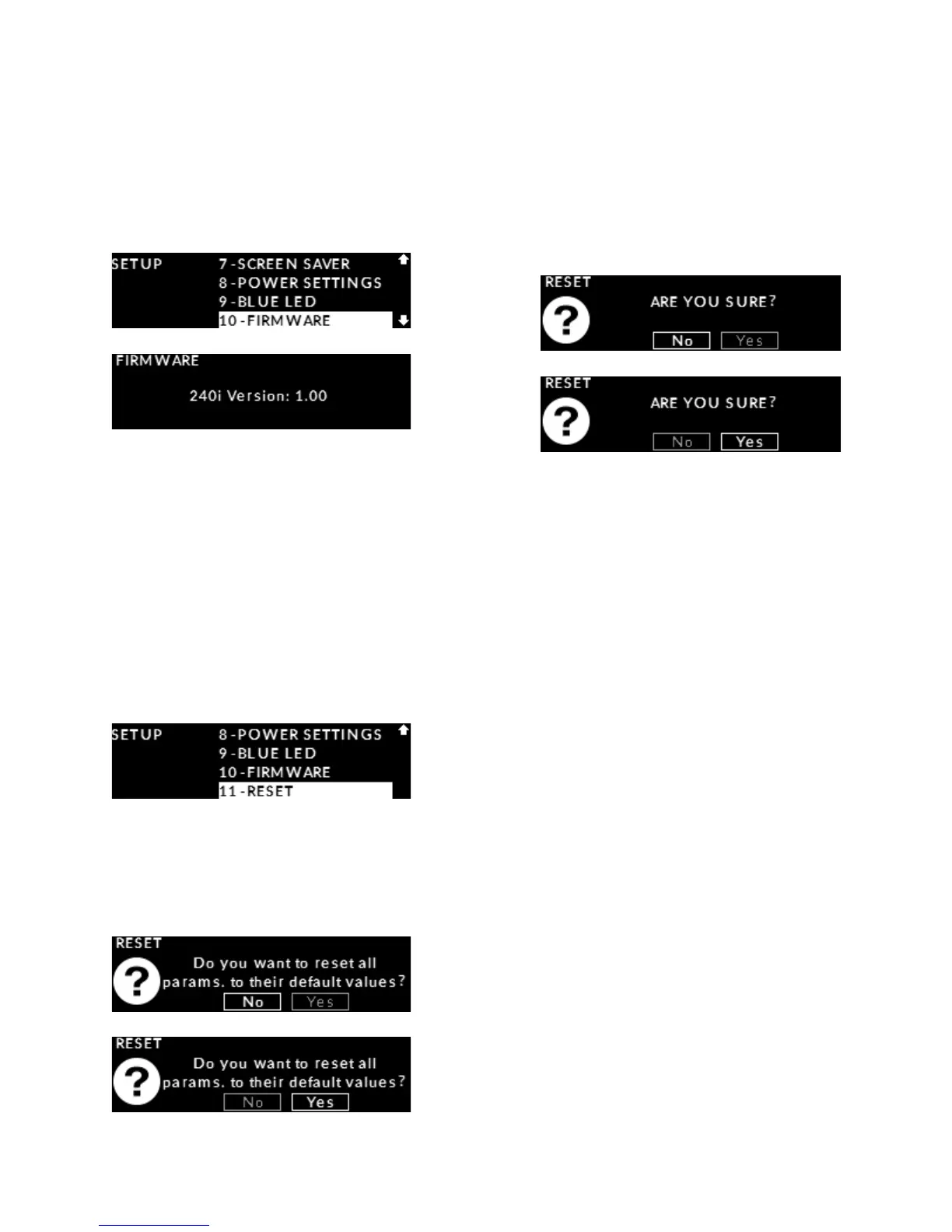
highlighted on the display and then press “OK”.
The current 240i rmware version will appear on the
display. This information will be displayed for ve (5)
seconds before automatically returning to the main
“SETUP” menu.
Press the “SETUP” button to exit from the “SETUP”
menu.
Reset to factory defaults
This “SETUP” feature allows you to reset all settings
back to their original factory defaults.
Enter the Setup mode by pressing the “Setup” button.
Rotate the volume control until “RESET” is highlighted
on the display and then press “OK”:
You will be prompted with “Do you want to reset all
params. to their default values?” and “NO” will appear
highlighted on the display. Rotate the volume control
to highlight “YES” on the display and press “OK”:
You will now be prompted a second time with
“ARE YOU SURE?” and “NO” will appear highlighted
on the display. This is to ensure that you really want
to erase all of your current settings. Rotate
the volume control to highlight “YES” on the display
and press “OK”:
“Unit has been reset to factory defaults.” will be shown:
Press the “Setup” button to exit from the “SETUP”
menu.


 To Next Page