15
To summarize which options are available for each of the nine (9) inputs refer to the following chart.
OPTICAL 1
OPTICAL 2
SPDIF 1
SPDIF 2
USB
ANALOG 1
ANALOG 2
PHONO MP IN
LABEL PRESET NAME
LABEL CUSTOM NAME
OFFSET
ENABLE / DISABLE
HT BYPASS
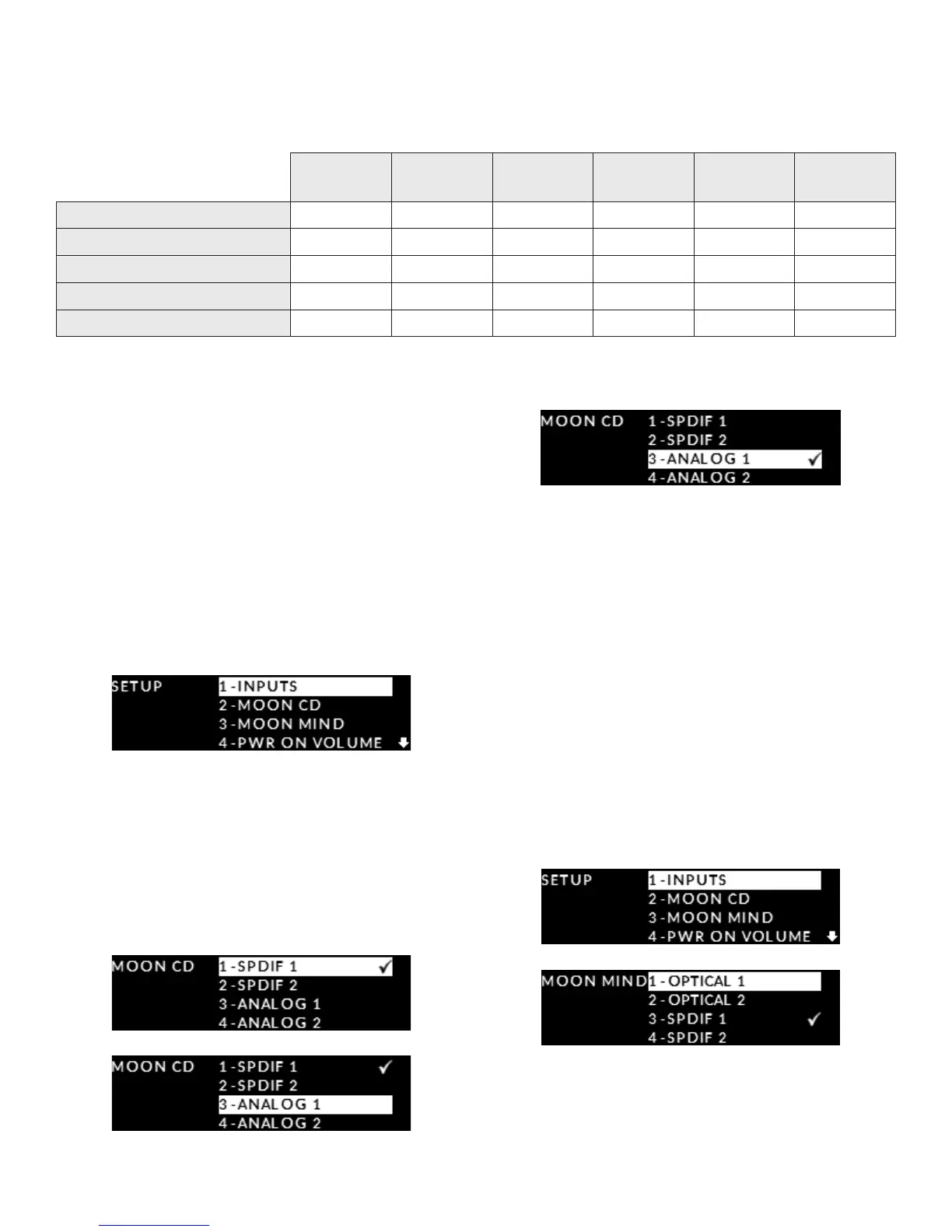
Setting up an input for a MOON CD Player
Your MOON 240i can automatically switch to the
designated input for your SimLink
TM
connected
MOON CD Player or CD transport when you press
its play button; However, you must rst assign a
corresponding input – either the “SPDIF 1”, “SPDIF
2”, “ANALOG 1” or “ANALOG 2” input - on the 240i
as follows:
Enter the Setup mode by pressing the “Setup” button;
Rotate the volume control until “MOON CD” is
highlighted on the display. Then press “OK”.:
The default input for “MOON CD” is “SPDIF 1”.
To change this input, rotate the volume control to
highlight “SPDIF 2”, “ANALOG 1” or “ANALOG 2”.
In this example we have chosen “ANALOG 1”. Press
“OK” and the check-mark symbol will appear to the
right of “ANALOG 1” and ash briey.
Press the “SETUP” button once to exit from the
“MOON CD” menu and return to the main “SETUP”
menu. Press the “SETUP” button again to exit from the
“SETUP” menu.
Setting up an input for a MiND Streamer
The MOON 240i can automatically switch to the
designated input for your Simlink connected MOON
MiND network player when you press its play button;
However you must rst assign a corresponding input.
Enter the Setup mode by pressing the Setup
button; Rotate the volume control until MOON MiND
is highlighted on the display. Then press OK.
The default input is "SPDIF 2". To change this input,
rotate the volume control to highlight the input


 To Next Page