EasyManua.ls Logo

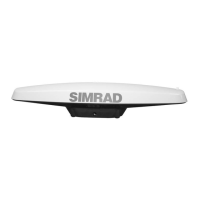
Simrad HS80 - User Manual

Simrad HS80
62 pages
Print Icon
To Next Page IconTo Next Page
Loading...
ENGLISH
HS80/HS80A
MX575C/MX575D
GPS Compass
Manual
navico.com/commercial

Questions and Answers

  • K
    Kelly CastroAug 1, 2025
    How to troubleshoot a Simrad HS80 Marine GPS System receiver that fails to power on?
    • H
      huntthomasAug 2, 2025
      If your Simrad Marine GPS System receiver fails to power on, check the following: Ensure the polarity of the power leads is correct. Inspect the power cable connectors for damage and proper connection. Confirm the power input voltage is within the range of 6 to 36 VDC. Verify the power source provides sufficient current (minimum > 1.0 A).
  • H
    Heather GuzmanAug 7, 2025
    What to do if no data from MX575C/ MX575D (NMEA -0183 connection) on Simrad HS80?
    • J
      Jason JonesAug 7, 2025
      If you are not receiving data from MX575C/ MX575D (NMEA -0183 connection) on your Simrad Marine GPS System, take these steps: First, check the receiver's power status using an ammeter to make sure it's powered on. Then, verify that the messages you want are activated, using the CDU or the $JSHOW command in a terminal program. Ensure the baud rate of the GPS compass matches the receiving device. Finally, check the integrity and connection of the power and data cables.
  • W
    William SalazarAug 12, 2025
    Why is my Simrad Marine GPS System not locking onto GPS satellites?
    • S
      Samantha GreenAug 12, 2025
      If your Simrad Marine GPS System is not locking onto GPS satellites, ensure that the GPS compass has an unobstructed view of the sky. Also, verify the lock status of GPS satellites using the MFD or CDU.
  • R
    Robert CummingsAug 17, 2025
    What causes random data from the smart GPS compass on my Simrad HS80?
    • J
      James BooneAug 17, 2025
      If you are getting random data from your Simrad Marine GPS System's smart GPS compass, first verify that RTCM or binary messages are not being output accidentally by sending a $JSHOW command. Next, ensure that the baud rate of the smart GPS compass matches that of the remote device. If the problem persists, the volume of data requested might exceed the current baud rate's capacity; try using 19200 as the baud rate for all devices or reduce the amount of data being output.
  • X
    xmoonAug 21, 2025
    How to fix no data from HS80/HS80A (N2K Network connection) on Simrad Marine GPS System?
    • A
      Adam MillerAug 21, 2025
      If you are not receiving data from HS80/HS80A (N2K Network connection) on your Simrad Marine GPS System, check the N2K connectivity using the Device List from the CDU. Also, check the integrity and connectivity of power and data cable connections.
  • M
    Melissa PerezAug 27, 2025
    What to do if Simrad HS80 has no SBAS lock?
    • M
      Megan LopezAug 27, 2025
      If your Simrad Marine GPS System is not locking onto SBAS satellites, first ensure the smart GPS compass has a clear view of the sky. Next, verify the lock status of SBAS satellites using the CDU. Set SBAS mode to automatic using the $JWAASPRN,AUTO command. Note that SBAS lock is only possible within an appropriate SBAS region, and availability is currently limited in the southern hemisphere.

Summary

Installation Guide

Mounting Location and Environment

Recommendations for determining the best mounting location and environmental factors.

Mounting Orientation and Options

Guidance on orienting the compass and choosing between flush or pole mounting.

Mounting Procedures

Step-by-step instructions for flush and pole mounting the GPS compass.

Ports and Communication

Serial Port Configuration

Explains serial port settings, baud rates, and message types.

NMEA 2000 Port

Details the NMEA 2000 port functionality and required adapter.

Powering the Smart GPS Compass

Powering and Connection

Covers power supply requirements, connection, and cable considerations.

Connecting to External Devices

Operation of the Smart GPS Compass

Smart GPS Compass Overview

Summarizes the compass's capabilities, antenna setup, and RTK technology.

Commands and Messages

Common Commands

Lists and describes common commands for compass control and configuration.

Technical Specifications

GPS Sensor Specifications

Details specifications for the GPS sensor, including channels and accuracy.

Output Messages

Troubleshooting Common Problems

Troubleshooting Guide

Lists common problems like no power, no data, or incorrect readings and their solutions.

Wiring Diagrams

Simrad HS80 Specifications

General IconGeneral
BrandSimrad
ModelHS80
CategoryMarine GPS System
LanguageEnglish

Related product manuals