12
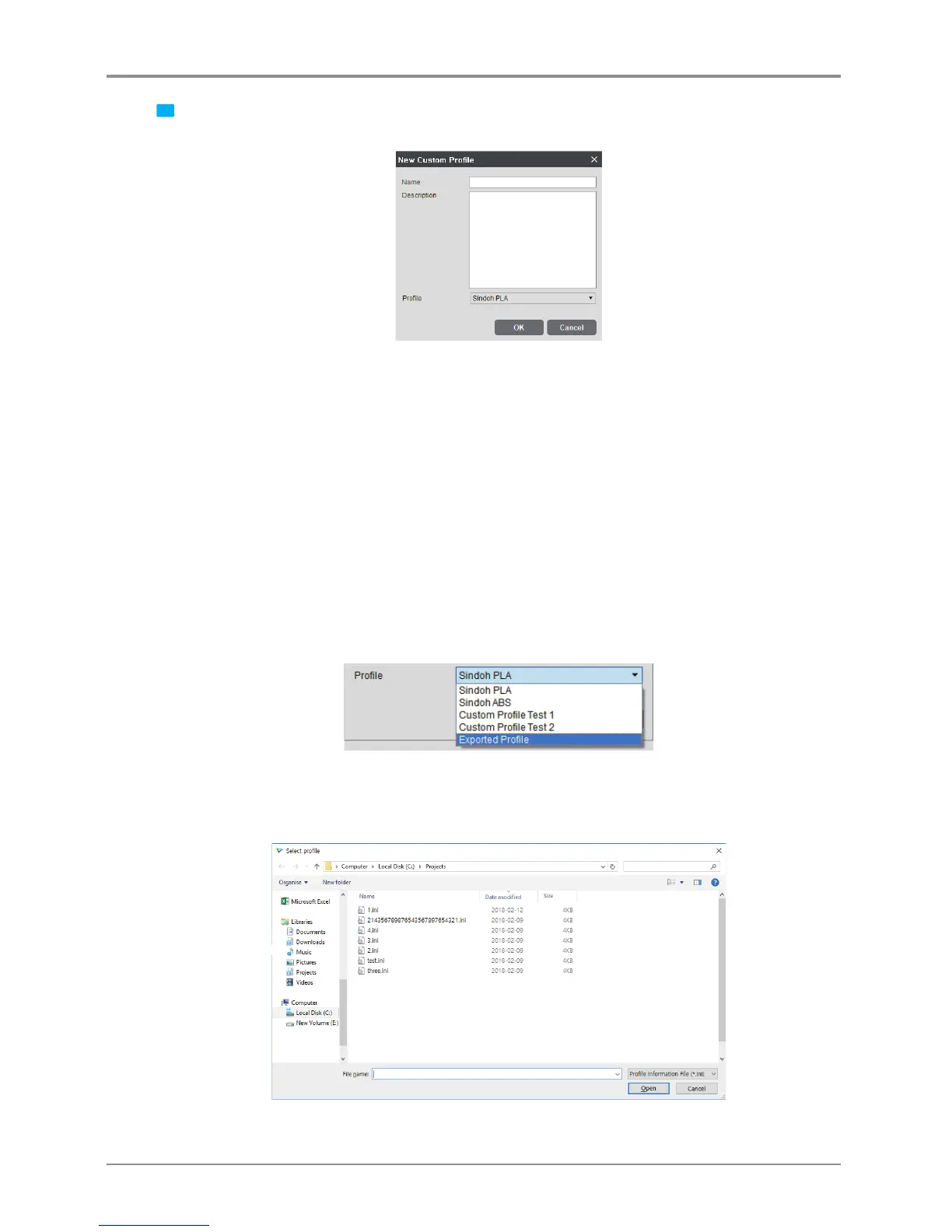
1 Clicking the [New] button → [New Custom Profile] window
- This window is for the creation of a new custom profile.
* Name (required value): Input a profile name with a maximum length of 30 characters.
- The symbols ?, “, *, \, /, |, :, <, >, [ , and ] cannot be entered in the custom profile name.
* Description (optional value): Input a profile description with a maximum length of 300 characters.
* Profile (required value): Select the profile number to be imported.
- The user may copy not only a default profile but also a previous custom profile that he/she has created.
- The list of default profiles varies depending on the model.
e.g., In the case of the DP200, when no custom profile is defined, only the “Sindoh PLA” and the
“Sindoh ABS” will be listed.
- In the case of tthe 3DWOX 1, 2X/2X DP303 and 1X/1X DP302 model, the [New Custom Profile] window
will show the “ETC” profile.
In profile editing, if the user selects a Sindoh profile, he/she can select only profile values within the
limits given by Sindoh.
However, if the user selects “ETC”, he/she can select a wider range of profile values.
<“Import Profile” function>
- Clicking the “Import Profile” button at the bottom of the profile window will show a pop-up window
for the selection of a profile from exported profiles. The user may create a custom profile by selecting
a profile of *.ini format to be imported.



 To Next Page