EasyManua.ls Logo

Singer 270 - Singer Service Manual Reel Driver Tripping Points; Singer Service Manual Pre-Tension Adjustment

Singer 270
144 pages
Print Icon
To Next Page IconTo Next Page
To Previous Page IconTo Previous Page
Loading...
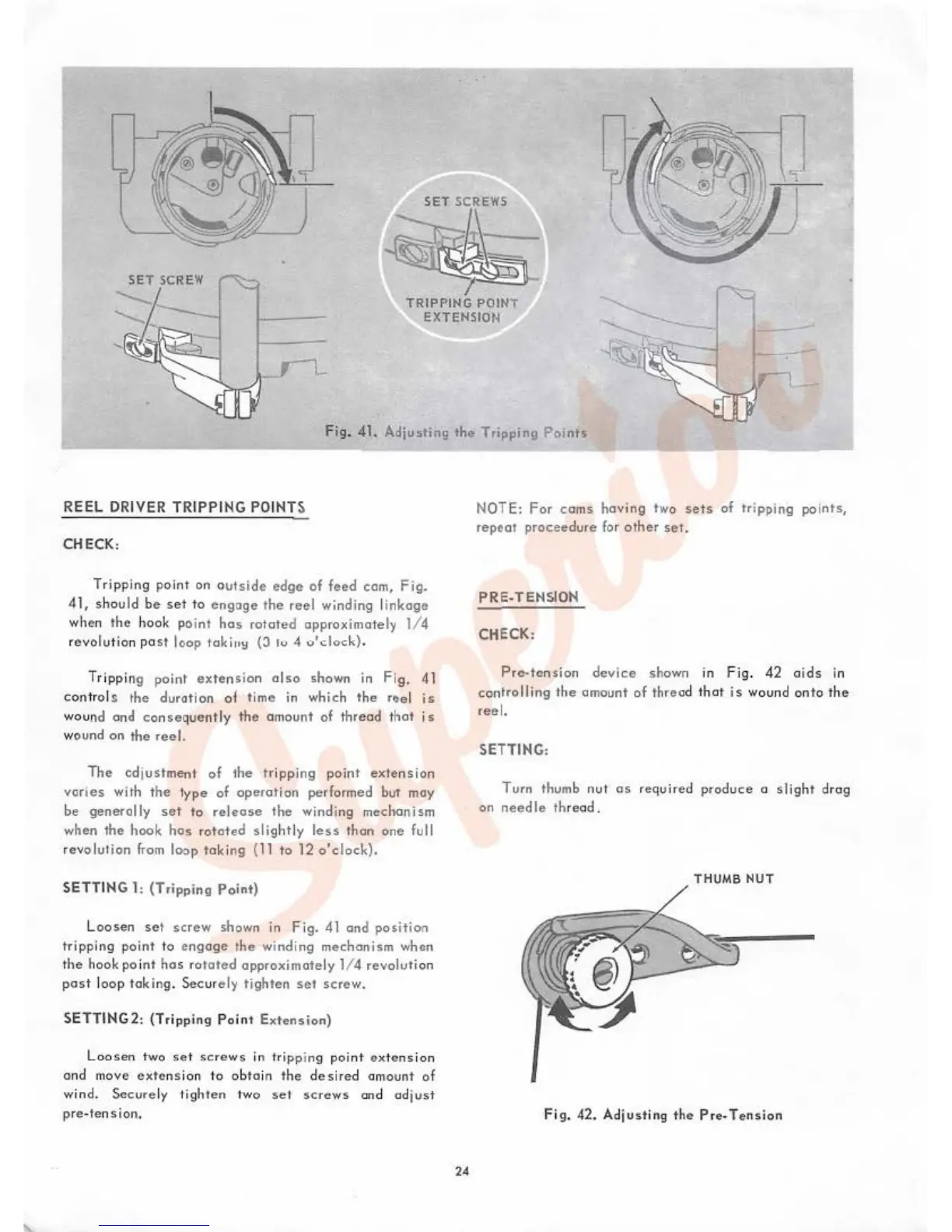
SET
SCREWS
~
TRIPPING
PO
I
NT
EXTENSION
Fig.
41.
Adjuoting
tht>
Tripping
Points
REEL
DRIVER
TR
I
PPING
POINTS
CHECK,
Tripping point on
outside
edge
of
feed com,
Fig.
41,
sho
uld
be
set
to
engoge
the
reel
winding li
nkage
when
the
hook
point
hos
rotated
approximately 1/ 4
revolut ion
pa
st
loop
toki
11~
(J
lu
4
o'clock).
Tripping point
exte
n
~
i
on
a l
so
shown in
Fig.
41
con
trols
the
duration
of
time in which
the
rf:el
is
wound and conseque
nt
ly
the
amount
of
thread
that
i s
wound on the
reel.
The
cdj
ustment
of
the trippi
ng
point
extension
var
i
es
with
the
typt>
of
operat
ion performed but may
be
generally
set
to
re
l
6ose
the
winding mechanism
when
the
hook
hos
r
otated
slight
ly
less
than
one
full
r
evolution
from loop
taking
(11 to
12
o'clock)
.
SETTIN
G 1:
(Tripping
Point)
L
oosen
set
screw
shown in
Fig.
41
and
position
tripping
point
to
engage
the
wi
nding
mechanism
when
t
he
hook poi
nt
has
rotated
approximate
ly 1/ 4
revolutio
n
pas
t loop
taking.
Secure ly
tighten
set
screw.
SETT
I
NG2:
(Tripp
ing
Point
Extension)
Lo
osen
two
se t
screws
in
trip
pin
g
po
in t
ex
t
ens
i
on
and
1nove
extens
ion to ob
ta
in the
desired
amount
of
wind.
Secu
re
ly tig
hten
tw
o
se
t
screws
and ad just
pre
-te
nsio
n.
24
NOTE:
For
cams
having
two
se
ts of
tr
i
pping
points,
repeat
proceedure for
other
set.
PRE
-TENSION
CHECK:
Prc.tcnsion
device
shown in Fig.
42
ai
ds
in
co
ntrolling
th
e amount
of
th
rea
d that is wound
onto
the
reel.
SETTING,
Turn
thumb
nu
t
os
required
pro
duce
o
slight
dr
ag
on
needle
threod .
T HUMB
NUT
Fig. 42.
Ad
j
ust
i
ng
tho P re
..
T
ens
ion

Table of Contents

Related product manuals