EasyManua.ls Logo

Singer 270 - Singer Service Manual Stop Motion Adjustments

Singer 270
144 pages
Print Icon
To Next Page IconTo Next Page
To Previous Page IconTo Previous Page
Loading...
STOP
MOTION
ADJUSTMENTS
ARM
SHAFT
There
sho
uld
be
a min imum of
end
pl
ay
in
the
arm
shaft
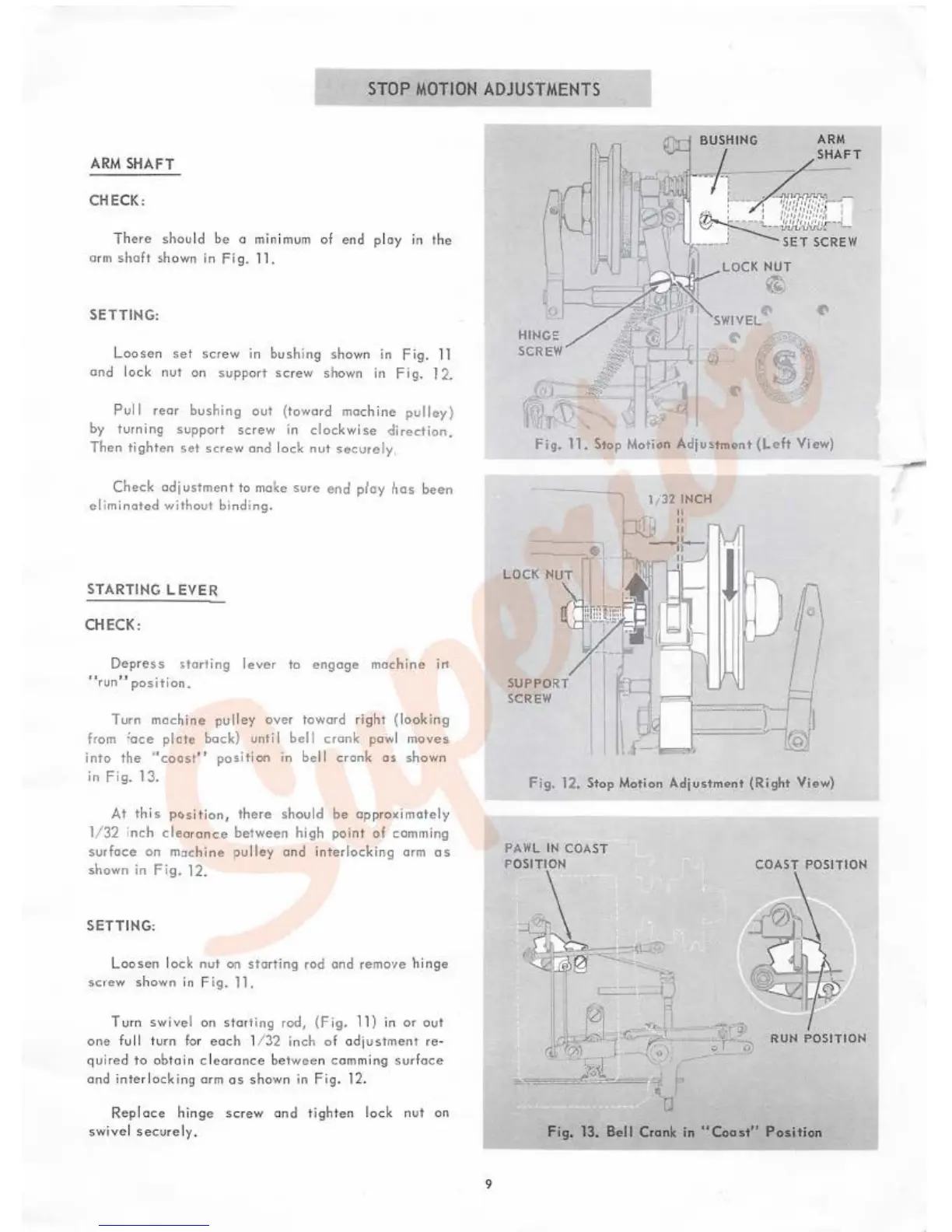
shown in
fi
g.
11.
SETTING:
Loo
se
n
set
screw
in bushing sho
wn
in
Fig.
11
en
d
lock
nut
on
support
sc
rew
shown
in
F
ig
. 1
2.
Pull
rear
bushing
out
{
toward
mach
i
ne
pul
ley
)
by
turning support
sc
rew
in
cloc
kwise
dir
ect
io
n.
Then
tighten
set
screw
and
lock
nut
secure
ly.
Check
adjus
tme
nt to ma
ke
sure
end
ploy
has
been
el
i
minated
without
bi
nd
i
ng
.
STARTING
LEVER
CHECK:
Dep
re
ss
itort
ing
lever
to
enga
ge
machine
i11
''r
un"
position.
Tu
rn
machi
ne
pulley
over
toward
right
{l
ooki
ng
from
'ace
plate
bock)
unti I
bell
crank
pawl
moves
into
the
.,coast
''
position
in bel l
crank
as
shown
in
Fig.
1
3.
At
this
p6sition,
t
here
should
be
ap
proximate ly
1/32 i
nch
clea
ran
ce
between
high poi
nt
of
comming
surface
on
m::~chine
pulley
and
i
nterlocking
arm
as
shown
in
Fig
. 12.
SETTING:
Loosen
l
ock
nut
on
sta
rting rod and remo•1e
hinge
screw
shown
in
Fig. 11.
T urn swi
vel
on
s
tart
ing rod, (
Fig.
11}
in
or
out
one
fu
ll
turn
fo
r
eac
h 1/
:!.2
in
ch
of
odj
ustmenl
re
-
q
ui
red
to
obt
ai
n c l
coronce
bet
wee
n
com
mi
ng
sur
f
oce
ond
inte
rl
ocking
arm
os
shown
in Fig. 12.
Repl
ace
h
in
ge
screw
on
d
tighten
lock
nut
on
swive
l
securely
.
BUSH
I
NG
ARM
I SHAFT
>r·
-r
t.
---
"'"
:-
:
+1f?fl
ilf!!!f
~
--
~
....
;
...
~_
•.:
.
;:},
•:
:
::~
.
I
~
~iJ!Jl:.iJ/j{){'oooL.
,
---
J
SET
SCREW
1
1
'--fjj
LOCK
NUT
·jx~e~
v.t,
SWIVEL
HINGE I
SCREW
~
, '1 1
....
r""
...
~
"""-
~J
11
"
Fig,
11.
Stop Motion Adju<tment
{Left
View)
---
SUPPORT
SCREW
l
t3
2 INCH
Fig,
1
2,
Stop Motion
Adjustment
(Right
View)
COAST POSITION
...
OT
.-
..
RUN
POSITION
Fig.
13. Bell Crank in
"Coast"
P
osit
ion
9
-

Table of Contents

Related product manuals