Sirona Dental Systems GmbH 15 Key combinations
Operating Instructions PerioScan
61 95 825 D 3496
D 3496.201.03.05.02
43
båÖäáëÜ
15 Key combinations
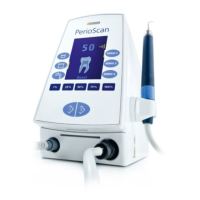
Signal mode: The signal mode can be activated by simultaneously
pressing the "Small rinsing media tank" and "PERIO 1"
keys. As soon as the signal mode is activated, the tooth
displayed on the screen starts flashing. Here, it is possi-
ble to adjust the volume of the signal with the 50 % and
100 % keys. Furthermore, the signal tone can now be
assigned to the detection of calculus with the "PERIO 1"
key or to noncontact of the tip with the root surface with
the "PERIO 2" key. The user can see which function he
has activated based on the readings that appear on the
display following his selection (doctoral cap = signal set
to noncontact of tip with root surface).
The signal tone can be deactivated (detection of calcu-
lus or noncontact of tip on root surface) by pressing the
activated key once again. You can quit the signal mode
by simultaneously pressing the "Small rinsing media
tank" and "PERIO 1" keys once again.
Deactivating the detection function: The detection function must be deactivated until the
SIROPERIO 4 PS or SIROPERIO PE 8 tip is attached.
This is done by pressing key . Once the SIROPERIO
4 PS or SIROPERIO PE 8 tip has been attached, the
detection function can be activated by simply pressing
key .
Patient communication system: To change to the patient communication mode, you
must simultaneously press the "Large rinsing media
tank" and PERIO 2" keys. 3 teaching images are avail-
able here to support your communication with your
patient. This will simplify explaining the treatment proce-
dure and the reason for the treatment to your patient.
You can select the individual images using the three
"PERIO" keys.
To quit the patient communication mode, simultaneously
press the "Large rinsing media tank" and "PERIO 2"
keys once again.
Reset: To reset the PerioScan to its factory settings, press and
hold key while simultaneously switching the unit off
and on again.
Deactivating the boost function: The boost function can be switched off by simultane-
ously pressing and . The text "Boost" then dis-
appears at the bottom center of the display. To reacti-
vate the boost function, press keys and simul-
taneously.
Continuous flushing (60 s): Continuous flushing can be activated for 60 seconds by
pressing key . This function can be terminated by
pressing key once again or by pressing the foot
switch.


 To Next Page