Use and Operation
6-3
indicator turns on and the X-ray machine
makes a "Di" sound. Wait for "
"
being displayed, which means exposure
level 1 is ready. Till "
" is displayed
and disappears, one exposure is
completed.
4
Status
indication
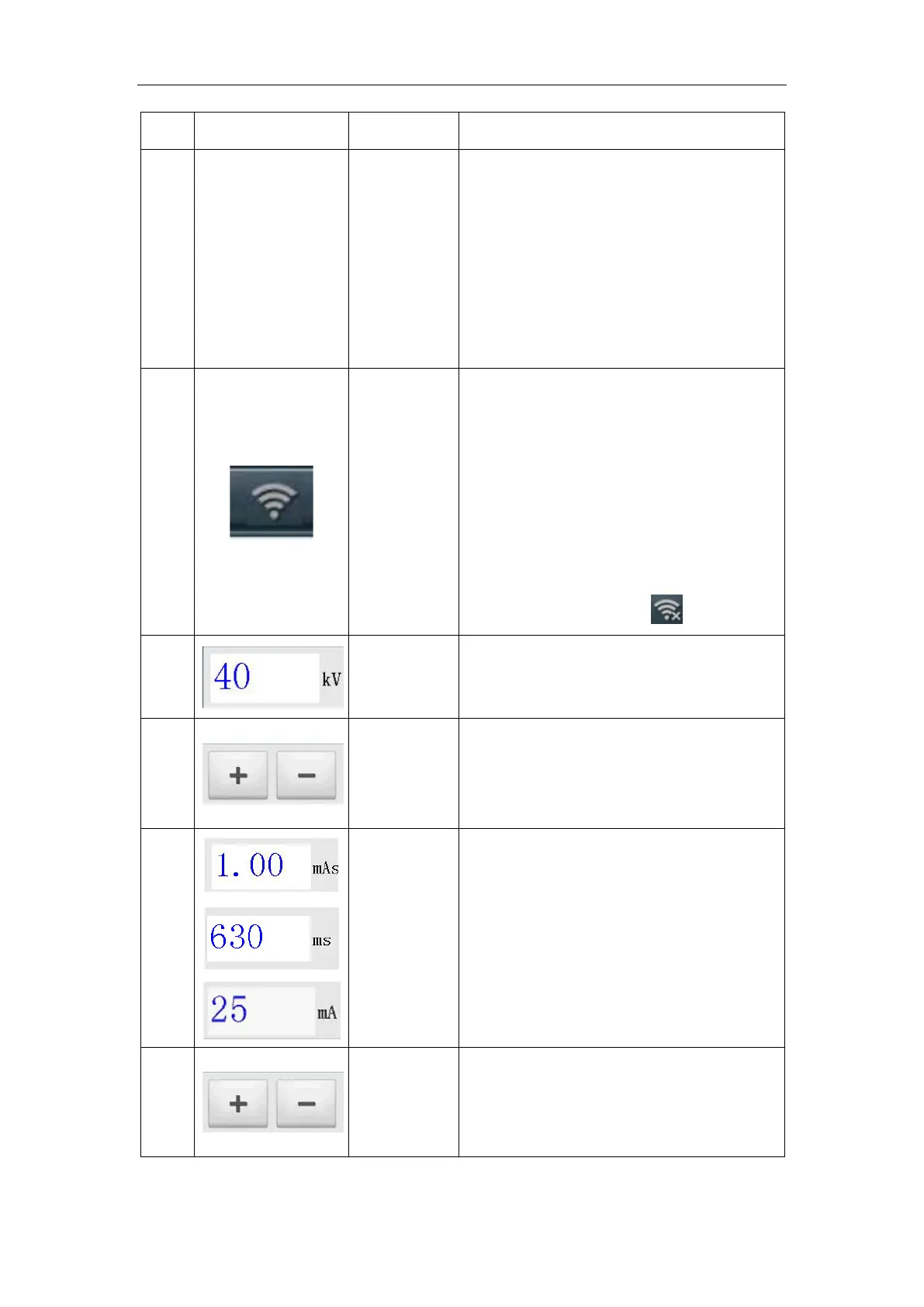
When the portable X-ray machine wireless
connection is successful, the indicator is
stays on; when the portable X-ray machine
wireless is not connected, the indicator
gets darkened; when the portable X-ray
machine wireless function is turned off,
the indicator changes to
.
5
Value
display
To display the value of the exposure
parameter kV.
6
Button
kV Parameter Adjust button
Adjust the parameter up or down, where
the parameter kV step value is 1kV.
7
Value
display
To display the value of the exposure
parameter mAs. Clicking on this position
will switch to display the exposure
parameter mAs, ms and mA values.
8
Button
mAs / ms parameter adjustment button.
Adjust the parameter up or down, where
mAs / ms changes according to the law of


 To Next Page