1 Satellite: In this item, press [Volume Up/ Volume positions. It will display a dialogue “Are you
Down] key can switch Satellites and press [OK] sure…”. If you select “Yes”, it will clear all
key can enter satellite list for you to select directly. position. Select “No” to cancel the operation.
2 LNB Freq: In this item, press [Volume Up/ Volume This item is only valid in “DiSEqC1.2” Mode.
Down] key can select the parameter. Option is5150/
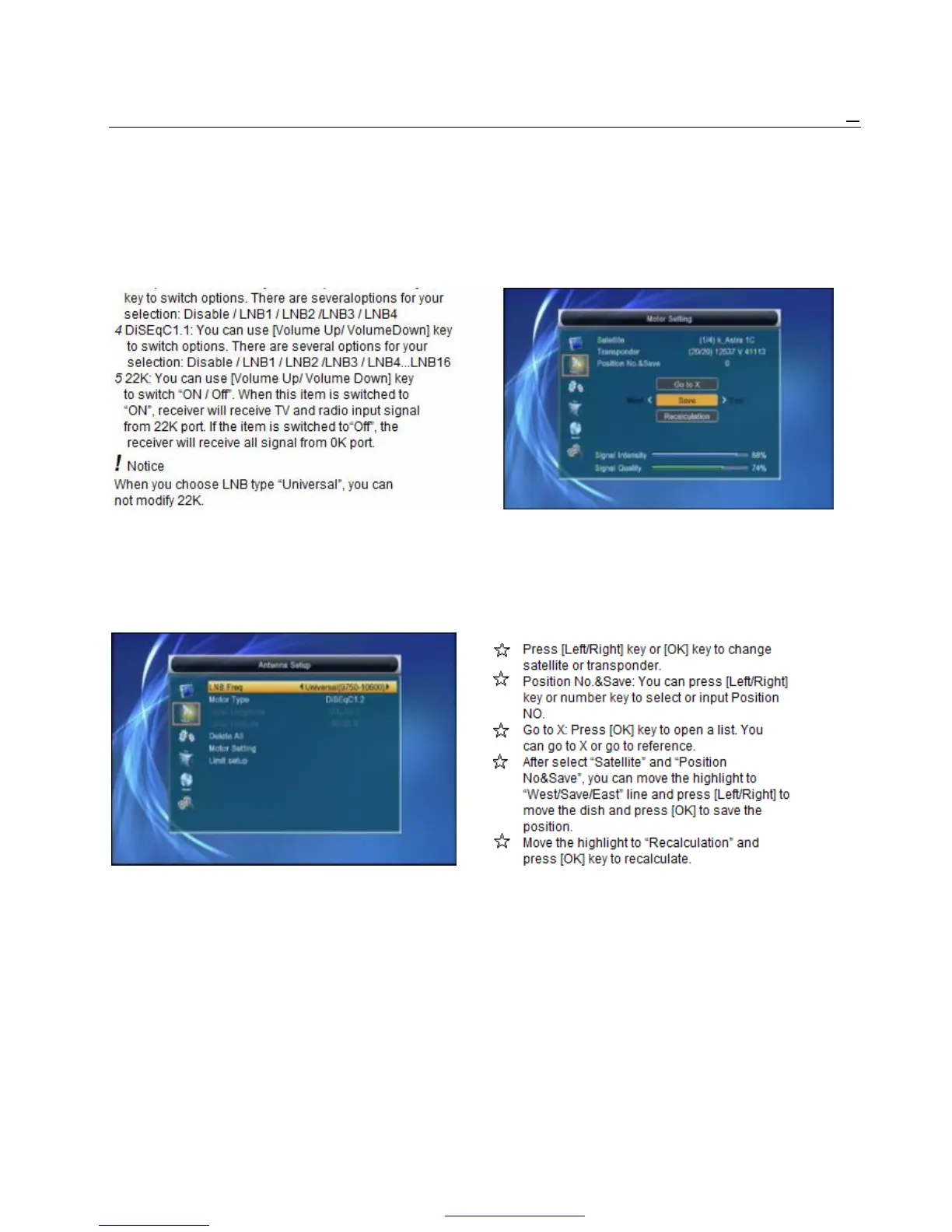
5750/5950/9750/10000/10050/10450/10600/10700/ 5 Motor Setting:
10750/11250/11300/5150-5750/5750-5150/Universal If you select “DiSEqC1.2”, “Local Longitude / Local
(9750-10600)/Unicable(9750-10600)/Unicable10200 Latitude” is not available. It will show the screen like
3 DiSEqC1.0: You can use [Volume Up/ Volume Down] below:
6 Toneburst: In “Toneburst” item, you can press [Volume
Up/ Volume Down] key to switch “Off/On” functions.
7 Polarity: In “Polarity” item, [Volume Up/ Volume
Down] key to switch “Auto / H / V” functions.
Motor Antenna
If you select “Motor Antenna” in “Antenna Connection”
menu, there will display the screen like below:
1 LNB Type:
5150/5750/5950/9750/10000/10050/10450/10600/ Set the satellite’s longitude and local longitude / local
10700/10750/11250/11300/5150-5750/5750-5150/ latitude, USALS can move dish automatically.
Universal(9750-10600)/Unicable(9750-10600)/ Move the highlight to “Motor Setting” and press [OK]
Unicable10200 key, it will show the screen like below:
2 Motor Type: DiSEqC1.2/USALS
3 Local Longitude/Local Latitude: If you select
“USALS”, “Local Longitude / Local Latitude” is
available. Press [OK] and number key to input.
4 Delete All: This operation will delete all satellite
PDF 文件使用 "pdfFactory Pro" 试用版本创建 www.fineprint.cn



 To Next Page