SKYJACK, Page 30 SJIII Series
Section 1 - Scheduled MaintenanceFunction Tests
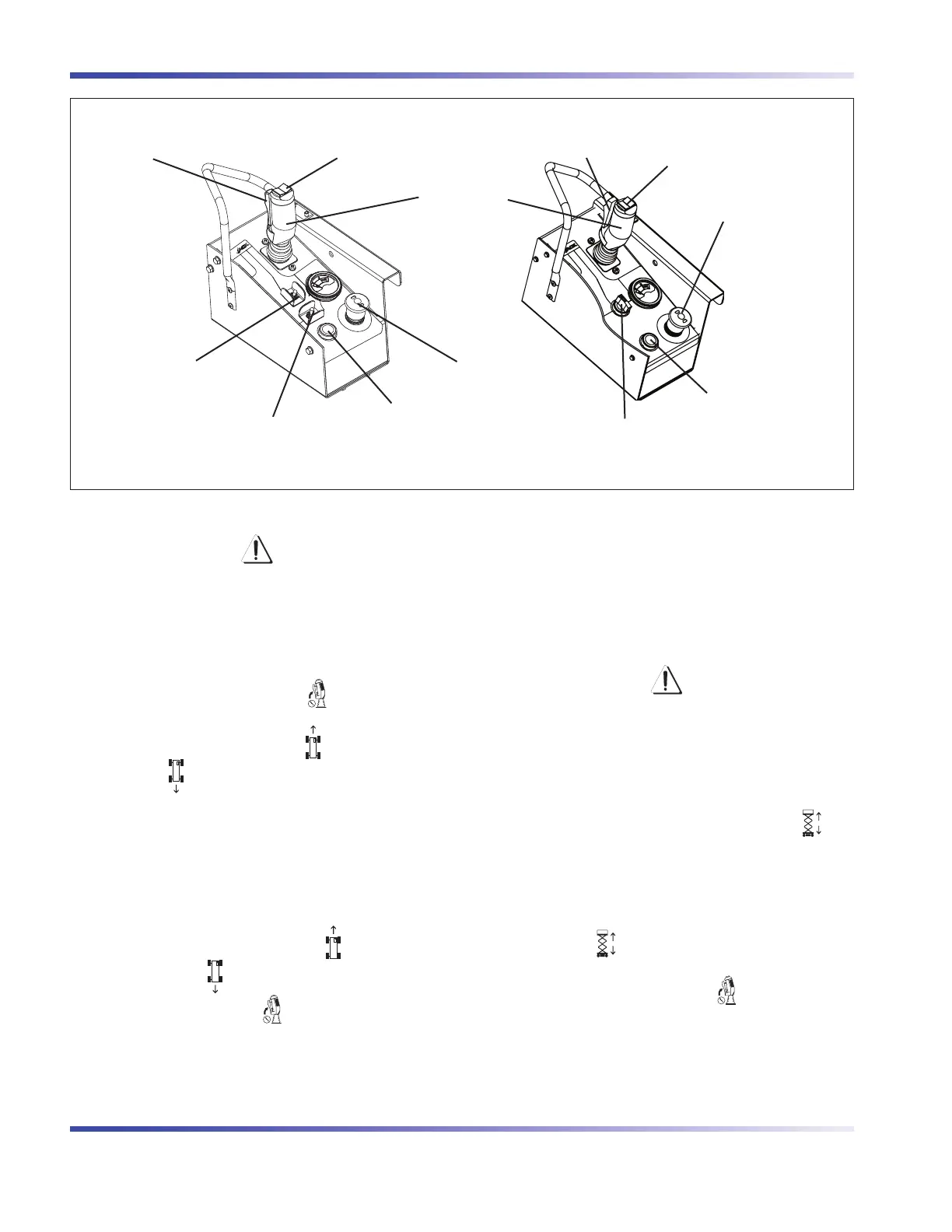
Lift/Drive/Steer Enable
Trigger Switch
Inclined Drive/Level Drive
Switch
Emergency Stop Button/
Operation Light
Rocker Switch
Horn Pushbutton
Controller
Lift/Off/Drive Switch
Emergency Stop Button/
Operation Light
Rocker Switch
Horn Pushbutton
Lift/Inclined Drive/Level Drive Switch
Lift/Drive/Steer Enable
Trigger Switch
Platform Control Console with Toggle Switch Platform Control Console with Rotary Switch
Test Brakes•
WARNING
Brakes will engage instantly when you
release the controller handle, causing
aerial platform to stop immediately.
1. Ensure path of intended motion is clear.
2. Activate and hold “
” enable trigger
switch.
3. Drive aerial platform “
” forward and then
“
” backward. Test brake by releasing
controller handle.
Result: Aerial platform should come to
a stop. If aerial platform pulls to one side
while stopping, do not operate aerial
platform until brake adjustments have
been checked.
4. Drive aerial platform “
” forward and
then “
” backward. Test brake again
by releasing “
” enable trigger switch
only.
Result: Aerial platform should come to an
instant and abrupt stop. If aerial platform
does not stop immediately, or if aerial
platform pulls to one side while stopping,
do not operate aerial platform until brake
adjustments have been checked.
Test Platform Raising/Lowering•
WARNING
Be aware of overhead obstructions
or other possible hazards around the
aerial platform when lifting.
1. For platform control console with toggle
switch:
Select lift/off/drive switch to “
” lift
position.
For platform control console with rotary
switch:
Select lift/inclined drive/level drive switch
to “
” lift position.
2. Activate and hold “
” enable trigger
switch.



 To Next Page