SKYJACK, Page 29
April 2006
Start Operation Section 2 - Operation
SJ800 - E Series
Battery Powered
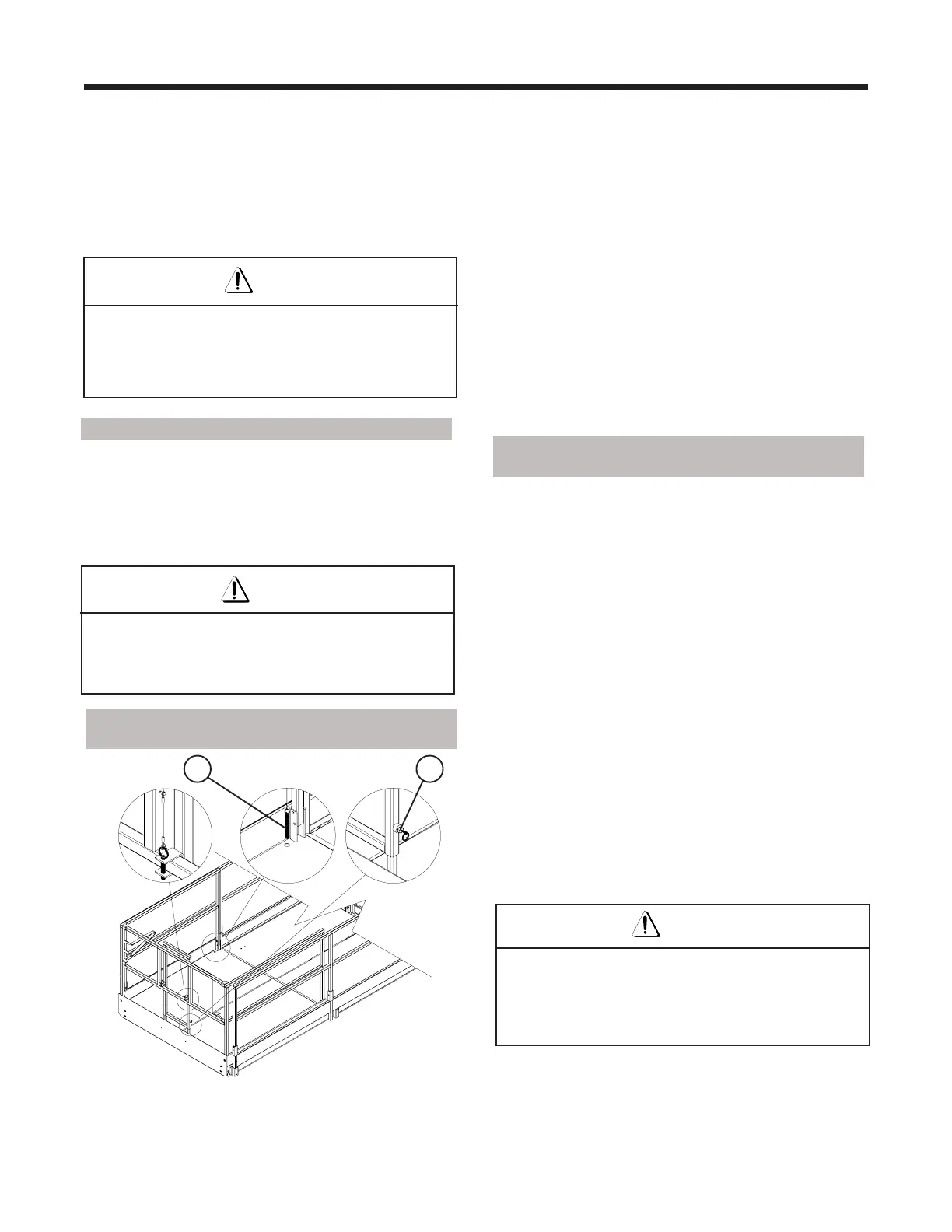
2.5-9 To Extend/Retract the Manual
Extension Deck
Figure 2-15. Manual Extension Deck
2.5-10 To Extend/Retract the Powered
Extension Deck
1. To extend the powered extension deck, ensure
the emergency stop button is pulled out.
2. On the operator’s control box, select “LIFT”
position with LIFT/OFF/DRIVE toggle switch.
3. On the powered extension deck control box,
activate the enable switch, then push the
extension/retraction toggle switch to the “×”
(EXTEND) position until desired extension is
reached. Release switch to stop.
4. To retract the platform, ensure the emergency stop
button is pulled out and select “LIFT” position
using the LIFT/OFF/DRIVE toggle switch.
5. On the powered extension deck control box,
activate the enable switch, then push the EXTEND/
RETRACT toggle switch to the “Ø” (RETRACT)
position until desired extension is reached.
Release switch to stop.
Warning
To protect against unintended movement of the
aerial platform, push in the emergency stop button
after you have arrived at your desired location or
elevation.
31
2.5-8 To Steer
1. Select “DRIVE” position with LIFT/OFF/DRIVE
toggle switch.
2. Press the rocker on top of the controller handle in
the direction you wish to steer.
Warning
Steering is not proportional. It is not self-centering
and will remain in the selected orientation.
Driving and steering may be active at the same time.
1. To extend/retract the manual extension deck,
remove the locking pin (item 1) then remove the
push bar locking pins (item 2) and rotate the push
bar towards the main platform. Extend the push
bar until it locks at full extension and push/pull
the extension deck using the push bar.
2. Upon full extension or retraction, reinsert the
locking pin on the platform (item 1) to prevent
accidental movement of the manual extension
deck during travel or transport.
3. When the push bar is not in use, pull the plungers
(item 3) on the push bar and retract it, then rotate
it back to its resting position and lock it into place
with the locking pins (item 2).
4. Push or pull the proportional controller handle
forward or backward to the desired speed and
direction of platform travel.
5. Return the proportional controller to the neutral
center position to stop. Release the enable trigger
switch.
Warning
To protect against unintended movement of the
aerial platform, push in the emergency stop button
after you have arrived at your desired location or
elevation.


 To Next Page