213205AAA SJ82 T, SJ86 T
108
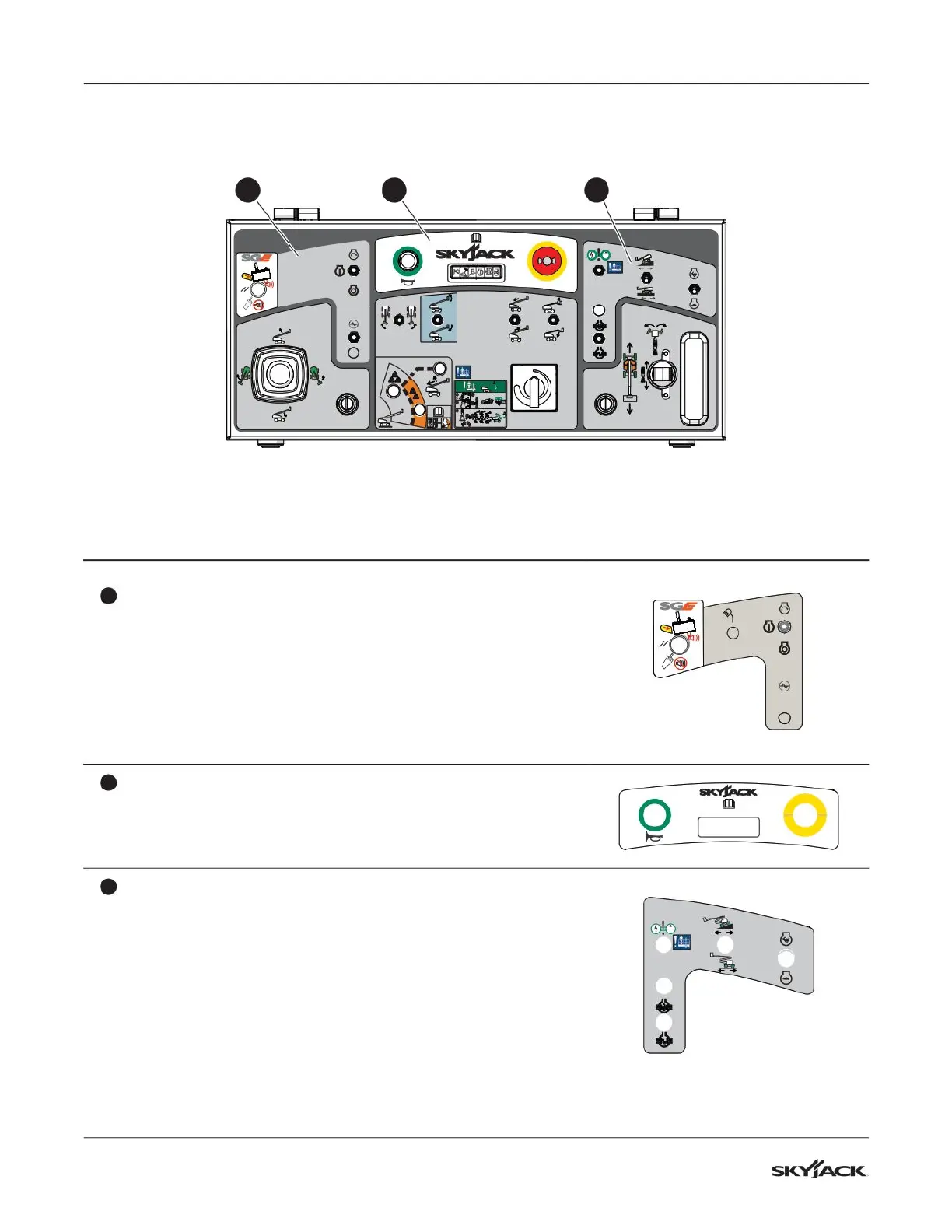
Section 8 – Labels Platform control console
Description Label Pictorial
1
SGE reset/start engine/generator (optional)
Select the SGE reset button to reset the SGE.
Push and hold the engine start/on/off switch to start the engine
and then return it to the on position. Select the off position to turn
the engine off.
Select the generator on/off switch to turn the generator (optional)
on or off.
2
Horn/emergency-stop
Push the horn button to make a sound like a car horn.
Push the emergency-stop button to stop the engine and disable
the controls.
TM
3
Emergency-power unit/engine controls
Select the emergency-power switch to enable the emergency-
power unit.
Select low torque (high speed) or high torque (low speed) with
the torque switch. Select high torque when you drive on a slope.
Select high or low engine throttle speed with the low/high throttle
switch.
Select the differential lock switch to engage or disengage the
differential lock.
8.8 Platform control console
TM
1
3
4
+
STOP
=
2
+
1 2 3


 To Next Page
 Loading...