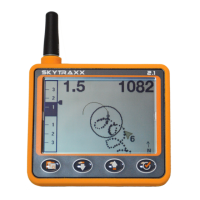
The Airspaces screen provides an overview of the airspaces within a 20km radius. With
the middle buttons the information of an airspace can be interrogated. After 2 minutes,
the view automatically switches back to the next airspace. At the top left, the horizontal
distance to the airspace is displayed. For the freely assignable fields, it is recommended
to select a field with QNE. This makes it possible to quickly check the horizontal distance
to the airspace.!
!
On the barogram screen you can see graphically the altitude of the last 120seconds. The
number right (80) indicates the horizontal altitude range over the displayed altitude.!
6.7.4. Pilot
Here the pilot name can be entered, this will be entered in the IGC file. By
pressing the OK button for a long time several profiles can be entered. This is only
necessary when flying with different aircrafts.!
6.7.5. FANET+
•
FANET+ Enable / Disable wireless interface!
•
FLARM FLARM is only available for Paraglider and Hangglider!
•
Type FLARM only works for Paraglider and Hangglider!
•
Broadcast Name If disabled, data gets anomymized!
• Online Tracking If disabled, base stations will not forward any data to the
internet!
•
Messages From Determine who`s messages are displayed!
!


 To Next Page
 Loading...