Chapter 1 Welcome
docs.smarttech.com/kb/171897 6
About the display
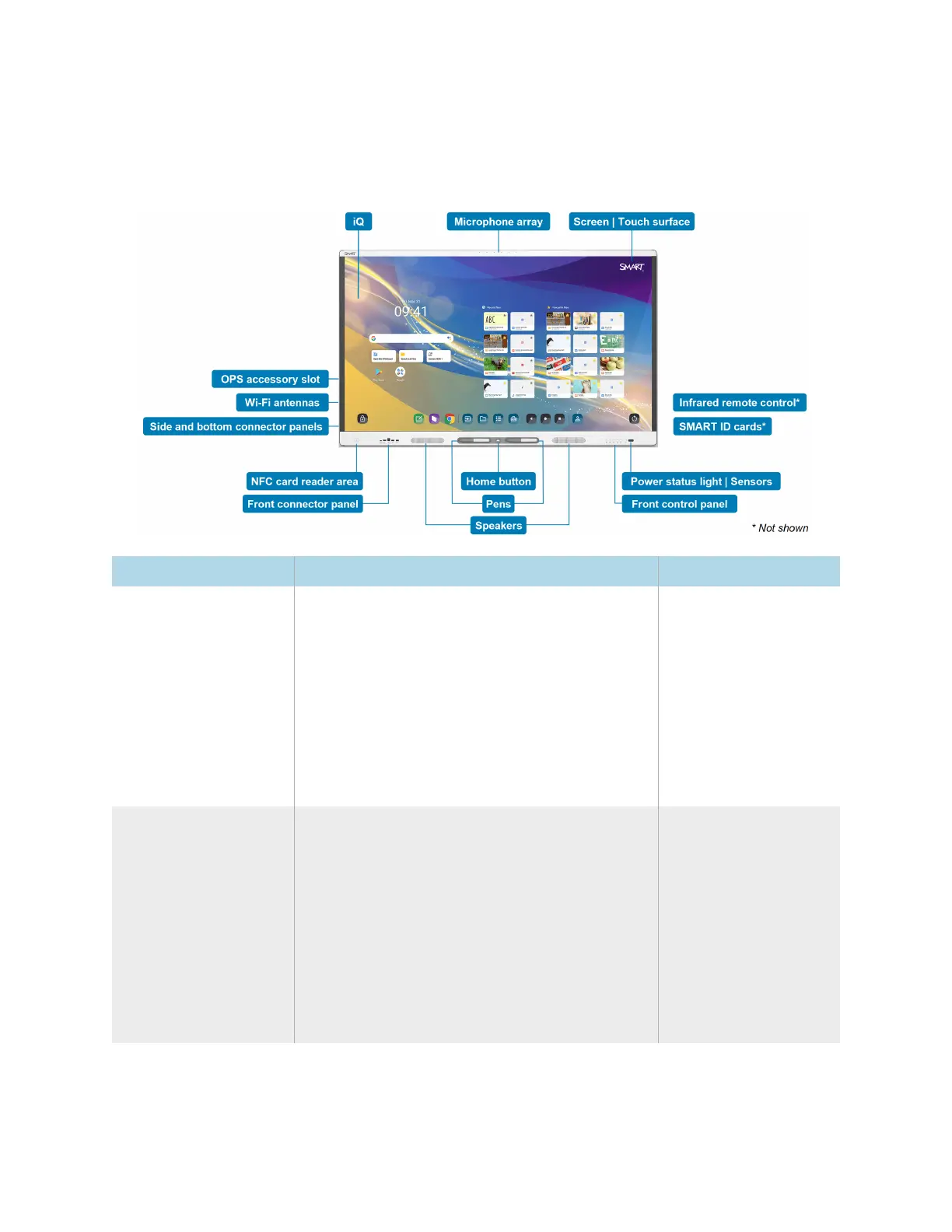
If you need to install or maintain the display, take this tour to familiarize yourself with its components:
Component Description In this guide
iQ iQ is the SMART Board MX (V5) and MX (V5) Pro
series interactive display’s embedded Android
operating system.
iQ runs on Android 13 (or later) with Google
™
EDLA
certification.
When you turn on the display for the first time,
you’re prompted to configure iQ.
By default, the display downloads and installs iQ
updates automatically. You can also download
and install updates manually.
SeePage13
SeePage14
Screen | Touch surface The display comes in the following screen sizes:
l
55"
l
65"
l
75"
l
86"
The display’s HyPr Touch
®
with Advanced IR
technology supports up to 40 touch points
(depending on the connected device’s operating
system).













 To Next Page