Please note
G
WARNING
The iPad
®
distracts the driver from the
traffic situation. This could cause the
driver to lose control of the vehicle.
There is a risk of an accident.
The driver must never use the iPad
®
while
driving.
Always keep the iPad
®
away from the
driver's field of vision.
G
WARNING
A bracket fitted in the vehicle without an
attachment could be thrown around and
thereby hit vehicle occupants, for exam-
ple in the event of an accident, braking or
a sudden change in direction.
There is a risk of injury.
Make sure that the entire tablet bracket
is securely mounted in the fitting.
When removing the iPad
®
or the attach-
ment, remove the entire tablet bracket.
!
When adjusting and folding the seats
with the tablet bracket mounted, contact
with adjacent components may occur. If a
charging cable is connected to the tablet
bracket, the charging cable or the USB
port may be damaged.
In order to avoid damage adjust the seats
with the appropriate caution.
When folding down the rear bench seat,
ensure that the rear bench seat does not
collide with the tablet bracket.
You must observe the legal requirements
for the country in which you are currently
driving when operating the tablet bracket
for iPad Air
®
.
Further information on the tablet bracket is
available from any smart centre.
Mounting the tablet bracket
i
Before mounting, ensure that no objects,
e.g. coat hangers, are on the headrests.
X
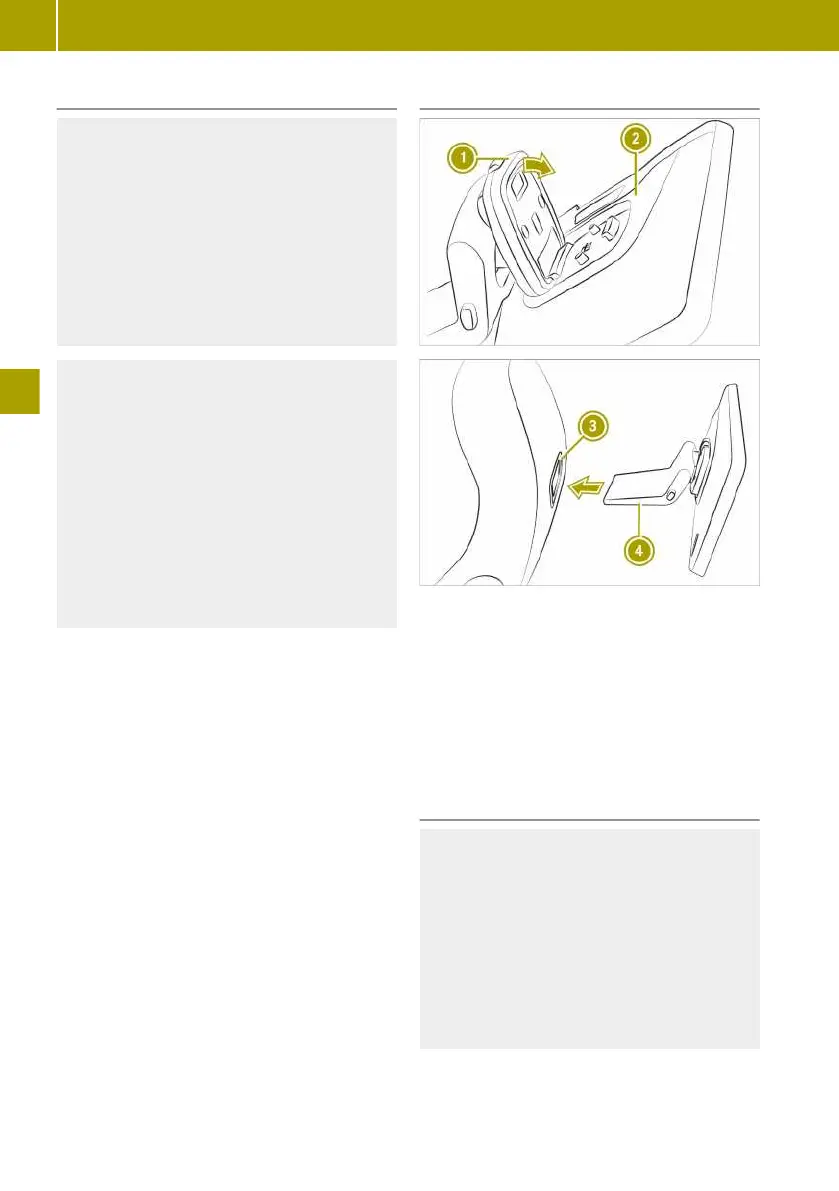
Mount bracket : on the back of attach-
ment ; until bracket : audibly
engages.
X
Insert tablet bracket ? with the bracket
forwards into fitting = until the tablet
bracket audibly engages.
Affixing protective film
G
WARNING
The display of the iPad
®
may shatter in
an accident. If there is no protective film
on the display, you or other passengers
may receive eye injuries, for example,
caused by fragments.
There is a risk of injury.
Ensure that the protective film is affixed
to the display.
102
Using the accessories
>> Feeling comfortable in the vehicle interior.















 To Next Page