i To avoid air bubbles or dirt getting
under the surface, observe the following
tips:
R
Do not bend the protective film.
R
Do not touch the adhesive surface of
the protective film.
R
Use disposable gloves to affix the pro-
tective film.
X
Carefully clean the display of the iPad
®
.
X
The adhesive surface of the protective
film is protected by a thin transparent
backing film. Peel off half the backing
film from the protective film.
X
Affix the upper edge of the protective film
to the edge of the display by applying
gentle pressure.
X
Slowly peel off the backing film from the
protective film. At the same time, care-
fully apply pressure to the protective
film with a suitable implement or plastic
card such as a credit card and smooth
over the surface.
If air bubbles or dirt particles are present
after attaching the protective film, proceed
as follows:
X
Carefully remove the protective film from
the display.
X
Remove dust and impurities.
X
Attach the protective film once again.
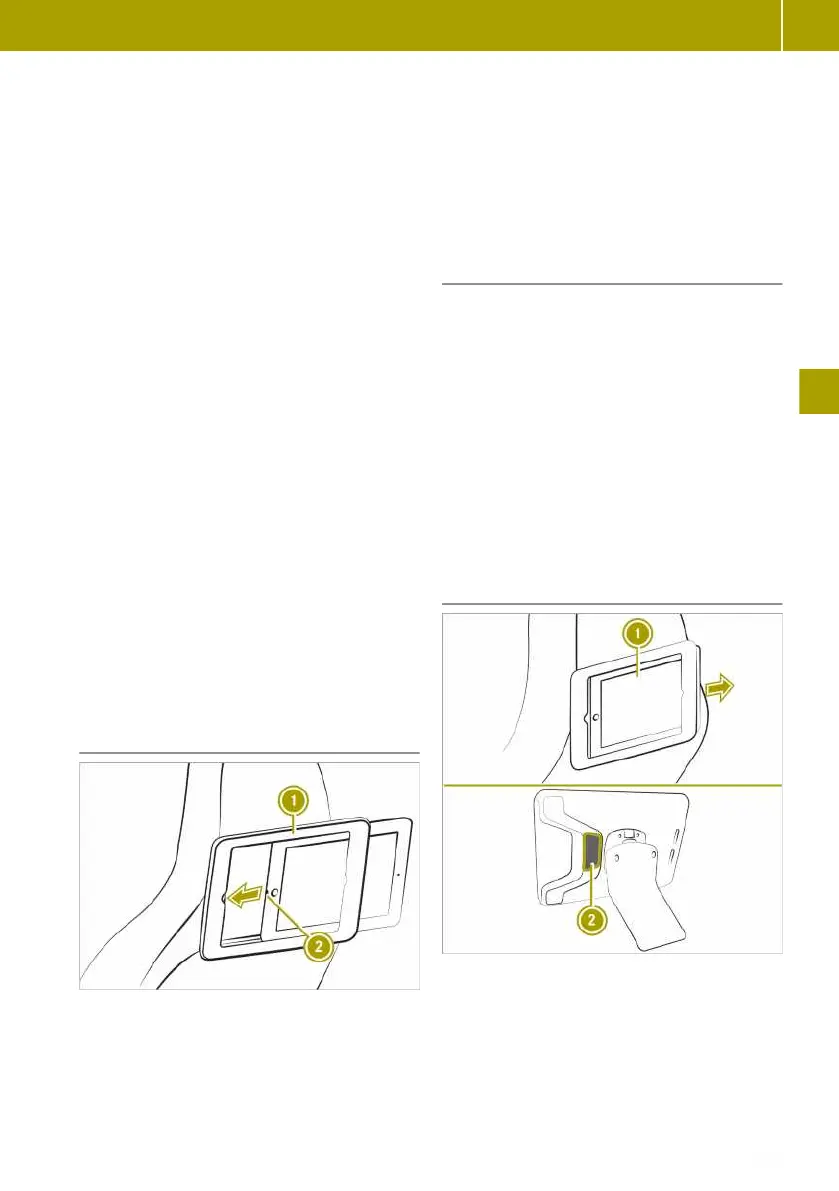
Inserting an iPad Air
®
X
Turn attachment : so that the opening
faces the vehicle interior.
X
Insert iPad
®
with Lightning connec-
tion ; first into the attachment until the
attachment audibly locks.
X
Move the attachment to the desired posi-
tion.
Charging the iPad Air
®
via the USB port
The iPad Air
®
can be charged via the USB
port on the tablet bracket.
This additionally requires:
R
a suitable USB adapter for the 12 V socket
R
a suitable USB data cable for the USB
adapter and USB port on the tablet
bracket
X
Insert the USB adapter into the 12 V
socket.
X
Connect the USB data cable to the USB
adapter and the USB port on the tablet
bracket.
Removing an iPad Air
®
i
The iPad
®
is not designed for the
extreme temperatures which can be
reached in a vehicle and may be dam-
aged. For this reason, it is not recommen-
ded to leave the iPad
®
in a parked vehi-
cle.
Using the accessories
103
>> Feeling comfortable in the vehicle interior.
Z















 To Next Page