At outside temperatures between -3 † and
3 †:
R
the Ò
symbol flashes for about
1 minute
in the black and white display and then
remains on continuously.
R
the colour display also shows a display
message next to the Ò symbol
(Y page 141).
For an on-board computer with colour dis-
play, you can set the temperature unit of the
outside temperature display (Y page 130).
Fuel gauge
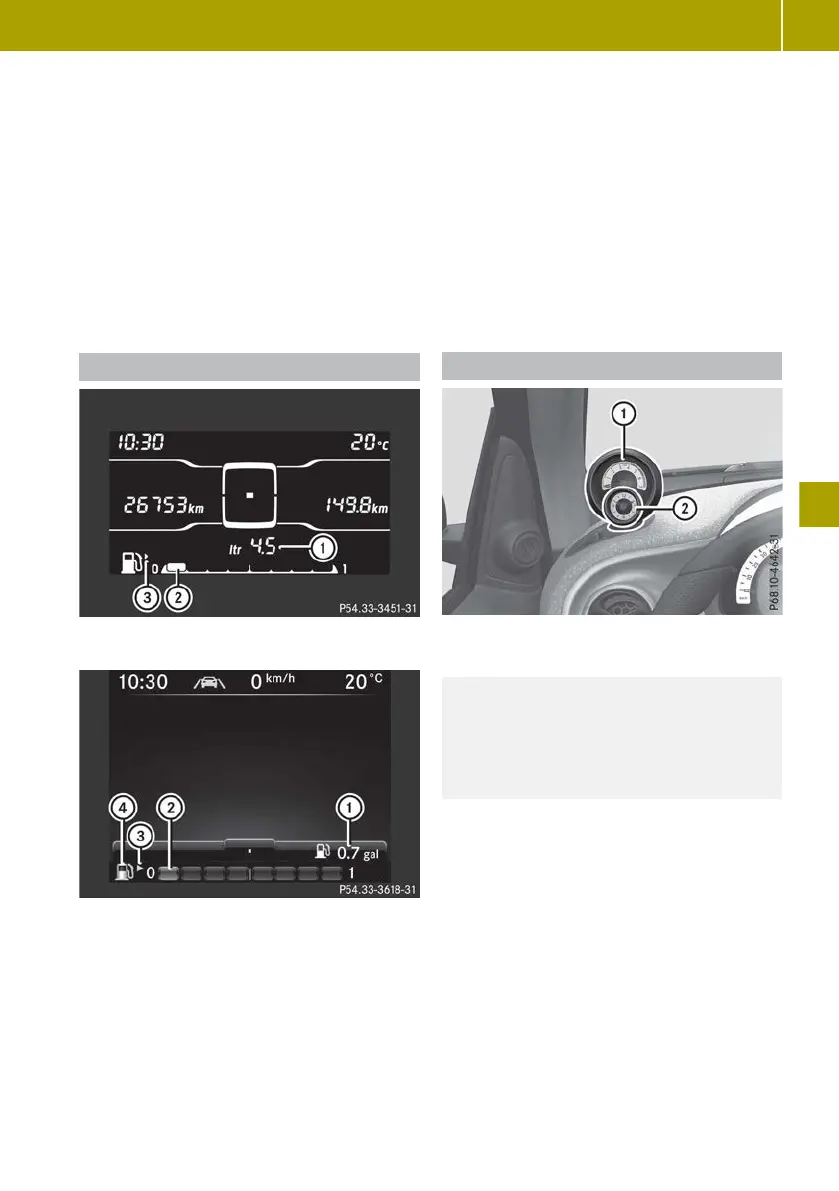
Fuel level indicator (example: monochrome dis-
play)
Fuel level indicator (example: colour display)
:
Reserve fuel display
;
Fuel gauge
=
Fuel filler flap location indicator
u The
fuel filler cap is located on the
right
?
6
Reserve fuel (yellow)
Fuel gauge ; is shown in the display as a
segment display with eight segments.
When the fuel level falls below the reserve
range
of
5.0 l, the last illuminated segment of
the fuel display will flash and a warning tone
will sound. Reserve fuel display : will also
appear. The reserve fuel display shows the
numeric value of the remaining fuel level in
0.5 l increments.
With a colour display:
R
6 symbol ? also appears in yellow
R
a display message is also shown
(Y page 143).
Dashboard instruments
!
Do not drive in the overrevving range.
Doing so will damage the engine.
H
Environmental note
Avoid excessive engine speeds. This
unnecessarily
increases
the fuel consump-
tion of your vehicle and harms the envi-
ronment as a result of increased emissions.
The overrevving range of the engine is shown
with dashed lines in the orange marking of
rev counter :. The fuel supply is interrupted
to protect the engine when the overrevving
range is reached.
Dashboard clock ; is synchronised with the
clock in the on-board computer.
Rev counter :, together with dashboard
clock ;, can be rotated approximately 60° on
the dashboard.
For vehicles with a colour display, you can
also set the brightness of the instrument
cluster lighting to different levels
(Y page 129).
Displays and operation
121
>> On-board computer and displays.
Z



 To Next Page
 Loading...