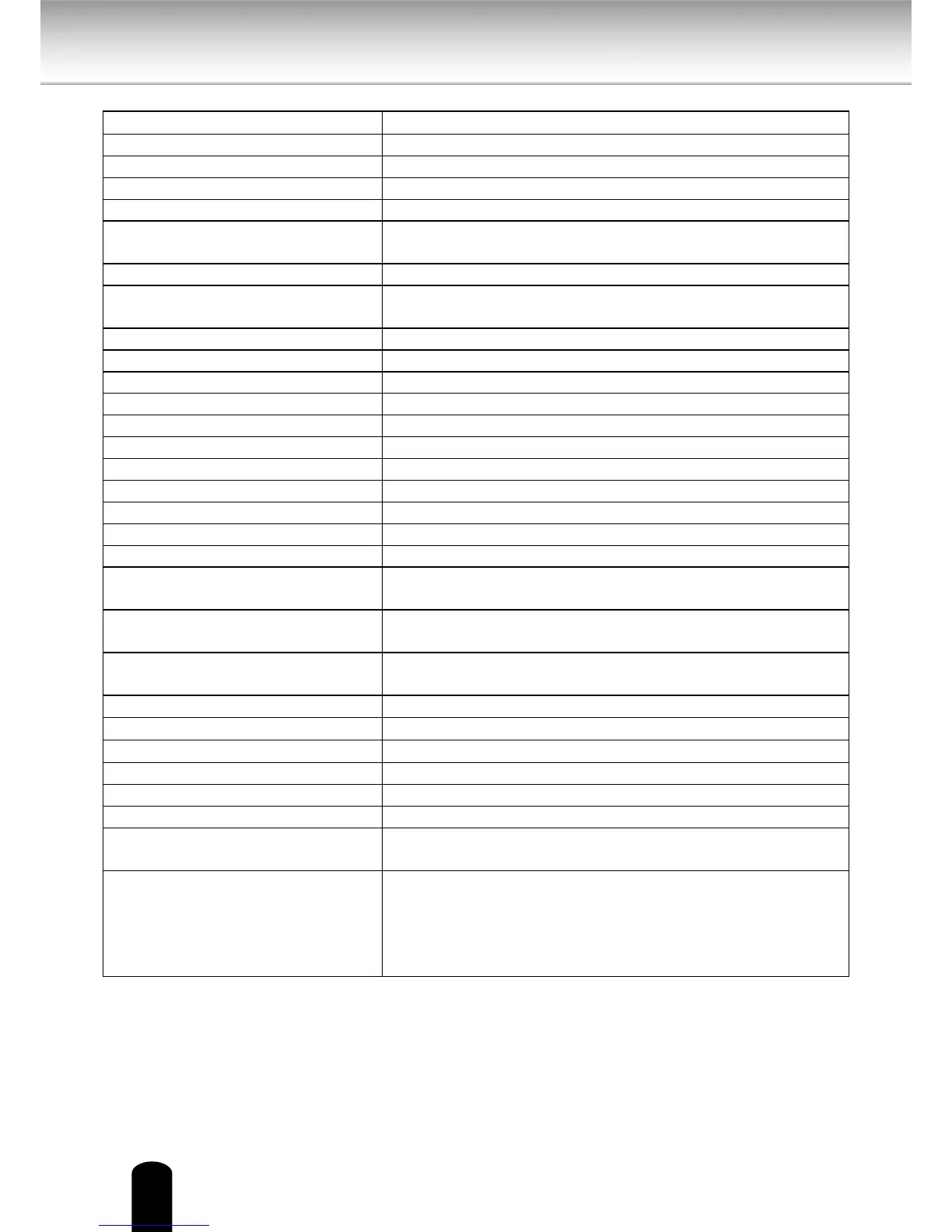
Specications
Power supply 12V DC ± 10 %
Consumption current 12V DC / 0�9 A
Image pickup device 1/3�2 inch (4:3), CMOS Digital Image Sensor
Full resolution Horizontal 1600, vertical 1200 pixels
Scanning system Progressive
Minimum object illuminance 2�0 lux / F1�8 (Max gain 4x, Exposure time 1/30)
0�2 lux / F1�8 (Max gain 8x, Exposure time 1/5)
White balance AWB
Image size 1600x1200, 1280x960, 800x600, 640×480, 320×240,
176 x 144
Image compression system JPEG, MPEG4
Image quality setting 6 levels
Maximum frame rate at M-JPEG*1 30 fps at 800 x 600, 15 fps at 1600 x 1200
Maximum frame rate at MPEG 4*1 30 fps at 800 x 600, 10 fps at 1600 x 1200
SD card slot micro SD / SDHC
Digital zoom Maximum 4 times
Pan range 350 deg
Tilt range 113 deg
Preset position 20 positions
Microphone in / Audio out*2 MIC IN (plug-in-power 3.3v, 200kΩ) / AUDIO OUT ( 1Vrms)
I/O terminal Input 1, output 1
Network interface 10Base-T / 100Base-TX, RJ45 connector,
Wireless LAN (IEEE 802�11b, 802�11g, and 802�11n)
Protocols TCP/IP, HTTP, UPnP, RTSP/RTP/RTCP, IGMP, SMTP, FTP,
DHCP, NTP, DNS, DDNS, PPPoE, SNMP
OS Windows
®
XP, Windows Vista
®
Business and Windows 7
®
Professional
Browser Internet Explorer
®
Ver� 8�0
Operating temperature 14°F to 122°F (-10°C to 50°C)
Operating humidity 20 % to 80 %
Storage temperature -4°F to 140°F (-20°C to 60°C)
Storage humidity 90 % or less
Weight 505 g (1�11 lbs)
Dimensions 5�2(W) x 5�6(D) x 5�1(H) inches (131(W) x 140(D) x 128(H)
mm) (excluding protrusion)
Accessories User's manual and install software (CD-ROM) (1),
Quick start guide and important safeguards (1),
AC adapter (1), Warranty (1), Screws, Ceiling mount
bracket(1sets), LAN Cable(1), RJ45 female adaptor(1),
Alignment sticker(1), Antenna(2)
● Designs and specications may change without prior notice for better improvement.
● Screens, photos, illustrations and other diagrams contained in this user's manual may
slightly change from actual ones.
*1: Varies in accordance with the object, image quality, network environment and performance
of the personal computer used.
*2: The sound may not be clear depending on the conditions of the lines.
S9C1


 To Next Page