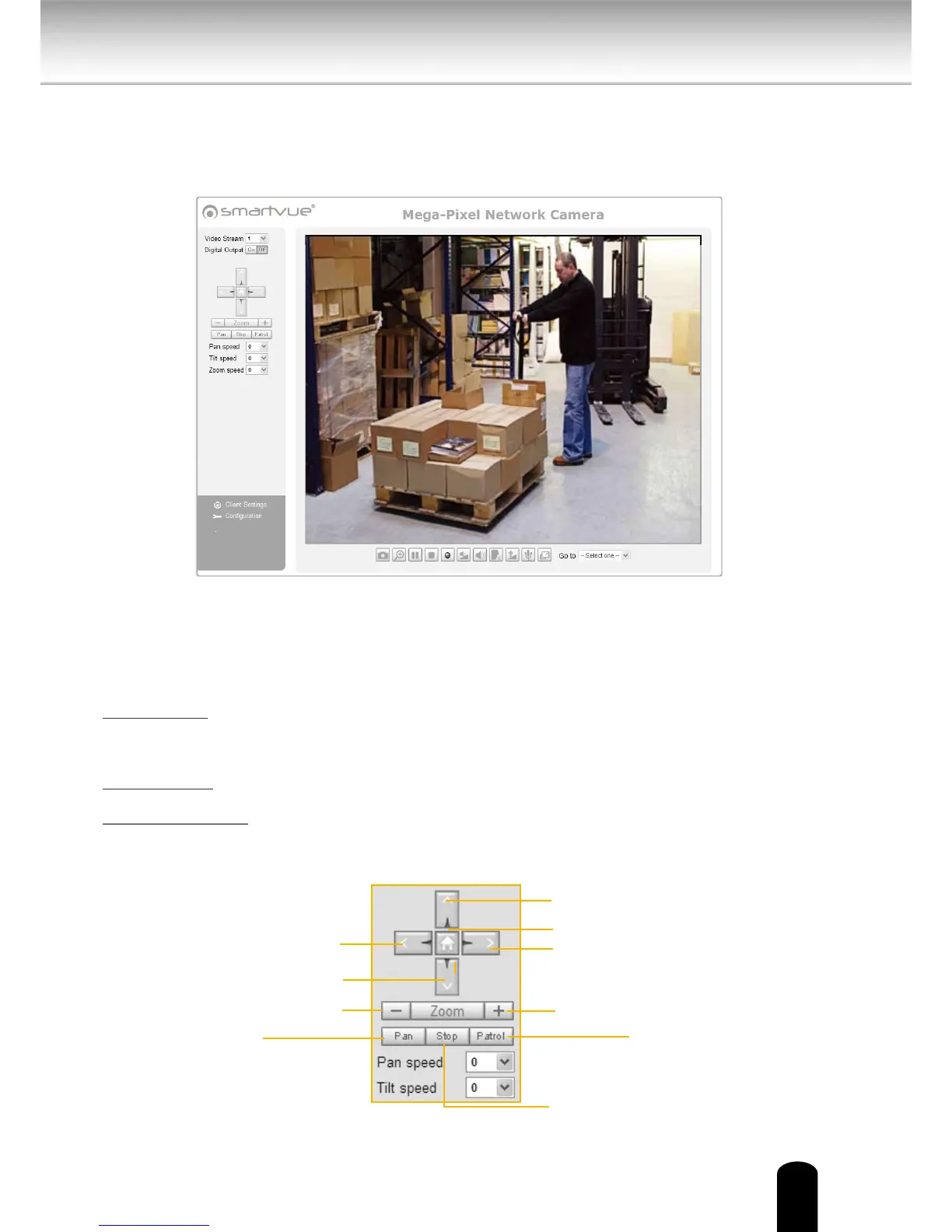
This chapter explains the layout of the main page. It is composed of the following
sections: Smartvue Logo, Host Name, Camera Control Area, Conguration Area, Menu,
and Live Video Window.
Smartvue Logo
Click this logo to visit the Smartvue website.
Camera Control Area
Video Stream: This Network Cmera supports multiple streams (stream 1 ~ 4) simultaneously.
You can select either one for live viewing. NOTE MJPEG will play in Apple browsers, but MPEG 4
streams will not.
Digital Output: Click to turn the digital output device on or o.
PTZ Control Panel: This Network Camera supports “digital zoom” and “mechanical“ pan/tilt
control. Please refer to Camera Control for detailed information.
Return to Home Position
Right
Left
Down
Up
Zoom In
Zoom Out
Start to Auto Patrol
Start to Auto Pan
Stop Auto Panning/patrolling
28
Main Page


 To Next Page