EasyManua.ls Logo

smartvue S9C1 - Physical Description

smartvue S9C1
119 pages
Print Icon
To Next Page IconTo Next Page
To Previous Page IconTo Previous Page
Loading...
16
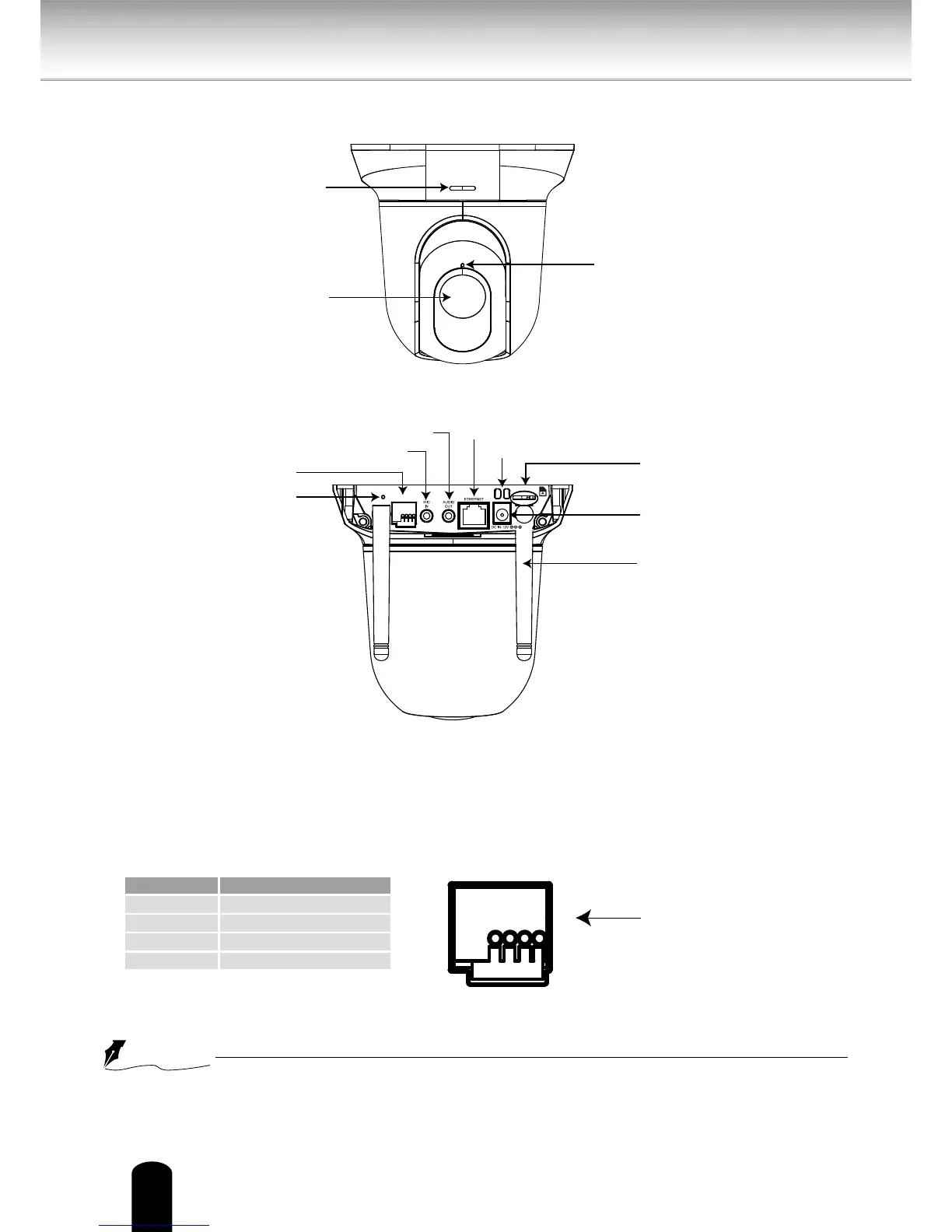
Front Panel
Back Panel
General I/O Terminal Block
This Network Camera provides a general I/O terminal block which is used to connect
external input / output devices. The pin denitions are described below.
12V DC is outputted from 1-pin only when connected to a power supply.
Pin Name
1 12V DC Output
2 Digital Output
3 Digital Input
4 Ground
Physical Description
When you connect
o r d i s c o n n e c t a
wire, use the orange
push-button.
NOTE
Built-in Microphone
Lens
Status LED
4 3 2 1
WPS/RESET
microSD
Power Cord Socket
Ethernet 10/100 RJ45
WPS/Reset Button
General I/O Terminal
Audio Out
Microphone In
MicroSD/SDHC Card Slot
Antenna
(S9C2 only)
Cable Clip
4 3 2 1