4 How to use
-71-
No.PS※※-OMW0009-A
■[F14] Zero cut-off setting
When the detection distance (guideline) is close to zero, the product rounds the value down and zero will be
displayed.
The zero cut-off range is 0.0 to 10.0% F.S., and can be set in 1.0% F.S. increments.
<Operation>
Press the UP or DOWN button in function selection mode to display [F14].
Press the SET button. Move on to select zero cut-off setting.
Select zero cut-off setting
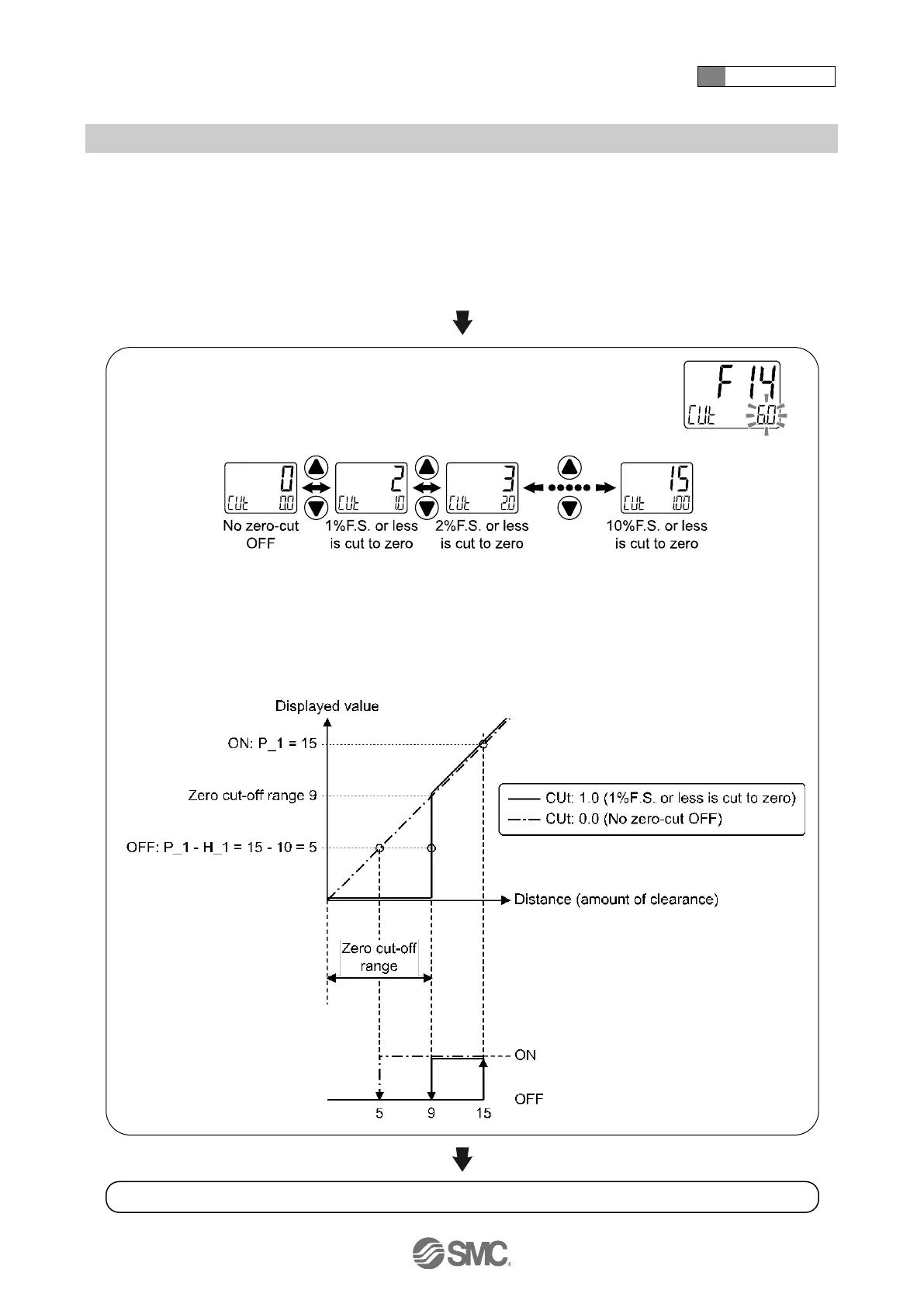
Press the UP or DOWN button to select the value of zero cut-off.
: The above figure shows the case when ISA3-G is selected.
: When the actual value is smaller than the displayed value in the upper line, zero will be displayed.
When OUT1 and OUT2 are used with the detection distance and the hysteresis range within the
zero cut-off range, the movement will be as follows.
Setting example: P_1 = 15, H_1 = 10, zero-cut 6%
Press the SET button to set. Return to function selection mode.
[F14] Zero cut-off setting completed



 To Next Page
 Loading...