EasyManua.ls Logo

Smeg SW262 - 5.4 Description of controls and wash programs; 5.4.1 Controls

Smeg SW262
37 pages
Print Icon
To Next Page IconTo Next Page
To Previous Page IconTo Previous Page
Loading...
15
Check from time to time that the silicone hose is properly secured to the stainless steel intake
pipe, and that there are no leaks. Use proper clamping equipment (such as plastic pull ties) to
secure the silicone hose to the stainless steel pipe.
5.4 Description of controls and wash programs
5.4.1 Controls
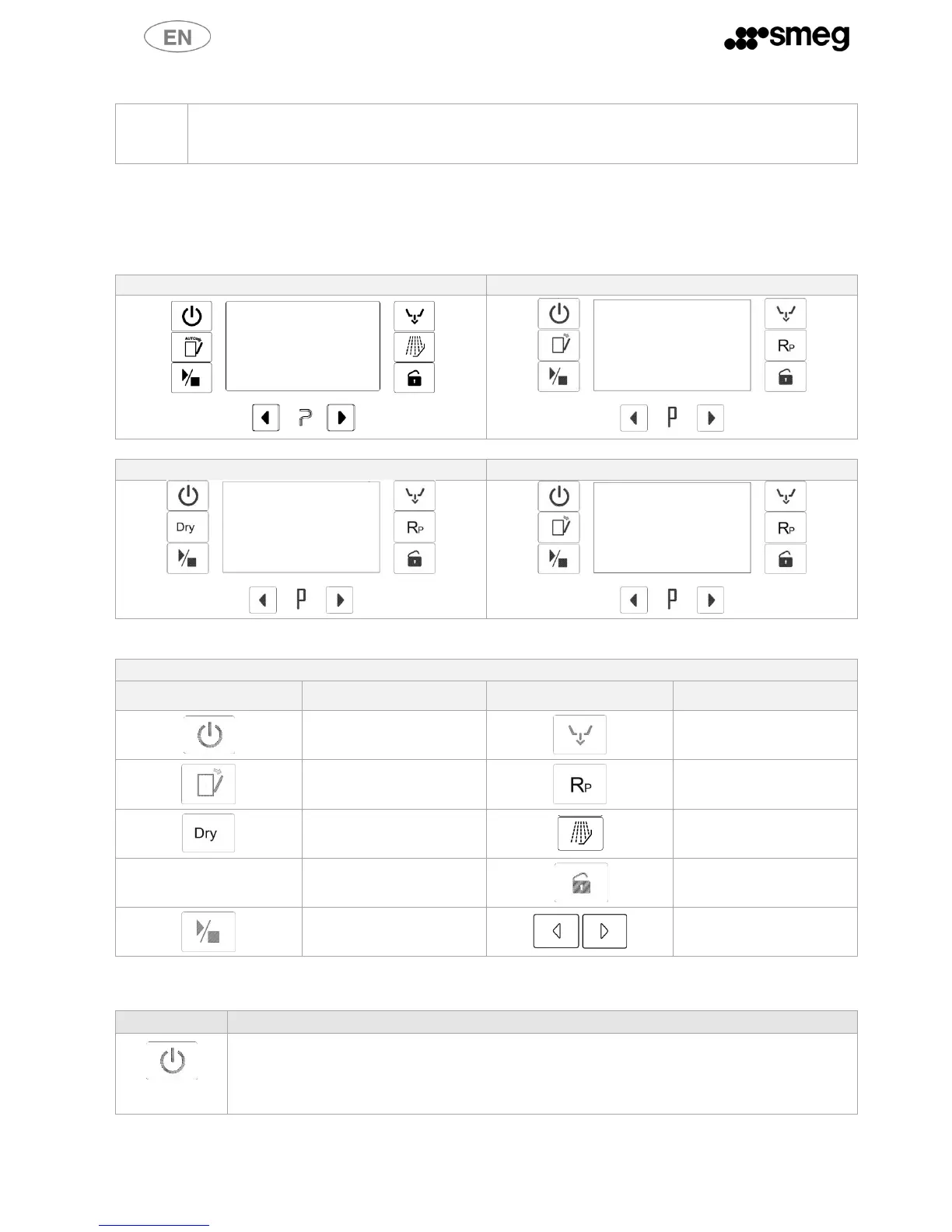
All the dishwasher's control and monitoring equipment is located on the front panel.
CONTROL PANEL SWT262
CONTROL PANEL SW262
CONTROL PANEL SWT260X
CONTROL PANEL SWT260
CONTROL PANEL SYMBOLS
SYMBOL
MEANING
SYMBOL
MEANING
On/Off
Drain
Auto open
(where expected)
Repeat
(where expected)
Dry
(where expected)
Additional Prewash
(where expected)
Open door
Start/Pause
Select
5.4.2 Detailed description
BUTTONS
DESCRIPTION
On/Off
The button is enabled with the door open or closed.
The button turns the interface on/off, thus permitting the dishwasher to be operated. Hold
the button down for 2 seconds to turn it on or off.

Table of Contents

Other manuals for Smeg SW262

Related product manuals