17
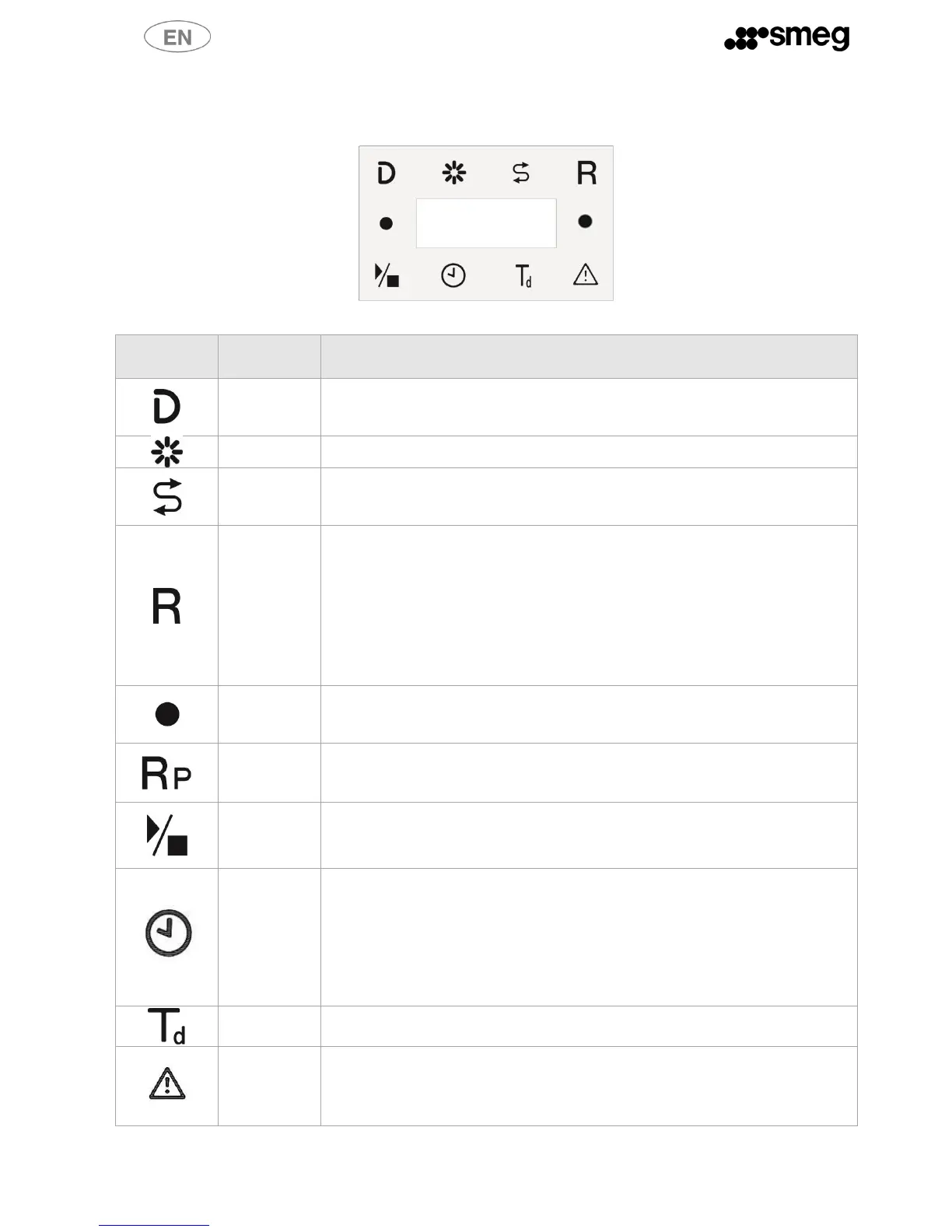
5.5 Indicator light – Meaning
fig. 12 – In the display area of the control panel: central digit area and indicator light around the perimeter
No detergent (only if the level sensor is installed in the container)
No rinse aid (only if the level sensor is installed in the container)
No salt: you must add salt. When the appliance is turned on, there is still some
reserve; fill the salt container as soon as possible after switching the machine on and
before running the next cycle.
Regeneration: indicates that the resins are almost exhausted; run a regeneration
cycle.
There are two ways to regenerate the resins :
- push the ON/OFF button to switch off the appliance, the writing OFF
flashes on the display until regeneration cycle has finished (about 5 minutes).
- Push the Drain button (See 5.4.2) and wait until the appliance has
finished complete drain and regeneration (about 8 minutes). During
regeneration, “OFF” and “R” flash on the display.
Selected function: indicates that the corresponding function is activated
Left: automatic open door or dry
Right: repeat or added prerinse.
Repeat: at the end of the cycle the dishwasher does not drain but holds the water for
next cycle – only available with certain programs.
Start/Pause: wash cycle enabled/disabled.
If the dishwasher is stopped
The value gives the nominal cycle duration. The time led also turns on. The
duration is approximate, depending on load, intake water temperature and
power connection. Show by faster hold down on/off
If a cycle is running
Remaining cycle time.
After 5 seconds of user inactivity, the display returns to the program number.
The selected cycle includes a final heat disinfection step – see table of
programs – only on models with this option.
Alarm
The dishwasher encounters an anomaly - caused by a malfunction or
anomalous conditions. The displays shows the number of the alarm. In the
alarms table in this manual, each code is matched with the components which



 To Next Page