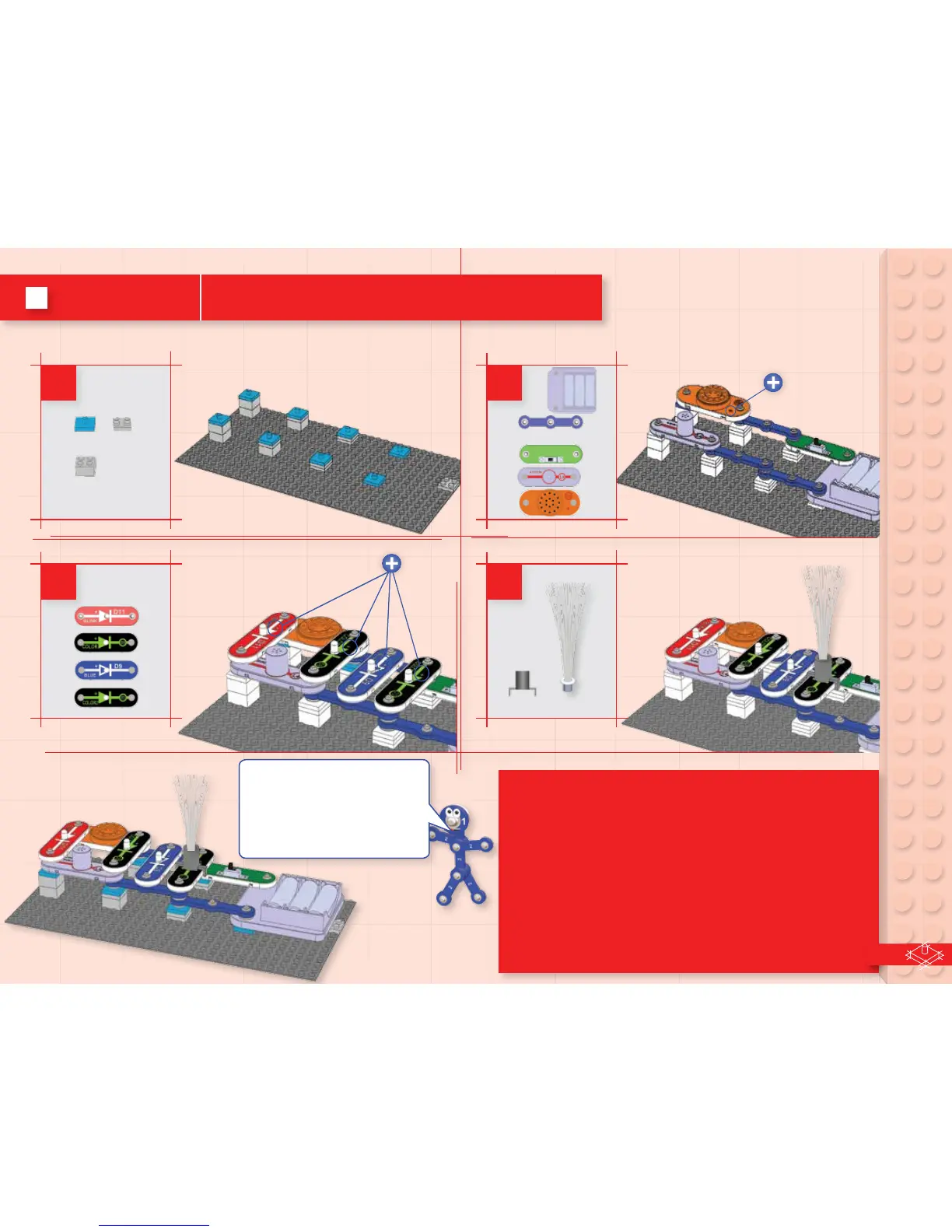
Build the circuit as shown, and turn on the slide switch (S1).
The four LEDS (D8, D9, D11, & D12) should be on, the lamp (L4)
should be o, and there may be a slight clicking from the melody
IC (U32). For best eects, place the ber optic tree on one of the
LEDs using the mounting base, and dim the room lights.
Next, add a jumper wire at one of these locations:
A. Across U32: the sound stops and D11 is brighter.
B. Across D11: D11 is o, and U32 plays a tune.
C. Across U32 and D11: L4 is on.
Use the remover tool to help separate the bricks and adapters
when dismantling the circuit.
3
2
4
1
8x
6x
7x
3x
This circuit has the melody
IC (U32), blink red LED (D11),
and lamp (L4) connected in
series, to show the dierences
in how they operate.
12
Project 3 4 Lights and Clicking



 To Next Page