Snap Circuits
®
uses building blocks with
snaps to build the dierent electrical and
electronic circuits in the projects. Each block
has a function: there are switch blocks, light
blocks, battery blocks, dierent length wire
blocks, etc. These blocks are dierent colors
and have numbers and letters on them so
that you can easily identify them. The blocks
you will be using are shown as color symbols,
allowing you to easily snap them together to
form a circuit.
For Example:
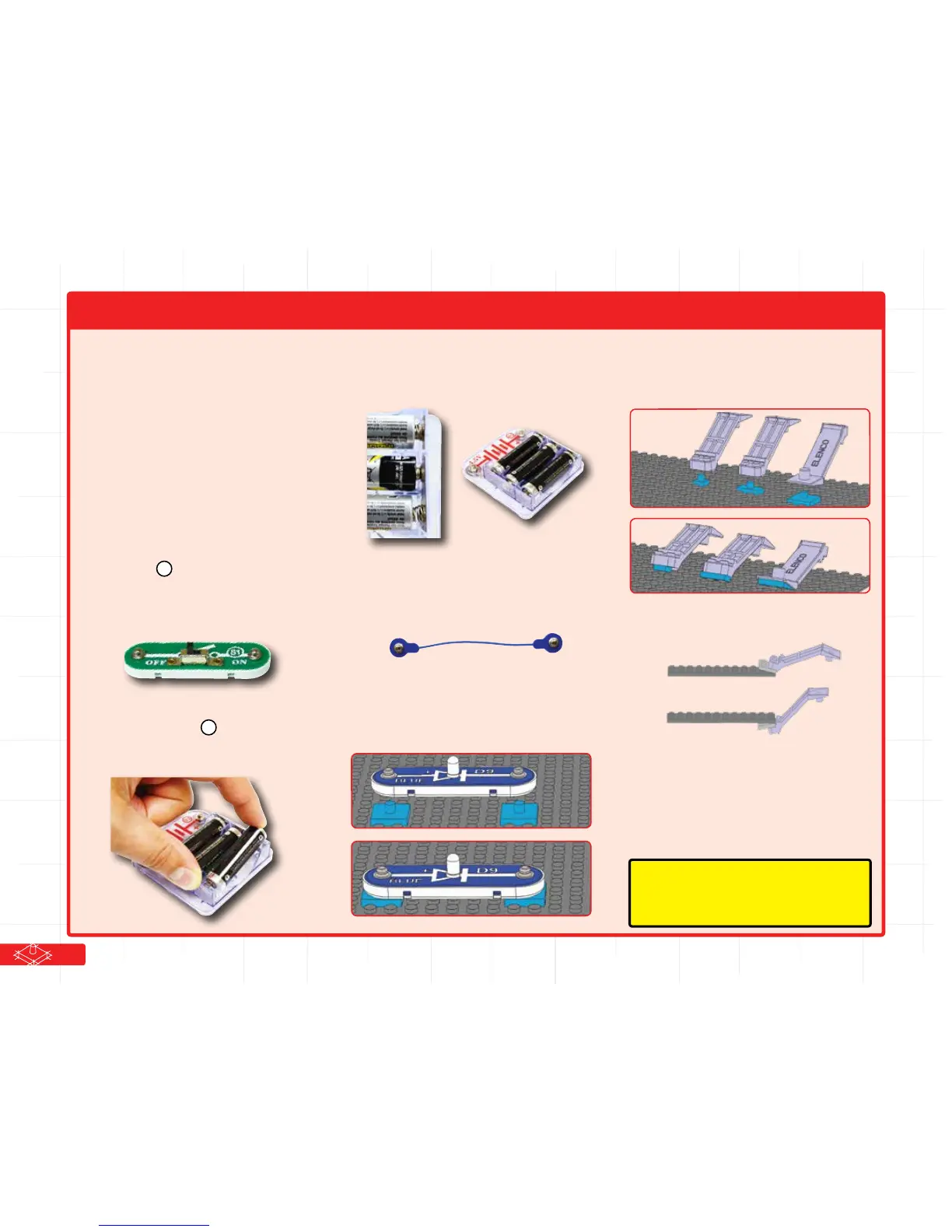
This is the slide switch, it is green and has
the marking on it. The part symbols in
this booklet may not exactly match the
appearance of the actual parts, but will
clearly identify them.
You need a power source to build each
circuit. This is labeled and requires three
(3) 1.5V “AA” batteries (not included).
When installing a battery, be sure the spring
is compressed straight back, and not bent
up, down, or to one side.
Some circuits use the jumper wires to make
unusual connections. Just clip them on as
indicated.
Often you will mount Snap Circuits®
components on bric2snap adapters, simply
place them on the posts of the adapters:
Sometimes if can be dicult to separate
bric2snap adapters from the baseplate or
bricks and plates, so use the Brick Remover
Tool for help for needed, as shown:
You can also use the remover to separate
bricks and plates from each other.
Note that this set includes 25 of each of the
bric2snap adapter pieces, more are used in
projects in this booklet. Your set includes
extra adapters so you can easily expand on
your own using other Snap Circuits® and
bricks sets you may have.
How to Use Snap Circuits
®
B3
S1
Note: While building the projects, be careful not
to accidentally make a direct connection across
the battery holder (a “short circuit”), as this may
damage and/or quickly drain the batteries.
3


 To Next Page