EN – 11
BOTTOM COVER REMOVAL
IMPORTANT: Save all hardware for reinstallation.
1. Stop engine, remove key and wait for all moving parts
to stop and for hot parts to cool.
2. Disconnect spark plug wire from engine.
3. Place unit in service position. See Service Position on
page 7.
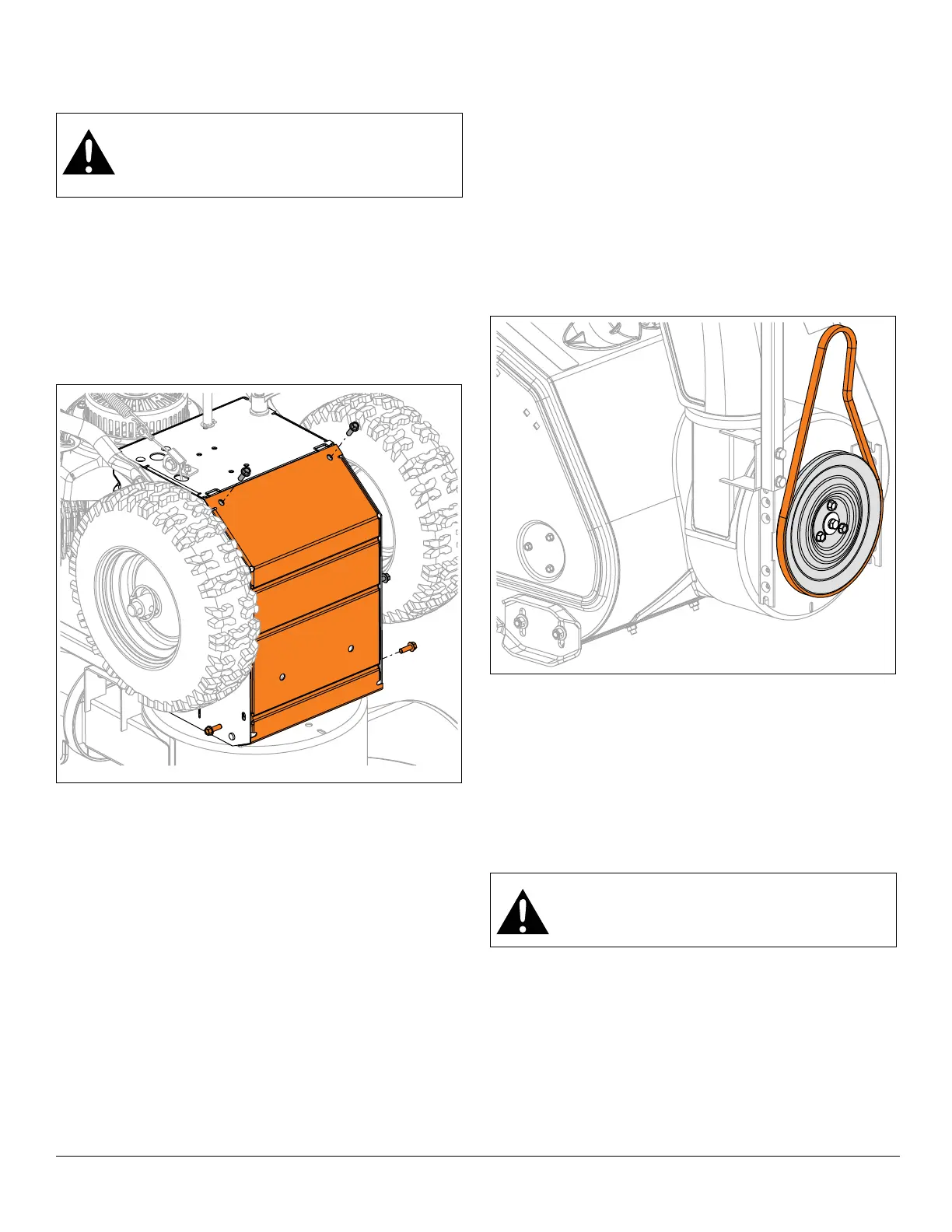
4. Remove hardware retaining bottom cover to frame
and remove cover. See Figure 13.
Install Bottom Cover
1. Secure bottom cover to frame with six hex screws.
2. Return unit to operating position.
3. Reconnect spark plug wire and fill fuel tank.
ATTACHMENT DRIVE BELT
REPLACEMENT
Remove Attachment Drive Belt
IMPORTANT: Save all hardware for reinstallation.
1. Stop engine, remove key and wait for all moving parts
to stop and for hot parts to cool.
2. Disconnect spark plug wire from engine.
3. Remove auger housing. See Separate Housing from
Frame on page 7.
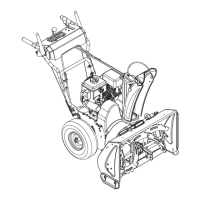
4. Remove attachment drive belt from attachment drive
pulley. See Figure 14.
Install Attachment Drive Belt
1. Install belt onto attachment drive pulley.
2. Reinstall auger housing to frame. See Reinstall Auger
Housing on page 9.
3. Adjust attachment clutch / brake. Refer to Operator’s
Manual for adjustment procedure.
4. Reconnect spark plug wire.
IMPORTANT: Check all adjustments after first use.
WARNING: AVOID INJURY. Before placing unit
in service position, drain fuel from tank and fuel
system. See Draining Fuel System on page 7.
Make sure unit is secure and will not tip.
WARNING: AVOID INJURY. Auger / impeller
must stop within 5 seconds when attachment
clutch lever is released.


 To Next Page