19
snom 720 User Manual Getting to Know Your Phone
Getting to know your phone
At a glance
The factory settings at a glance:
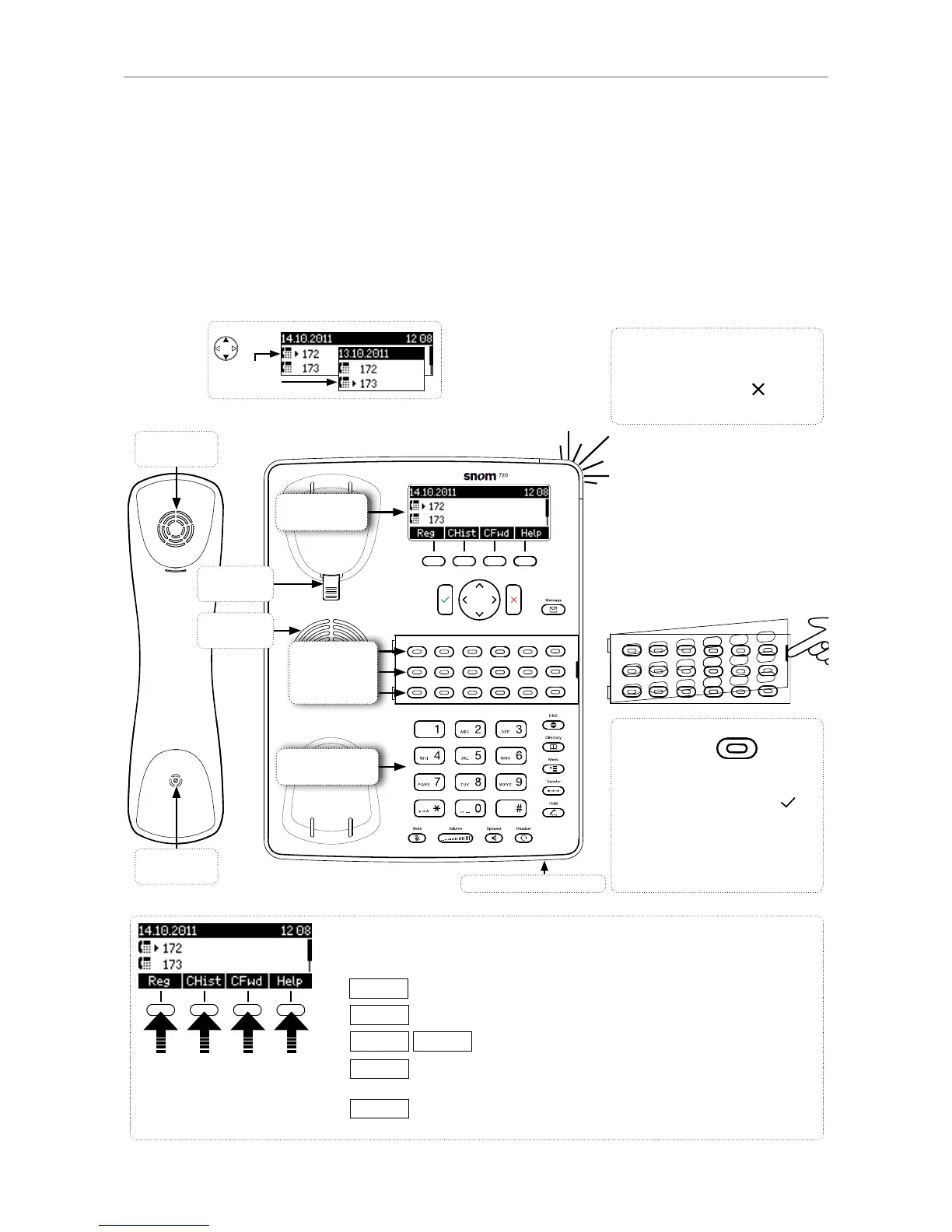
Handset
microphone
Handset
speaker
Freely programmable LED
keys P1 - P18
• Default setting: Line
• Fast-blinking LED: Inco-
ming call. Press key or to
accept
• Steadily lit LED: In call
• Slow-blinking LED: Call on
hold
Call LED
• Blinking fast: Incoming call
• Steady light: In call OR
• Missed call. Press to turn
off.
Reg
Select outgoing identity, incl. inactive identities
CHist
Call lists (missed, received, dialled calls)
CFwd
noFwd
Forwarding all calls (on/off)
Help
Show IP address of phone and snom's web address. When
there is status information, this function key is replaced by:
Info
Status information (call forwarding active, passwords not set,
missed calls, etc.)
Press the function key to
activate the function, open
the list etc. depicted by the
symbol above the key.
Context-sensitive, programmable
function symbols and function keys
Outgoing
identity:
Alphanumeric
keypad
Display -
idle screen
P1 - P6
P7 - P12
P13 - P18
Handset
rest tab
Casing microphone
Casing
speaker
Labeling keys P1-P18: See
Appendix 3 for instructions.



 To Next Page