20
snom 720 User Manual Getting to Know Your Phone
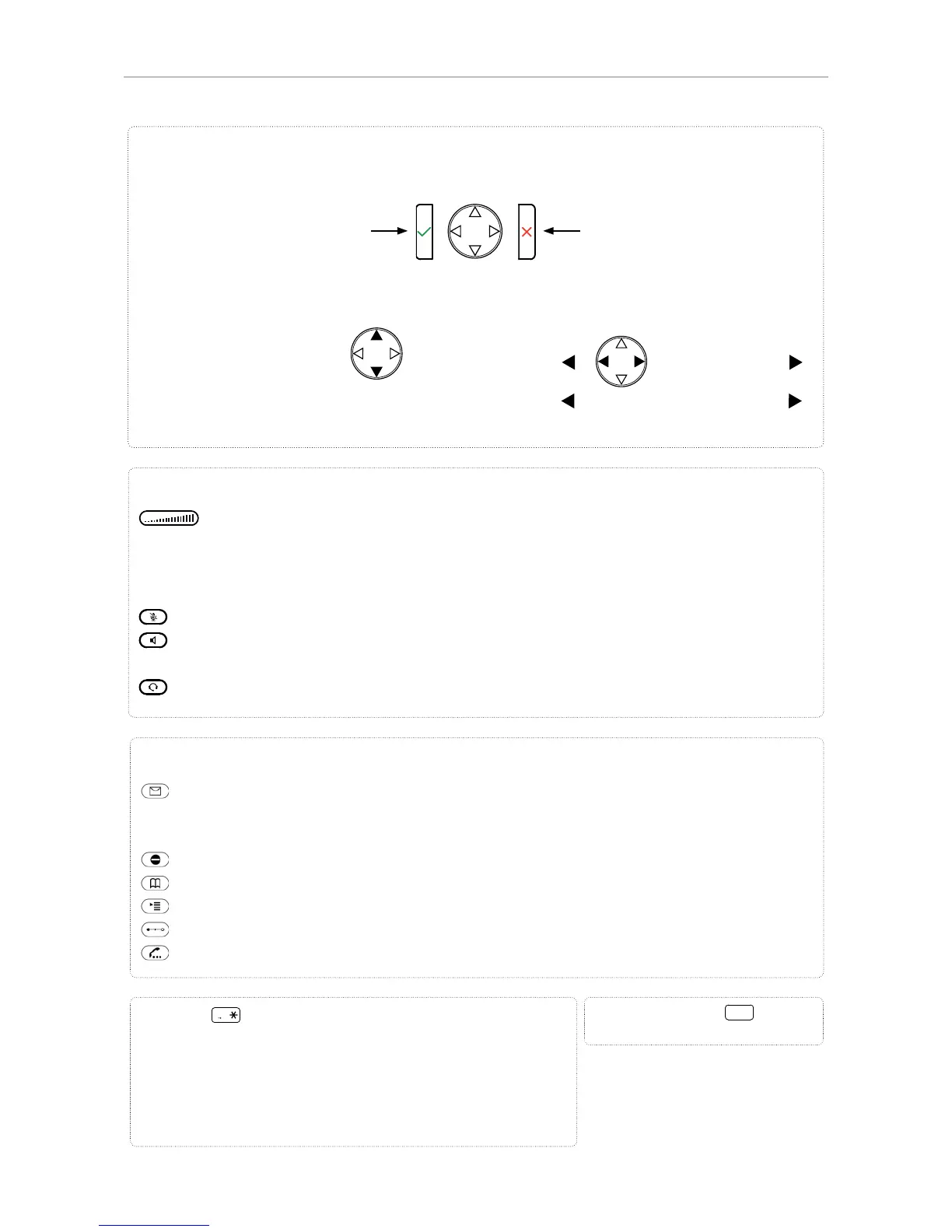
Star key
a A
• In editing mode:
- Press for one second to change input mode (numerals >
lower case > upper case)
- Press briefl y to type *
• On idle screen: Press for 3 seconds to lock/unlock the
keypad
Pound (hash) key
:
Rescue mode for TFTP update
Adjusting the volume
• of the ringer when the phone is idle or ringing
• of the handset/casing loudspeaker when in a call
Keys with LEDs - key lights up when function is activated:
Muting and unmuting the microphone
Toggling between handsfree and handset mode. Press to dial number and accept calls on
speakerphone.
Headset mode on/off
Audio control keys
Dedicated, customizable function keys:
MWI key with LED
• Lit when message is waiting on mailbox
• Press to listen to message(s)
Turn DND (do not disturb) on/off
Directory
Settings menu
Call transfer
Hold call
• Confi rming, saving actions &
input, and returning to previous
screen
• Accepting calls on speaker-
phone and in headset mode
• From idle screen: Redial
• Canceling actions & input, and
returning to previous screen
• Terminating calls on speaker-
phone and in headset & hand-
set modes
• Turning off call LED after
missed call
• From idle screen: Selecting
identity for outgoing calls
• In other contexts:
Navigate up/down
• From idle screen
:
Received calls
• In other contexts :
Navigate/space left
• From idle screen :
Missed calls
• In other contexts :
Navigate/space right
Navigation keys



 To Next Page