NETYS RT Hot Swap 7 - 11 kVA - 551574B - SOCOMEC
61
EN
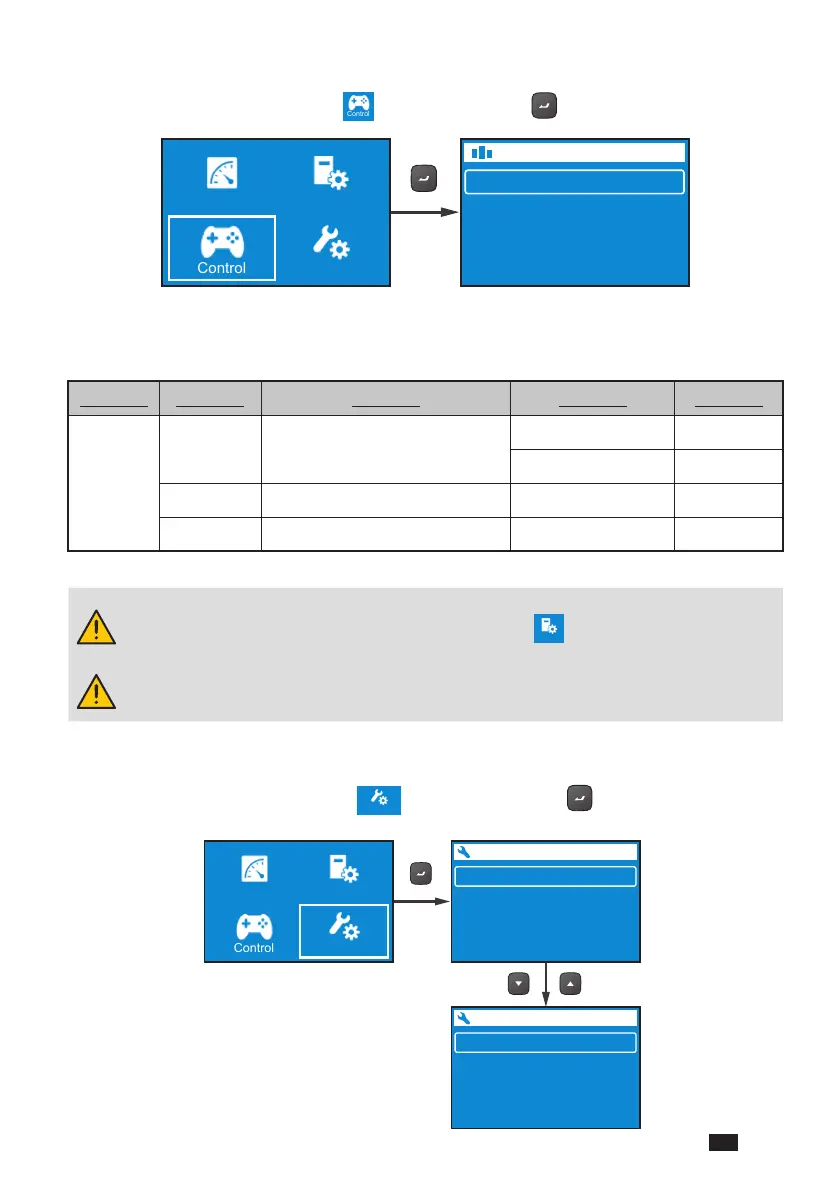
9.1.3. Control Menu
In the Main Menu, after selecting
Control
, press the button to enter the Control Menu.
The Control Menu provides commands for enabling specic UPS functions. Please
refer to the table below for the setup items and selectable values.
LEVEL 1 LEVEL 2 LEVEL 3 LEVEL 4 LEVEL 5
Control
Output Bypass*
1
Go into Bypass Yes/ No
Go out of Bypass Yes/ No
Charger Execute Boost Charge Yes/ No
Alarm Clear Prediction Warning*
2
Yes/ No
*1: The item Bypass will be hidden if you set the Standby Mode as Bypass
Output. To set up Bypass Output, please go to
Setting
→ Output → Standby
Mode → Bypass Output.
*2: The item Delay Alarm Again under Control → Alarm → Clear Prediction
Warning can be set from 1 week to 52 weeks.
9.1.4. Maintenance Menu
In the Main Menu, after selecting
Maintenance
, press the button to enter the
Maintenance Menu.
Output
Input
Bypass Input
Battery
Measurement
Control
Setting
Maintenance
Test
Battery Aging
Reset
Log
1 /2
About
2 /2
Measurement
Control
Setting
Maintenance




 To Next Page