8.2.3 Device Addition8.2.3 Device Addition
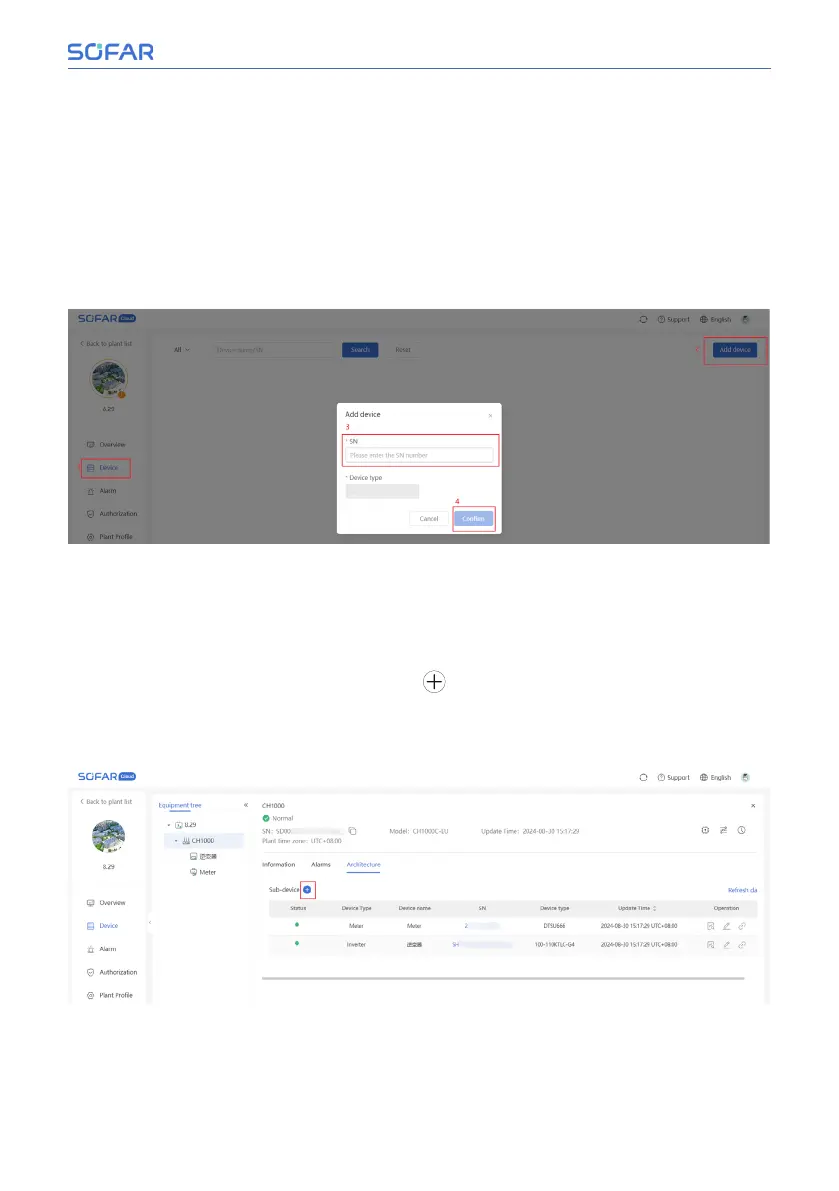
1. 1. Add CH1000
If you did not add CH1000 when you created the plant, you can add CH1000
device after you created the power station. Enter the created power station,
click “Add device” in the upper right corner, and add the corresponding SN of
CH1000.
2. 2. Add inverter and meter
After adding CH1000, users can add inverter and meter devices. After entering
the plant, click “Device”, and then click the SN of CH1000 to enter the detail
page of CH1000, as shown in the following figure. On the CH1000 device page,
click “Architecture”, and then click the “
” button to add the SN of inverter
or meter. The inverter SN number is located in the SN barcode on the invert-
er and begins with SH or SD. The meter SN is located on the meter in the SN
barcode and is a 12-digit number.
Installation and User Manual 67/92
SOFAR Cloud /APP Operation



 To Next Page