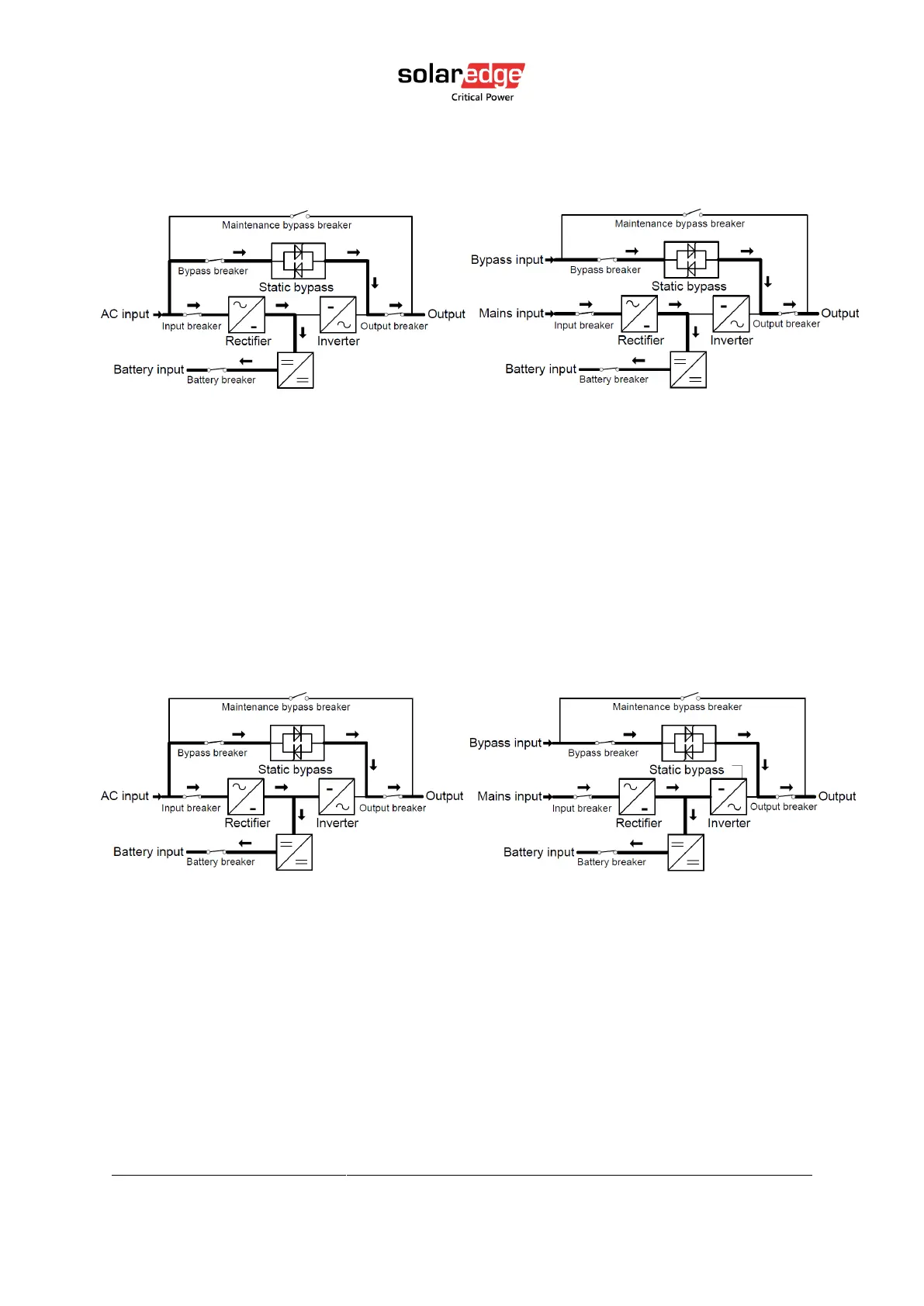
L10US-IB20, L10US-IB40, L10US-IB60 L10US-IB00, L15US-IB40, L15US-IB60 L15US-
IB00, L20US-IB60, L20US-IB00 UPS
SINGLE INPUT: Mains Input DUAL INPUT: Mains Input and
Bypass Input
Figure 12 Bypass mode
4.1.5. ECO mode
When the UPS is at AC Mode and the requirement to the load is not critical, the UPS can be
set at ECO mode to increase the efficiency of the power supplied. At ECO mode, the UPS
works at Line-interactive mode, so the UPS will transfer to bypass supply. When the AC is out
of set window, the UPS will transfer from bypass to Inverter and supplies power from the
battery, and then the LCD shows all related information on the screen.
SINGLE INPUT: Mains Input DUAL INPUT: Mains Input and Bypass Input
Figure 13 ECO mode



 To Next Page