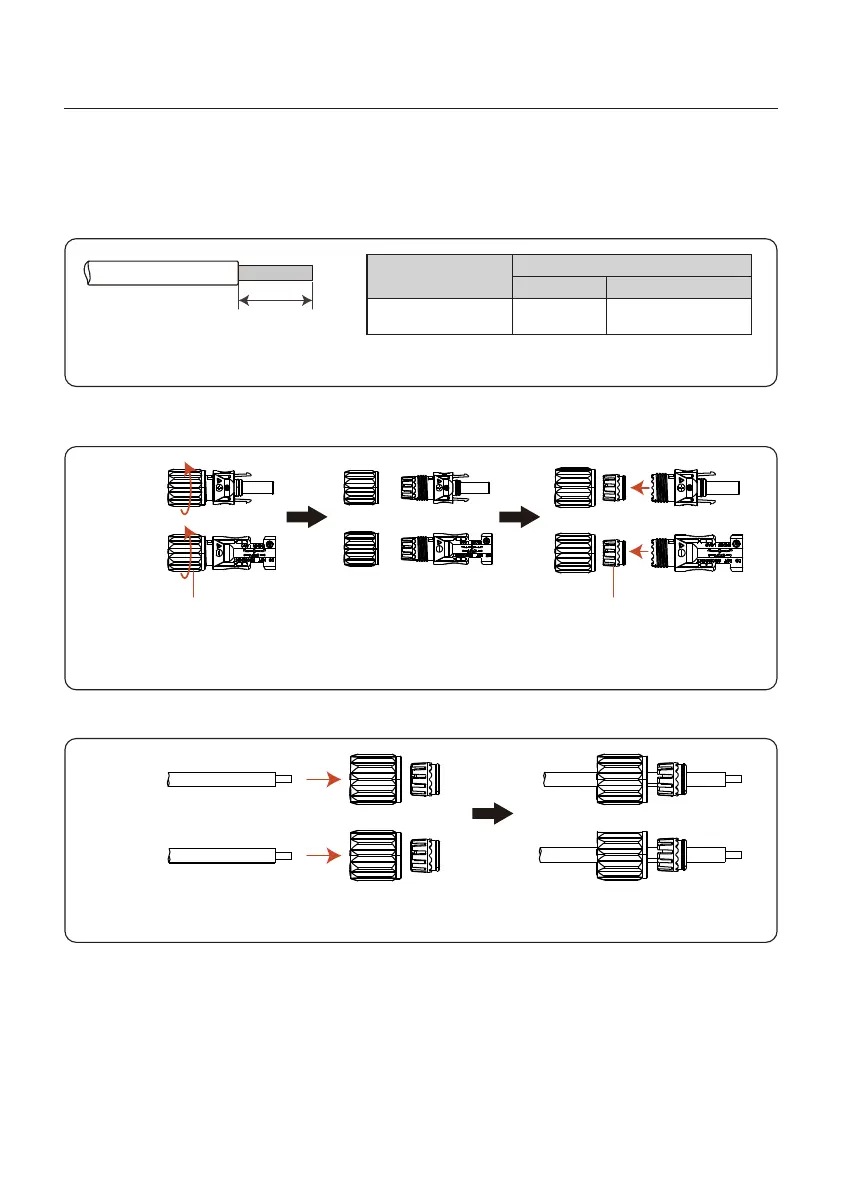
7±0.5mm
Please complete the assembling of the DC cable according to below procedures:
Step 1: Choose a proper DC cable and strip about 7+/-0.5mm, refer to the following table
for specifications.
4.0~6.0
4.0(12AWG)
(12~10AWG)
Cable type
Cross section(mm²)
Range
Industry generic PV cable
(model:PV1-F)
Recommended value
Figure 4.6 Strip
Step 2: take out the DC connector from the accessory bag, rotate the nut to remove it and
take out the waterproof rubber ring.
Positive
Negative
Nut
Waterproof rubber ring
Figure 4.7 Remove the cover of the terminal connector
Step 3: Pass the stripped DC cable through the nut and waterproof rubber ring.
Figure 4.8 Pass the cable trough
Positive
Negative
4. Installation
User Manual
15







 To Next Page