EasyManua.ls Logo

Sonel MIC-5010 - Page 22

Sonel MIC-5010
50 pages
Print Icon
To Next Page IconTo Next Page
To Previous Page IconTo Previous Page
Loading...
MIC-5010, MIC-5005 USER MANUAL
18
I
ISO
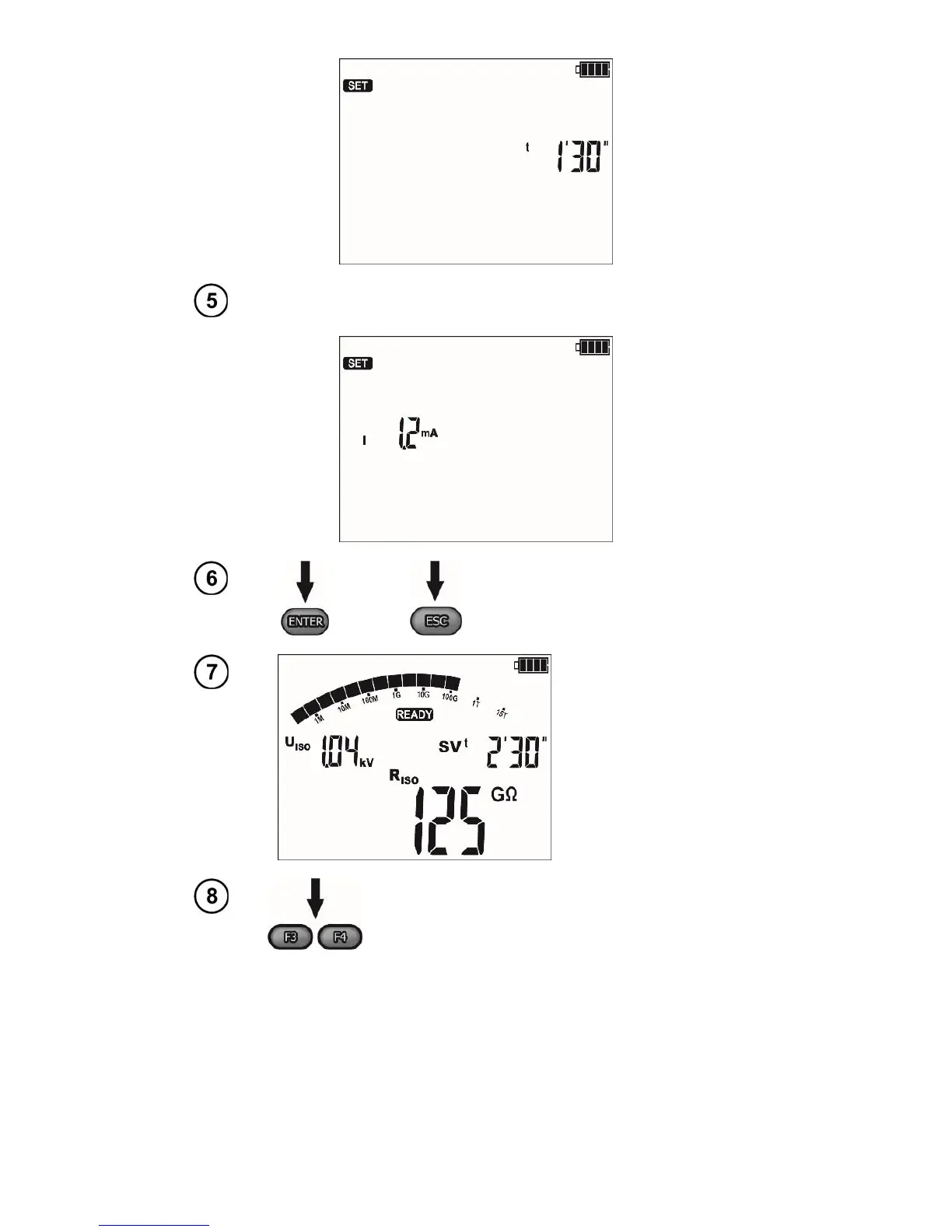
current: 1.2 mA or 3 mA,
or
Press
ENTER
to confirm settings or
press ESC to exit without saving the
changes.
Execute the
measurement.
After the measure-
ment is completed,
read the result.
Use F3 and F4 (SCREEN) to see individual com-
ponents of the result in the following order:
R
ISO
, U
ISO
, t → I
L
and C → U
ISO
1 and t1 alterna-
tively with R
ISO
1 and I
L
1 → U
ISO
2 and t2 alterna-
tively with R
ISO
2 and I
L
2 → ..., where C - the ca-
pacity of the tested object.
Note:
- Further information, starting the measurement, displayed symbols, result readout and component view
operate identically as the R
ISO
measurement.

Related product manuals