MIC-5010, MIC-5005 – USER MANUAL
Additional information displayed by the meter
Interference voltage occurs on the tested object. The
measurement is possible however it will be burdened
with additional uncertainty that is specified in the tech-
nical data.
U
n
>10 V +two-
tone, continuous
beep + and LED lit
in red
Interference voltage exceeds the allowable value, the
measurement is blocked.
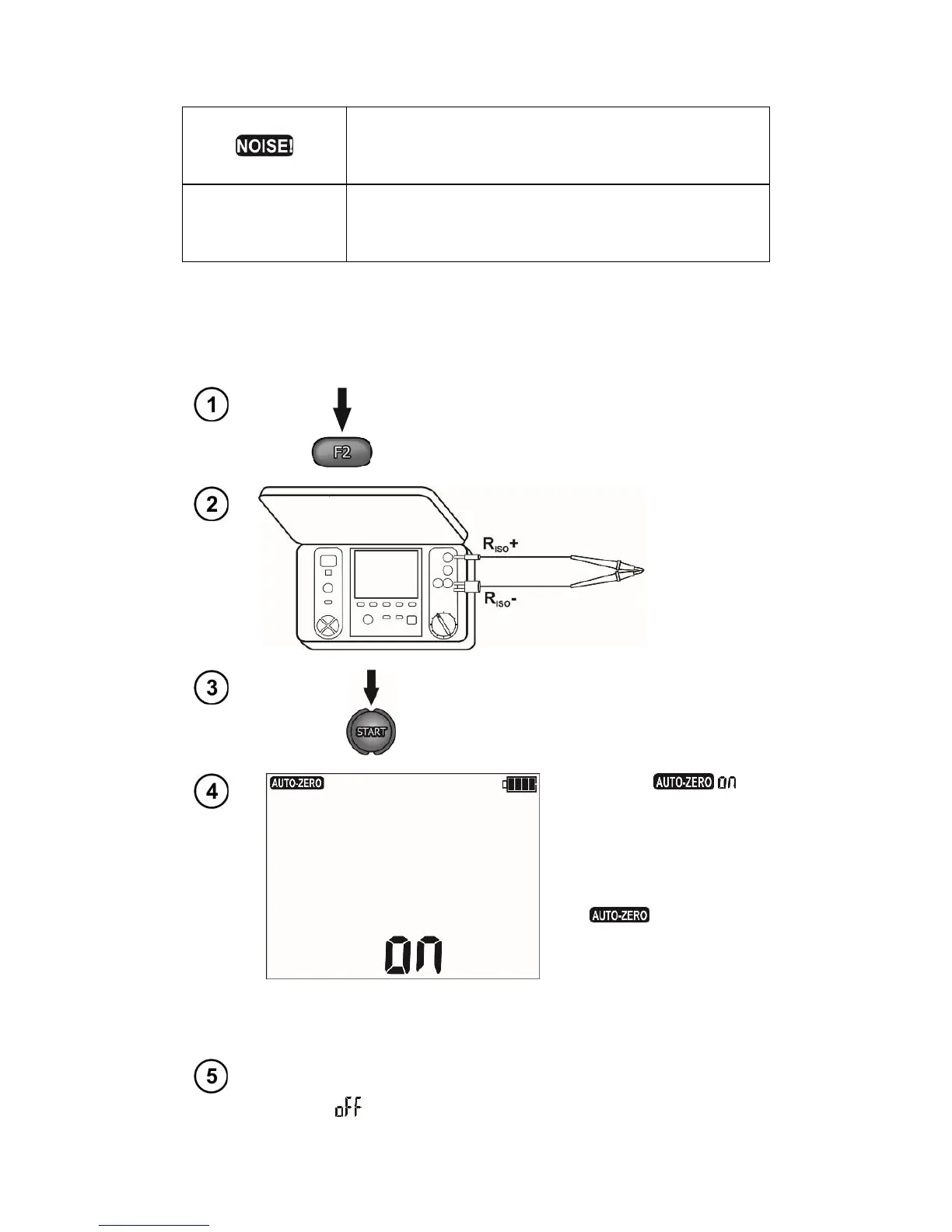
3.2.2 Calibration of test leads
In order to eliminate the impact of the resistance of test leads on measurement result, the compen-
sation (autozeroing) of resistance may be performed.
Press the F2 button (R
ZERO
).
A notice
appears, confirming
that the test leads' cal-
ibration has been per-
formed, and the meter
enters the measure-
ment mode. The sign
remains visi-
ble during measure-
ments.
The compensation is
active even after the
meter is switched off
and on again.
In order to remove the calibration made (return to default calibra-
tion), perform the above-mentioned activities with test leads open;
the sign shall appear.



 To Next Page