25
© Copyright 2018 Karaoke Home Entertainment www.khe.com.au / www.khe.co.nz / www.picknmix.com.au
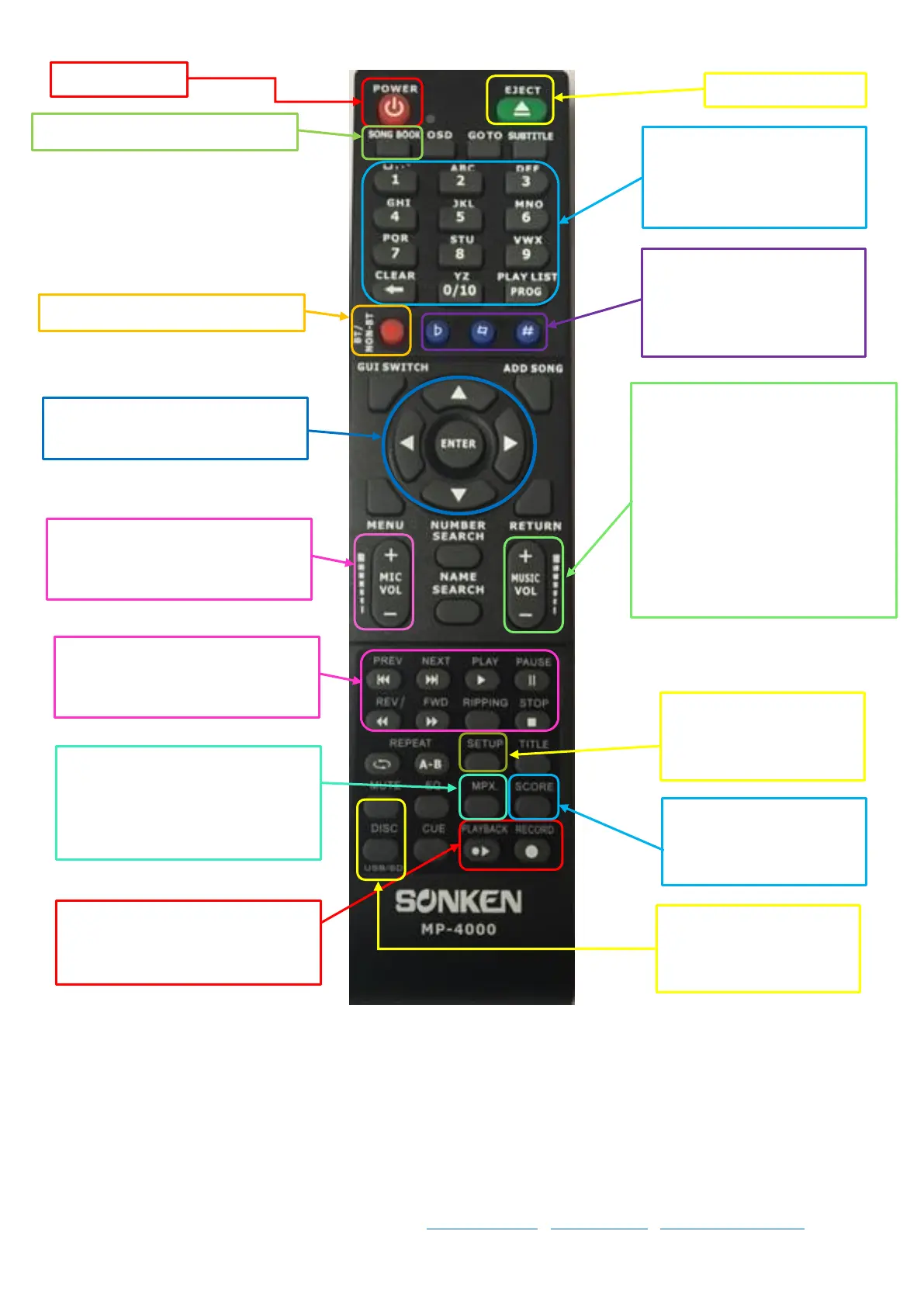
To generate a songbook, see Pg ##
Track numbers to select a
particular track on a disc or
enter a song number from
your song book
Switch Bluetooth Mode on and off
Key Control, from left to
right: Lower key, bring back
to centre (original key) and
make key higher
Use the arrows to navigate the
menus and enter to select
Microphone Volume, Shared, so
you can adjust specifically the
volume of your microphones
Music volume, you generally want
to turn the music volume down,
microphone volume up, so you
can hear yourself sing over the
music, if the music is higher you’ll
drown yourself out and have to
scream to be heard. Then turn
your master volume on your
speaker system up to turn overall
volume up.
Standard play/pause/stop/next
functions
Setup; click this to view
and edit the setup
settings
Use this button to turn on/off full
guide vocals on an MPX type
karaoke song, if not MPX format it
will not work
Switch on/off the scoring
function
Record to begin record, stop
record and playback recordings
Switch between a disc or
USB/SD Card



 To Next Page