2
© Copyright 2018 Karaoke Home Entertainment www.khe.com.au / www.khe.co.nz / www.picknmix.com.au
How to Download MP3+G Files
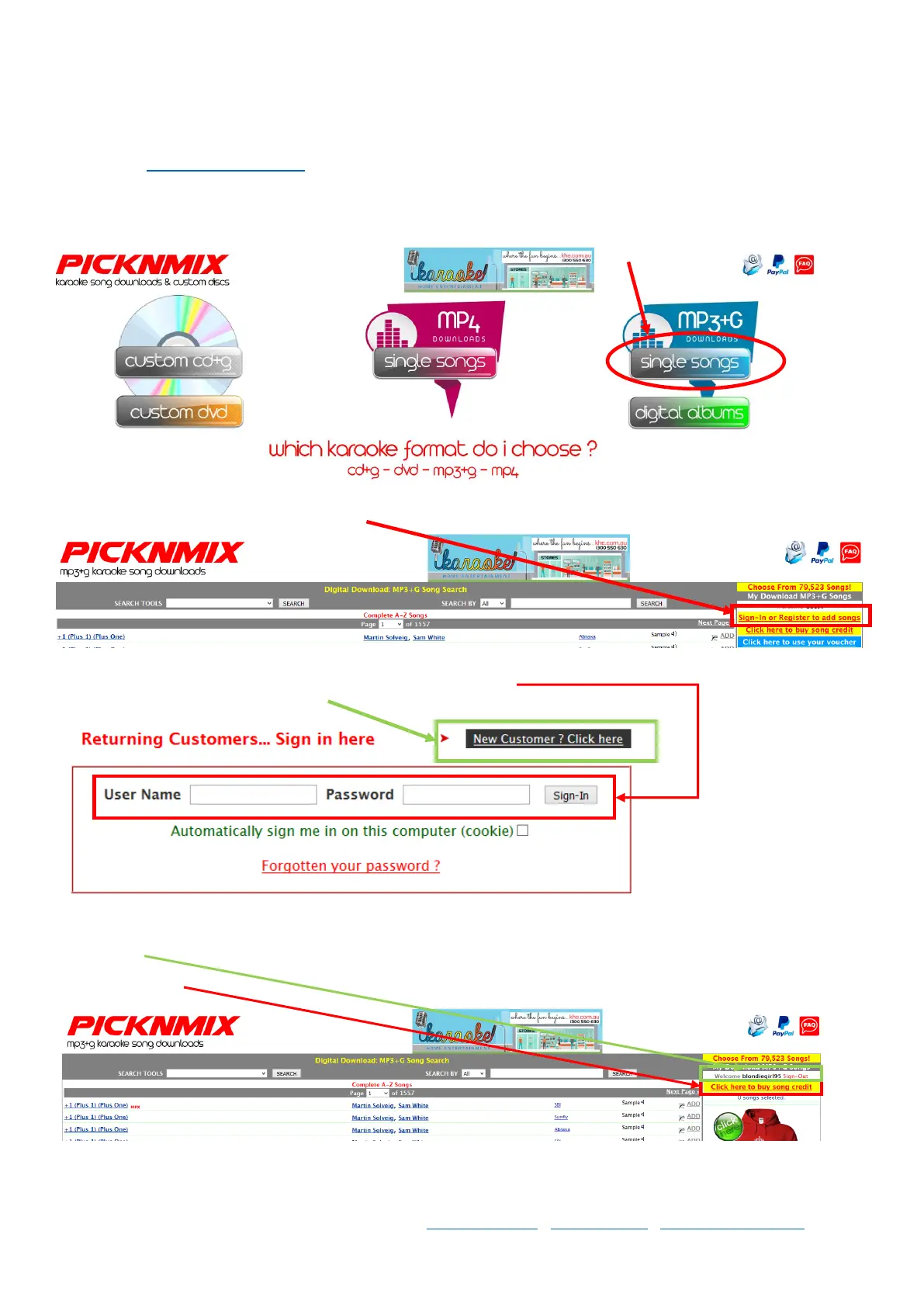
Step 1 Go to www.picknmix.com.au and choose either Single Song or Digital Albums for MP3+G
(for compatible MP3+G devices like the karaoke boom box, MP600, MP2000, Miic Star MS62, Magic Sing ET23KH
and PCDJ Karaoki Hosting Software)
Step 2 Click “Sign-In or Register to add songs”
Step 3 Enter your KHE.com.au Account login details, and click “Sign-In” or if you do not have an account with
KHE.com.au then click “New Customer, Click here”
Step 4 Once you’ve logged in you will go back to the large list of songs which you can search through, you should see
your Username in the top right hand corner on the side bar, and “Click here to buy song credit”.
Click this button.



 To Next Page