3
© Copyright 2018 Karaoke Home Entertainment www.khe.com.au / www.khe.co.nz / www.picknmix.com.au
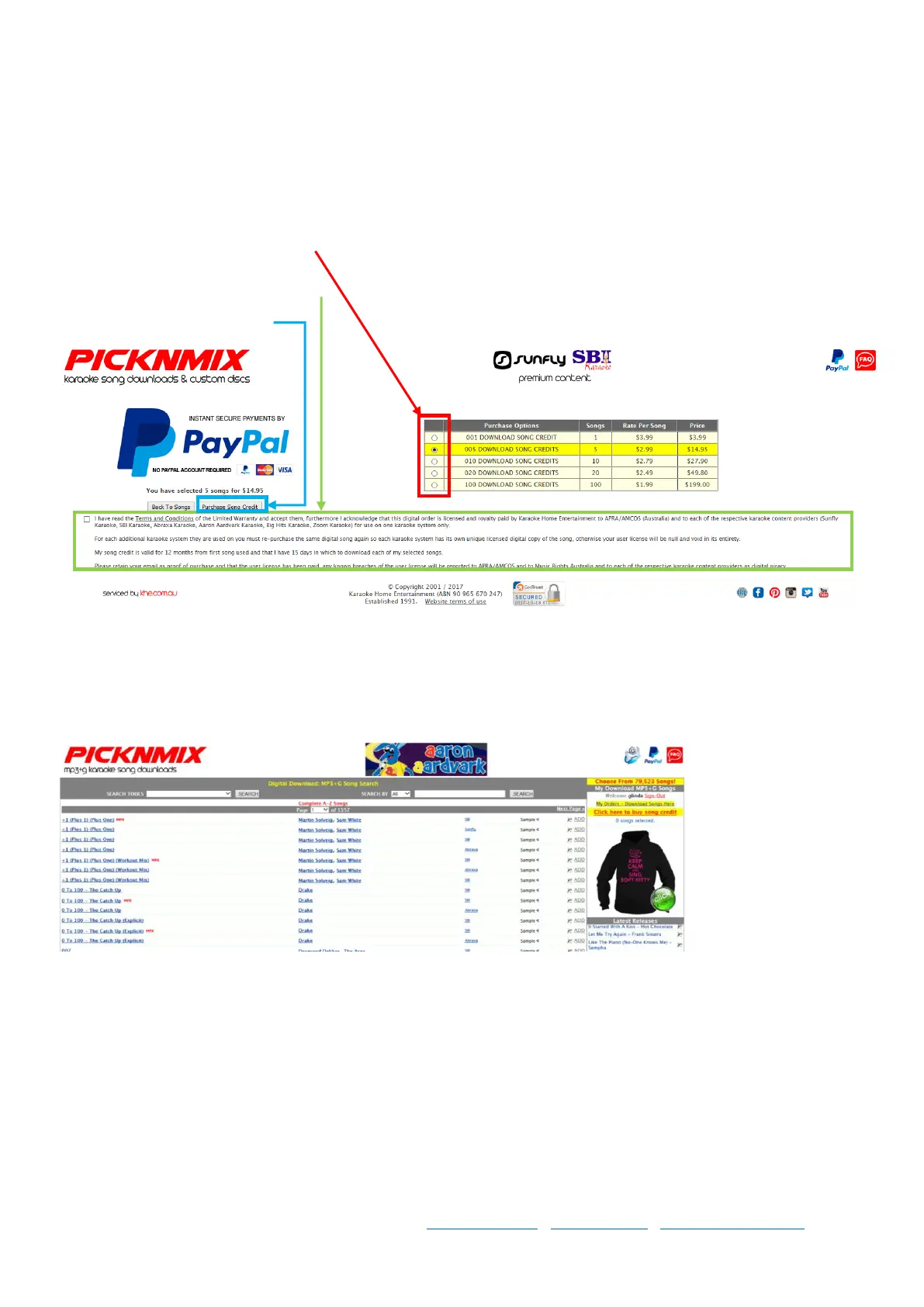
Step 5 You’ll come to this screen below where you can see all the pricing tabled out for you, for how many songs,
how much per song, and how much for the total voucher.
You pay the Price at the very end, for the entire selection of songs now. You can choose and download your songs
over 12 months from the day you download your first song.
Select how many songs you want.
Read the terms and conditions & tick the box.
Select purchase song credit.
Step 6 Follow the prompts, login to PayPal and process the payment. Or enter your card details into PayPal and
process your payment.
Step 7 Once the payment has processed, you will go back to the screen with the songs listed and you can search by
song title, or artist. Select ADD, beside each song you wish to download.
Step 8 Your songs will appear and create a list on the right hand side of the page, and the website will tell you when
you’ve selected all your songs.
If you’re songs selected are correct, select the “Checkout” button
Step 9 Follow the prompts on screen to checkout the songs, checking you have the correct songs all the way
through. Please note: Once you’ve completed your order / downloaded your songs they cannot be exchanged /
refunded due to strict licensing restrictions.



 To Next Page