Getting Started Section 2
CONNECTING ACCESSORIES
1. Place the PACSCAN on a flat level surface.
2. Connect the foot pedal cable connector to the
rear panel of the system into jack labeled
"FOOT PEDAL". Place the foot pedal on the
floor.
3. Verify that the Power Switch located on the
rear panel of the system is in the "OFF"
position.
4. Connect the jack plug of the AC Adapter
cable to the DC input jack located on the rear
panel of the system.
5. Connect the AC Adapter to a proper AC
power source (i.e. wall outlet):
100 VAC / 60 Hz
120 VAC / 60 Hz
220 VAC / 50 Hz
220 VAC / 60 Hz
CAUTION
This instrument may be damaged if operated
with an AC adapter other than that provided.
6. Connect the probe connector (A-Scan probe
or pachymeter probe) to the jack on the right
side of the system labeled "PROBE". Before
inserting be sure to line up the red indicator
marks on both the jack and cable connector.
OPTIONAL PRINTER SET-UP
1. Place the printer on a flat level surface.
2. Connect one end of the printer cable to the
matching connector on the printer’s rear
panel and the other end to the matching
connector on the right side of the system
labeled “PRINTER”.
3. See the included printer instruction manual
for paper loading and power up instructions.
POWER UP CHECK
1. Slide the Power Switch of the PACSCAN
located on the rear panel to the "ON"
position.
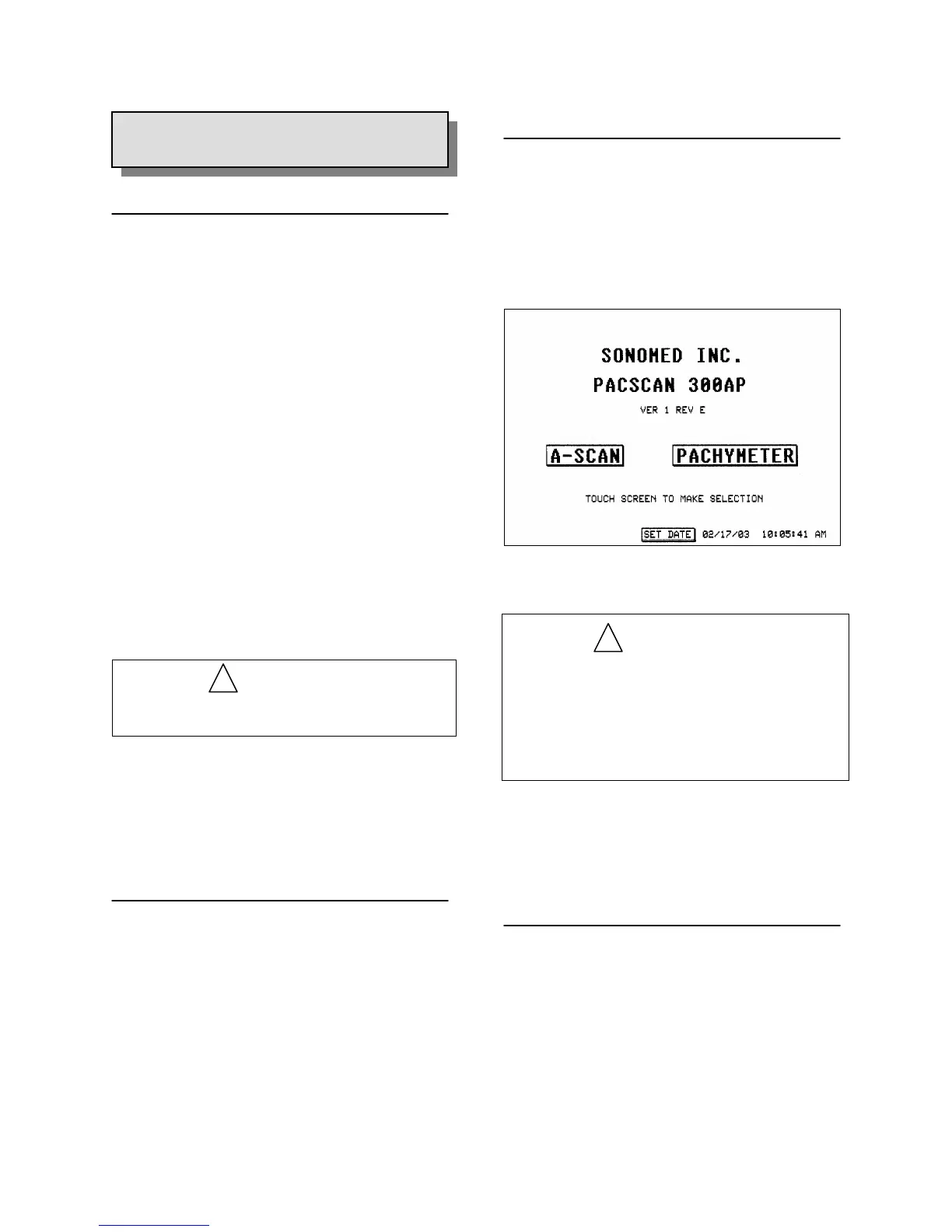
2. Verify that the green LED on the face of the
system illuminates and that the Main Screen
appears on the display (see Figure 2-1).
Figure 2-1. Main Screen Display
WARNING
In the event of loss of stored data including the
system calibration values and user settings due
to a discharged battery, a “STORED DATA
LOST” warning message will be displayed.
Please contact Sonomed service department for
further assistance.
3. If either LED does not illuminate or Main
Screen does not appear, immediately power
OFF the system and contact your local
representative or Sonomed for assistance.
USING THE TOUCH SCREEN
2.3
SYSTEM SET-UP
!
!
The touch screen provided with the PACSCAN
system is a highly sensitive device which
enables selections to be made and recorded on
screen. On-screen selections should only be
made by gently using a finger or the provided
Stylus pen (do not use a pencil, pen, or other
sharp object).
2 - 4 Doc # 0300-A-1901-3D



 To Next Page