The Sonove M2-M Marine Monitor is a robust and elegantly designed display unit developed for a wide range of marine applications, including existing and new bridges, cabinets, and engine rooms. It is tested according to EN 60945 for bridge use and approved by DNV GL, making it suitable for ECDIS and navigation applications. The M2-M series prioritizes high reliability and long-term availability in demanding marine environments.
Function Description
The M2-M Marine Monitor serves as a display unit for various marine applications. Its primary function is to provide a visual interface for automation technology and process communication, displaying critical information in a clear and reliable manner. The monitor supports multiple input sources and offers extensive configuration options through its On Screen Display (OSD) menu, allowing users to fine-tune display parameters and manage various functionalities.
Important Technical Specifications
The M2-M series offers a range of monitor variants, distinguished by display size, brightness, mounting type, touch capability, and power supply.
Display Specifications:
All M2 monitors are equipped with a TFT display and an anti-reflective coating. Optional Capacitive Multi-Touch (CT) and High Bright (HB) versions are available. The monitors are fully dimmable.
- M2-M-24 / M2-M-24 CT:
- Display size: 24"
- Resolution: 1920 x 1080
- Brightness: 300 cd/m² (M2-M-24), 265 cd/m² (M2-M-24 CT)
- Dimming: 100% - 0%, min.: 0.5 cd/m²
- M2-M-24HB / M2-M-24HB CT:
- Display size: 24"
- Resolution: 1920 x 1080
- Brightness: 1000 cd/m² (M2-M-24HB), 870 cd/m² (M2-M-24HB CT)
- Dimming: 100% - 0%, min.: 0.8 cd/m²
- M2-M-27 / M2-M-27 CT:
- Display size: 27"
- Resolution: 1920 x 1080
- Brightness: 350 cd/m² (M2-M-27), 280 cd/m² (M2-M-27 CT)
- Dimming: 100% - 0%, min.: 0.5 cd/m²
Power Supply:
Depending on the product configuration, the monitor can be supplied with 230/115 VAC and/or 24 VDC. The power supply sockets are clearly defined for each type.
Interfaces:
The monitor features a variety of interfaces located on the back:
- DVI-D: Two DVI-D sockets for video input.
- Serial Interface (RS 232): A D-SUB socket for serial communication.
- Serial Interface (RS 422/485): A D-SUB socket for RS 422/485 communication.
- USB Touch (Type B): For touch screen functionality (if CT option is present).
- SMP-03V-BC (Source Select): For external source selection.
- SMP-04V-BC (External Buzzer): For connecting an external buzzer.
- SMP-05V-BC (External LED): For connecting an external LED (red/green).
- SMP-06V-BC (External Backlight Control): For external brightness control, including potentiometer connection.
Mounting Options:
The M2 series monitors support flush mounting, desktop, wall, and ceiling mounting. Special mounting brackets or console mounting kits are required and can be ordered separately. The monitor is designed for mounting angles between 10° and 120° and can be installed in landscape or portrait format.
Usage Features
On Screen Display (OSD):
The OSD is the primary interface for controlling most monitor functions. It allows users to select input sources and fine-tune various functional parameters such as brightness, contrast, and color settings. The OSD is navigated using an external OSD Control Pad located at the back of the monitor, which includes keys for Menu, Decrease Brightness, Increase Brightness, Exit, LED status, and Power ON/OFF.
OSD Menu Structure:
The OSD menu is organized into several sub-menus:
- Image Settings:
- Scheme: Pre-set values for brightness, contrast, etc. (sRGB, normal, sport, game, cinema, vivid).
- Backlight: Adjusts backlight intensity.
- Contrast: Adjusts contrast in the Y domain, affecting all color channels.
- Saturation: Adjusts saturation in the UV domain (for S-Video, CVBS, YPbPr, RGB+CS, and video mode of DVI/HDMI).
- Hue: Adjusts hue in the UV domain (for S-Video, CVBS, YPbPr, RGB+CS, and video mode of DVI/HDMI).
- Sharpness: Adjusts image sharpness.
- Reset Scheme: Resets current scheme settings to factory values.
- Advanced:
- Color: Dialog for color settings.
- Color Temp: Selects color temperature schemes (users RGB, 4200K, 5000K, 5400K, 6500K, 7200K, 9300K).
- User Color: Allows creation of custom color schemes by adjusting Red, Green, and Blue Gain and Offset.
- ADC Calibration: Performs auto fine-tuning on the Analog-to-Digital Converter (for VGA and graphics mode of DVI/HDMI).
- Noise Reduction: Reduces noise (for S-Video, CVBS, YPbPr, RGB+CS, and video mode of DVI/HDMI).
- CCS Mode: Changes Cross-Color Suppression (off/adaptive/normal).
- Dynamic NR Mode: Changes Dynamic Noise Reduction (low/medium/high/off/adaptive).
- MPEG NR Mode: Enables/disables and sets the level of MPEG noise reduction.
- Main DCDi: Turns DCDi (Directional Correlational Deinterlacing) on/off.
- Main MADI Mode: Changes Motion Adaptive De-Interlacing (normal/off/adaptive).
- Film Mode & Scaling: Adjusts image for video camera films (2:2/3:2 pulled down).
- Film Mode Detection: Selection of Video-3:2/Video-2:2/Video-3:2-2:2/off.
- Film Display Mode: Selection of Normal 3:2 or other future modes.
- Display Settings:
- Aspect Ratio: Adjusts display between full screen, panoramic, Letter Box Expand, Pillar Box, and 1:1.
- PIP (Picture-In-Picture): Displays HDMI/DVI and another input simultaneously. Supports various Main- and PIP Channel combinations.
- PIP Mode: Toggles between Off, Small PIP, Large PIP, PIP-Tall, and Side-by-Side.
- PIP Position: Adjusts vertical and horizontal position of the PIP window.
- PIP Transparency: Adjusts transparency of the PIP window.
- Tiling: For video wall applications.
- Horizontal Total: Defines total horizontal number of displays.
- Vertical Total: Defines total vertical number of displays.
- Horizontal Position: Defines horizontal position of the actual display unit.
- Vertical Position: Defines vertical position of the actual display unit.
- Tiling Status: Enables/disables tiling function.
- Position Settings:
- Width/Height: Adjusts total width/height of the image by stretching or shrinking (for video mode of HDMI, S-Video, composite and component inputs).
- Horizontal Start/Vertical Start: Changes the starting point of the image horizontally/vertically (for video mode of HDMI, S-Video, composite and component inputs).
- Auto Adjustment: Performs auto-adjust function on the image (for VGA inputs).
- Horizontal/Vertical Position: Alters placement of the image (for VGA inputs).
- Phase: Adjusts sampling phase of the analog interface for optimum image quality (for VGA inputs).
- Clocks/Line: Adjusts sample clock of the analog interface (for VGA inputs).
- Advanced: Manually forces difficult-to-detect modes (for VGA inputs).
- 1080p/720p: Selects Video or Graphics optimization for 1080p/720p content (for graphics mode of HDMI).
- OSD Settings:
- Language: Selects OSD menu language (English, German, French, Italian, Spanish, Turkish, Danish).
- Time Out: Determines how many seconds until the OSD closes automatically.
- Horizontal Flip/Vertical Flip: Flips the OSD horizontally/vertically.
- Rotation: Rotates the OSD.
- OSD Zoom: Changes OSD size.
- Keypad Layout: Changes between 6-Button or 4-Button OSD-Keypad.
- Advanced: Sets presentation of the OSD window.
- Horizontal/Vertical: Moves the OSD window horizontally/vertically.
- Blend: Changes transparency of the OSD window.
- Setup:
- Factory Reset: Loads factory-loaded values.
- Speed Mode: Sets fast image transfer in graphics mode.
- Show Menu Of: Changes menu between Main image and PIP if PIP mode is on.
- Input Search: Toggles input search on/off.
- Advanced: Adjusts various engineering setups.
- Remote Protocol: Selects remote protocol.
- Slave Address: Sets slave address for remote protocol.
- Ext. Source Select: Switches external source select On/Off.
- DDC Supported Inputs: Selects handling of input sources (AUTO, DVI 1, DVI 2 (DP), NONE).
- Backlight Control: Changes backlight control settings (Checked/Unchecked).
- Status LEDs: Switches LEDs On/Off.
- Dimming Mode: Sets dimming mode (Optimized, 5 Level, Linear).
- COM Port Settings: Configures controller board properties.
- COM Interface: Sets COM port (RS-232, RS-485 Full Duplex or RS-485 Half Duplex).
- Baud Rate: Selects baud rate (2400, 4800, 9600, 14.4k, 19.2k, 28.8k, 38.4k, 57.6k, 76.8k, 115.2k).
- Data Bits: Sets number of data bits (7, 8).
- Stop Bits: Sets number of stop bits (1, 2).
- Parity: Sets kind of parity (None, Odd, Even).
* Display On Counter: Shows hours the display has been switched on.
* Power On Counter: Shows hours the board has been powered on.
* Main Input: Shows detected input mode (resolution and frame rate) of the main input channel.
* PIP Input: Shows detected input mode (resolution and frame rate) of the PIP input channel.
* Firmware Version: Shows firmware version.
* OSD Version: Shows OSD version.
* Hardware Version: Shows hardware version.
Capacitive Touch (CT):
For models with CT, the touch display must be connected to a computer's USB port. The correct USB cable is included, and the touch driver must be installed on the computer.
External Potentiometer:
An external potentiometer can be connected for brightness control. For automatic recognition, the potentiometer must have an electrical resistance of 470 kΩ. If not, a series resistor (R1) is required, with a specific resistance ratio (R2/R1 = 141).
Maintenance Features
Cleaning:
Regular cleaning is essential for preventing malfunction and ensuring a long product lifetime.
- Housing: Use a clean, soft, non-abrasive cloth with hot water or mild detergents (without abrasive or oily content). Do not spray directly on the housing.
- Display: Use a clean, soft, non-abrasive cloth (preferably cotton) with a standard glass cleaner (without abrasive or oily content). Do not spray directly on the screen.
- Important: Always switch off the monitor and disconnect from the power supply before cleaning. Do not use chemical solvents, abrasive compounds, or materials, as these can damage the surface or protective coat.
Recycling and Disposal:
The product is not to be disposed of as normal domestic waste. It must be properly recycled or disposed of according to local regulations, as components may contain hazardous substances (e.g., lithium battery, electrolytic capacitor, display). Sonove recommends environmentally sound disposal methods, including reuse or recycling of products and components.
Safety Instructions:
The manual emphasizes several safety instructions to prevent injury, product damage, or fatal incidents:
- Personnel responsible for installation and operation must read and understand all operating instructions, safety notes, and related documents.
- The product must be grounded.
- Ensure safe power connection and correct voltage/polarity.
- Do not open or modify the product.
- Use only approved spare parts and accessories.
- Ensure adequate cooling and ventilation.
- Avoid operating the product if damaged or not functioning normally.
- Maintain a minimum distance of 1m from the internal buzzer to prevent hearing damage.
- Prevent static pictures on the display to avoid image sticking; use a screensaver or moving images and decrease contrast for static content.
- Be aware of potential Electromagnetic Interference (EMI) and observe the Compass Safe Distance.
- Ensure safe dissipation of electronic interference by laying supply and signal lines separately from strong interfering sources (at least 250 mm apart) and using shielded communication cables.

 Need help?
 General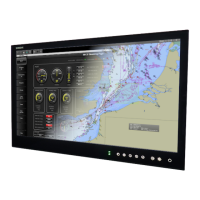

 To Next Page